EasyManua.ls Logo

AKG DMS800 - User Manual

AKG DMS800
2 pages
Print Icon
To Next Page IconTo Next Page
Loading...
DSP
-60
-75
-80
-85
-90
-95
-100
-60
-75
-80
-85
-90
-95
-100
CHANNEL 1 CHANNEL 2
iR
DATA LINK
BACK
CH 1
< 10cm< 10cm
13
-60
-75
-80
-85
-90
-95
-100
-60
-75
-80
-85
-90
-95
-100
CHANNEL 1 CHANNEL 2
BACK
CH 1 CH 2
CH 1
CH 2
BACK
CH 1 CH 2
12
2 sec. ON/OFF2 sec. ON/OFF
11
2x AA
* alternative
10 DPT800*DHT800
ON/OFF
DSP
-60
-75
-80
-85
-90
-95
-100
-60
-75
-80
-85
-90
-95
-100
CHANNEL 1 CHANNEL 2
BACK
CH 1 CH 2
9
-60
-75
-80
-85
-90
-95
-100
-60
-75
-80
-85
-90
-95
-100
CHANNEL 1 CHANNEL 2
BACK
CH 1 CH 2
CH 1
CH 2
BACK
CH 1
CH 2
8
CH1
CH1
ON/OFF
DSP
-60
-75
-80
-85
-90
-95
-100
-60
-75
-80
-85
-90
-95
-100
CHANNEL 1 CHANNEL 2
BACK
CH 1 CH 2
7
3x
3x
-60
-75
-80
-85
-90
-95
-100
-60
-75
-80
-85
-90
-95
-100
CHANNEL 1 CHANNEL 2
BACK
CH 1 CH 2
CH 1
CH 2
BACK
CH 1 CH 2
6
3x
3x
ON/OFF
DSP
-60
-75
-80
-85
-90
-95
-100
-60
-75
-80
-85
-90
-95
-100
CHANNEL 1 CHANNEL 2
BACK
CH 1 CH 2
2 sec.2 sec.
5*
* optional
ON/OFF
DSP
-60
-75
-80
-85
-90
-95
-100
-60
-75
-80
-85
-90
-95
-100
CHANNEL 1 CHANNEL 2
BACK
CH 1 CH 2
CH 1
CH 2
4
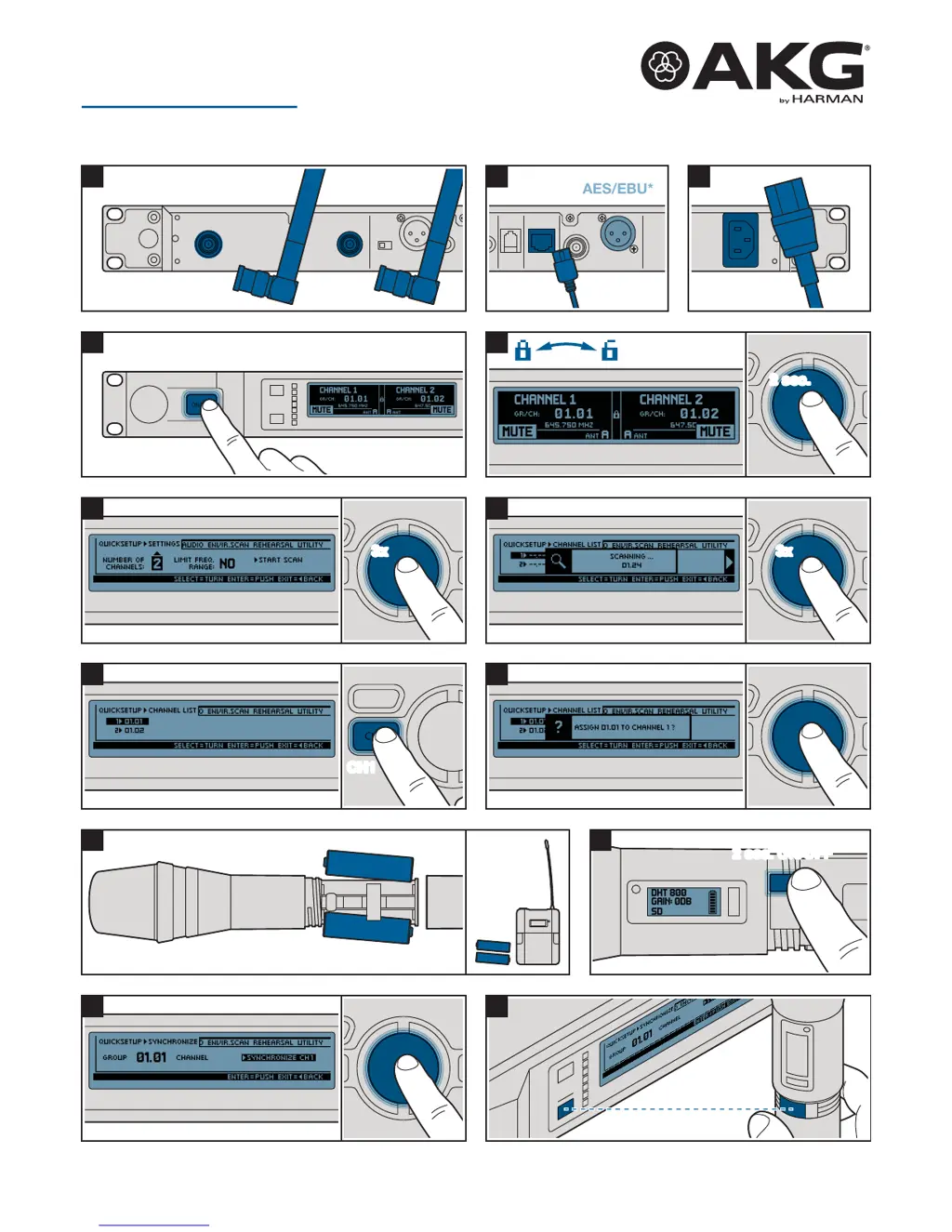
Power
3
Dante
AES/EBU*
AES/EBU*
2
* alternative
Antennas
1 DSR800
02/15/5048141
DMS800
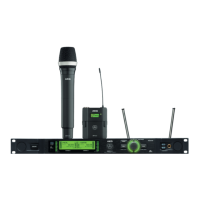
DIGITAL WIRELESS MICROPHONE SYSTEM
Quick Start Guide

Other manuals for AKG DMS800

Questions and Answers

  • C
    Charlene NewmanSep 12, 2025
    What does 'SYSTEM ERROR' mean on AKG DMS800 Microphone system?
    • N
      Nicholas JenkinsSep 12, 2025
      If your AKG Microphone system displays 'SYSTEM ERROR', it indicates an internal error. Switch off the receiver and switch it back on after approximately 10 seconds. If the error persists, contact your AKG service center.
  • S
    Sarah StewartSep 12, 2025
    What does 'RF ERROR' mean on AKG DMS800 Microphone system?
    • J
      Jacob BraySep 12, 2025
      The 'RF ERROR' message on your AKG Microphone system means that the receiver cannot be synchronized to the set frequency. Tap the SELECT wheel to confirm the error and set another frequency. If the error continues, contact your AKG service centre.
  • L
    Lisa LeblancSep 14, 2025
    What does 'UPDATE FIRMWARE' mean on AKG DMS800 Microphone system?
    • A
      ashleymcbrideSep 15, 2025
      The 'UPDATE FIRMWARE' message on your AKG Microphone system indicates that the system is ready for software updates. Switch off the receiver and switch it back on after approximately 10 seconds. If the error persists, contact your AKG service centre.
  • E
    Eugene FordSep 16, 2025
    What does 'ERROR DEVICE' mean on AKG DMS800 Microphone system?
    • T
      tchangSep 17, 2025
      If your AKG Microphone system displays 'ERROR DEVICE', it means that the transmitter data contains errors. If the error occurs frequently, contact your AKG service centre.
  • T
    tstewartNov 18, 2025
    Why AKG DMS800 Microphone system has no sound?
    • D
      dianawilliamsNov 18, 2025
      Several factors can cause a lack of sound in your AKG Microphone system. It could be due to interference from other wireless devices (TVs, radios, etc.), a frequency mismatch between the transmitter and receiver, or the transmitter being muted or switched off. Check that the main cable is properly connected, the receiver is on, and the receiver is correctly connected to the PA system. Also, ensure the microphone or instrument is connected to the bodypack transmitter, the batteries are correctly inserted and charged, and the transmitter isn't too far from the receiver or obstructed. Finally, verify the software versions on both transmitter and receiver match. To resolve these, try the following: * Switch off other wireless systems. * Set transmitter to the same frequency as the receive...

Summary

DSR800 Receiver Setup and Connections

Receiver Connections and Power

Connect antennas, audio outputs (AES/EBU, Dante), and power supply to the receiver unit.

Receiver Front and Back Panel Overview

Details the front panel controls, display, and back panel connections of the receiver.

Receiver Quick Setup and Channel Assignment

Guide to performing quick setup, scanning frequencies, and assigning channels on the receiver.

Transmitter Operation and Synchronization

Handheld and Bodypack Transmitters

Information on the DHT800 handheld and DPT800 bodypack transmitters, including battery installation.

Transmitter Synchronization Process

Steps to synchronize transmitters with the receiver for wireless operation.

Receiver Operation and Synchronization Status

Receiver Quick Setup Status

Indicates successful synchronization (SYNC OK) or failure (SYNC FAILED, TIMEOUT).

Transmitter Gain and Settings

Adjusting transmitter settings, including gain levels for vocal or guitar.

Regulatory and Compliance Information

FCC Compliance Statement

Details FCC rules, limitations, and conditions for device operation and interference.

AKG DMS800 Specifications

General IconGeneral
TypeDigital Wireless Microphone System
ModulationDigital
THD< 0.5%
Latency< 3 ms
Simultaneous ChannelsUp to 32
Receiver DisplayLCD
Transmitter Power10 mW
Transmitter Battery Type2 x AA
RF Output Power10 mW
Audio Frequency Response20 Hz to 20 kHz
Operating Range100 m (line of sight)
Receiver OutputsXLR, 1/4" (6.3 mm)
Transmitter TypeHandheld, bodypack
Transmitter Microphone TypeDynamic, condenser
Dynamic Range> 110 dB
Audio OutputBalanced, unbalanced

Related product manuals