Need help?
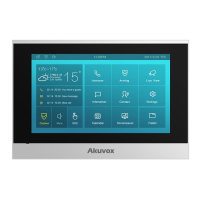
Do you have a question about the Akuvox C313N and is the answer not in the manual?
Configure network connection (Ethernet/Wi-Fi) during device start-up.
Access basic settings via 'More > Settings' on the device.
Access advanced settings using default password '123456'.
Access device settings via web browser using IP address and credentials.
Set display language via device 'Setting > Language' screen.
Set display language via web interface 'Phone > Time/Lang'.
Set time via device 'More > Setting > Time'.
Synchronize time using NTP servers via web interface.
Configure daylight saving time parameters: active, offset, schedule.
Configure screen brightness, screen saver, and sleep timing on the device.
Upload custom pictures for screen saver functionality.
Customize icon display on home and 'More' screens for convenience.
Set ringtones and volumes on device via 'More > Setting > Sound'.
Upload custom audio files for ringtones and set volumes via web.
Manage contacts, groups, and blocklists on the device.
Add new contacts with name, number, ringtone, group, and account.
Manage contacts, groups, and blocklists via web interface.
Add new contacts via web interface 'Contacts > Local Contacts'.
Search, display, edit, and delete contacts on web interface.
Set blocklist directly or while editing contacts on web.
Import/export contacts in batch using .xml or .csv formats.
Configure network connection using DHCP or static IP.
Set network connection via device 'More > Setting > Advance > Network'.
Configure network via web interface 'Status > Network information'.
Set device location, mode, and address for network deployment.
Set up Wi-Fi connection for the device.
Enable/disable VLAN and set priority and VLAN ID.
Make direct IP calls and configure IP call feature and port.
Make SIP calls and configure account, server, and transport type.
Register and configure up to two SIP accounts on device and web.
Set up SIP server for call sessions.
 General
| Display | 7-inch capacitive touch screen |
|---|---|
| Resolution | 1024 x 600 |
| Connectivity | Wi-Fi, Ethernet |
| Operating System | Linux |
| RS485 | Yes |
| Relay Output | 2 |
| Video Codec | H.264 |
| Audio Codec | G.711, G.726 |
| Housing Material | Plastic |
| Mounting | Wall mount |
| Audio | Built-in Microphone and Speaker |
| Power Supply | PoE |
| Microphone | Built-in |
| Speaker | Built-in |
| Operating Temperature | -10°C to +55°C |


 To Next Page