42
Appendix B – Intuitive attendant control
The intuitive attendant control (hereinafter referred to as the attendant control) takes
full control of the Esprit and may only be used by someone accompanying the wheelchair
user. Under no circumstances may the wheelchair user themselves operate the attendant
control. The individual components are installed by Alber or by the authorised specialist
dealer.
1. Connecting the attendant control
• Switch off the wheelchair user’s control unit (see chapter 5.2.2).
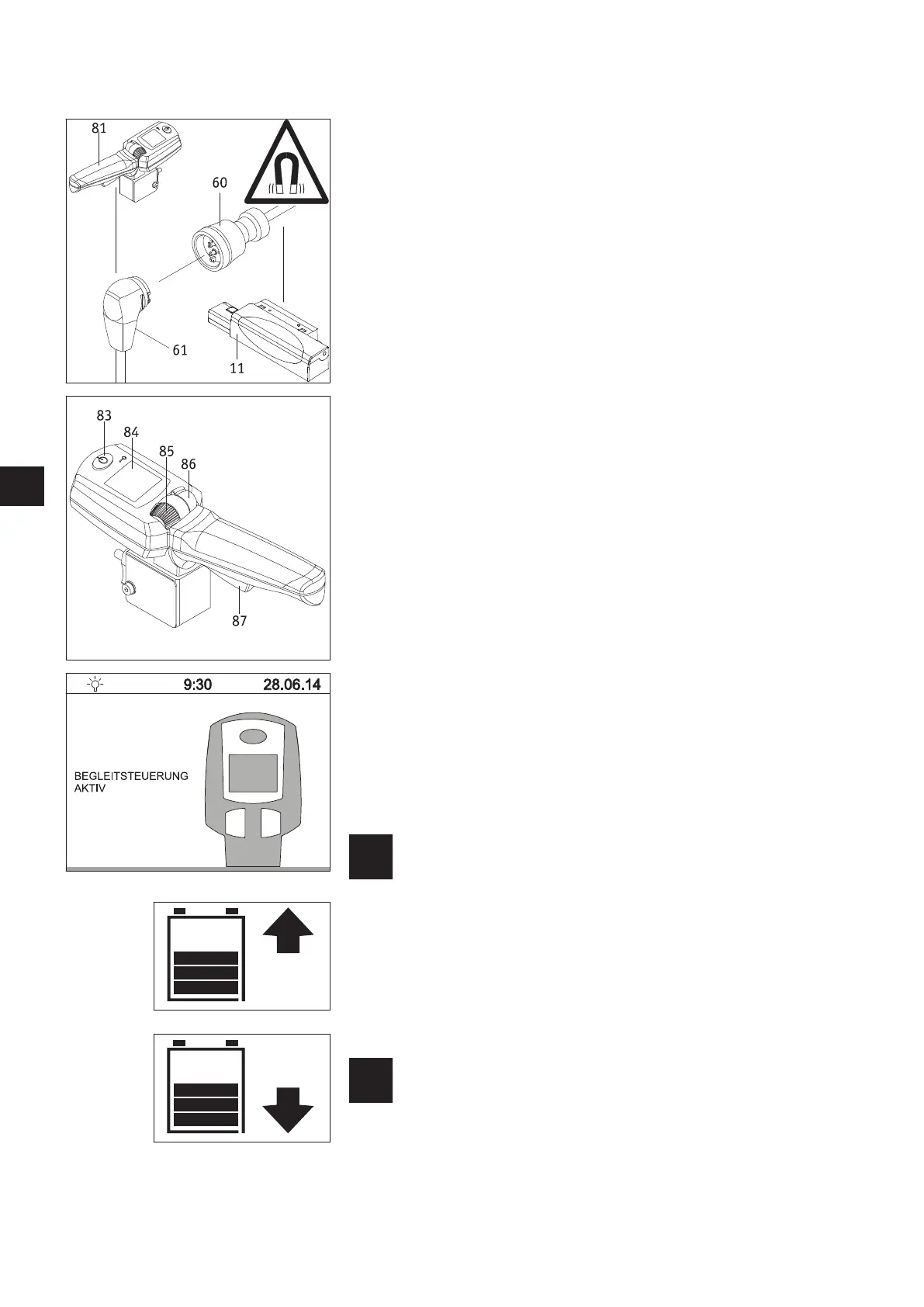
• Connect the magnetic plug [61] of the intuitive attendant control to the socket [60]
of the interface [11].
• The attendant control is now connected to the Esprit.
2. Starting up the attendant control
• Switch on the Esprit and wait until the start screen is displayed.
Do not, under any circumstances, touch the attendant control, the control unit
joystick or its individual operating elements during start-up. If you do, you will
get an error message.
• Press button [83] on the attendant control. This switches the system on and brings up
the following status displays:
- In the wheelchair user’s control unit display:
text “attendant control active” with the attendant control symbol (see diagram).
- In the attendant control’s display [84]:
battery symbol (indication of battery capacity), to the right of the currently selec-
ted travel direction (arrow symbol) - see diagram to the bottom left.
• The attendant control is now active; the control unit is inactive. The wheelchair can
now only be moved by an attendant.
3. Travel mode with the attendant control
• Specify the direction of travel you desire by pressing switch [86] forwards (forwards
travel) or backwards (reverse travel). The selected travel direction is shown in the dis-
play by an arrow symbol.
• Use the adjustment wheel [85] to select the maximum final speed you require.
When setting your speed, this will briefly be displayed as a percentage below the bat-
tery symbol.
• Pull the travel lever [87] in order to begin your trip.
The maximum final speed to be reached can be stored in the Esprit
software. Contact your specialist dealer in this regard.
4. Turning off the attendant control
Press button [83] of the attendant control to switch it off.
If the control unit is still switched on when you do this, it will immediately take control
of the Esprit. To fully shut down the Esprit, you need to switch it off using the control
unit (see chapter 5.2.2).
If the Esprit is switched off using the control unit when the attend-
ant control is still active, the attendant control is automatically
activated when you next start up the system.



 To Next Page