42 43
Multimedia message (MMS) settings
•Group messaging When enabled, you will be able to send a single
message to multiple recipients.
•Delivery reports Will request a delivery report for each multimedia
message you send.
•Read reports Will request a report on whether each recipient has
read a multimedia message sent by you.
•Auto-retrieve Will automatically download the whole MMS
message (including message body and attachment)
to your phone. To download only the MMS message
header, unmark the checkbox.
•Roaming auto-retrieve Mark the checkbox to enable auto-retrieve when
roaming.
•Creation mode Select a creation mode.
•Maximum message
limit
Touch to change the maximum message size.
•Priority To set the priority.
5
Calendar & Alarm clock & Calculator
5.1 Calendar ........................................................................
Use Calendar to keep track of important meetings, appointments, etc.
To open Calendar, touch the Application tab
from the Home screen, then
touch Calendar.
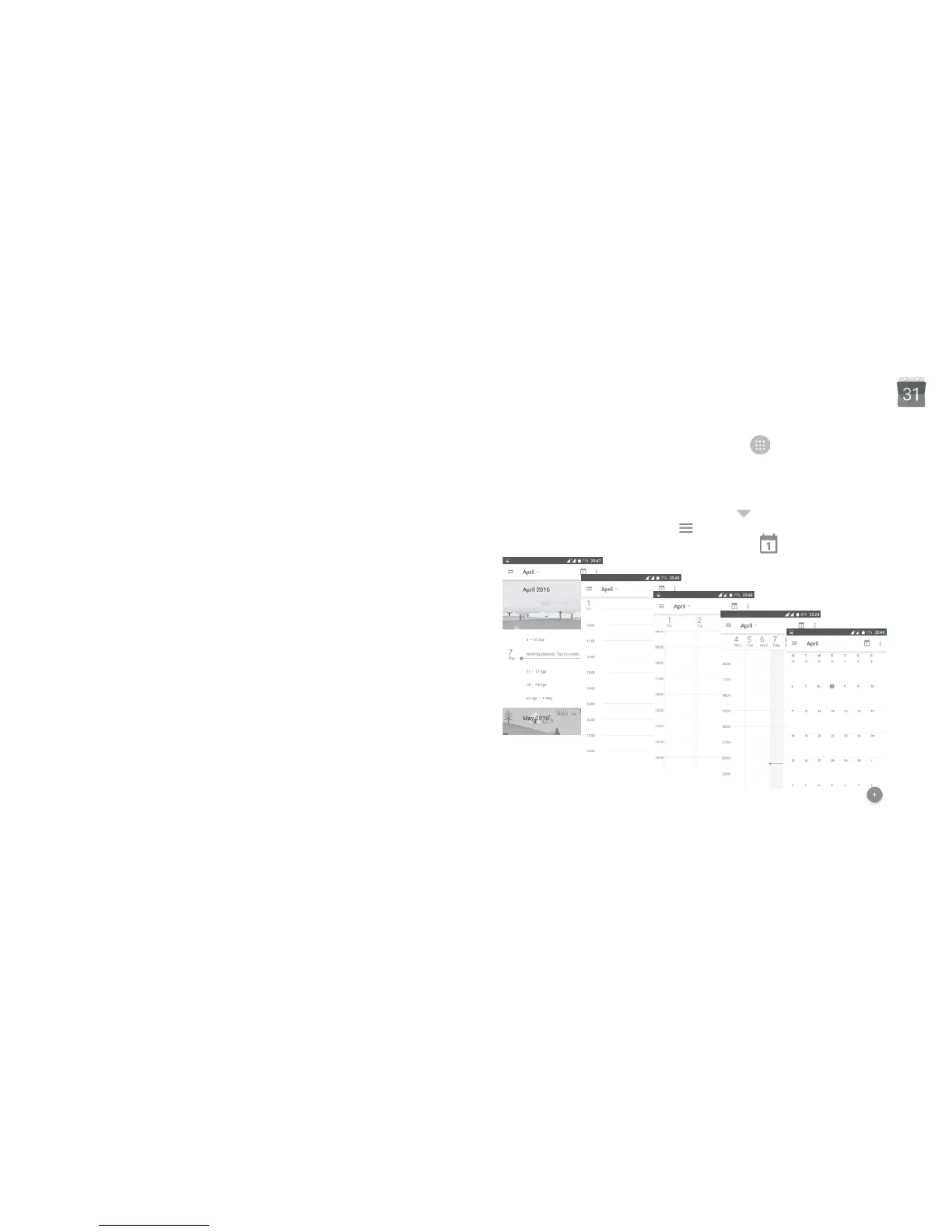
5.1.1 Multimode view
To change your Calendar view, touch the icon besides the month title to
open the month view, or touch and select Schedule, Day, 3-Day, Week or
Month to open different views. Touch the icon
(1)
to return to Today’s view.
Day view
Schedule view
Week view
Month
view
3-day view
(1)
The number indicates the date.











 To Next Page