62 63
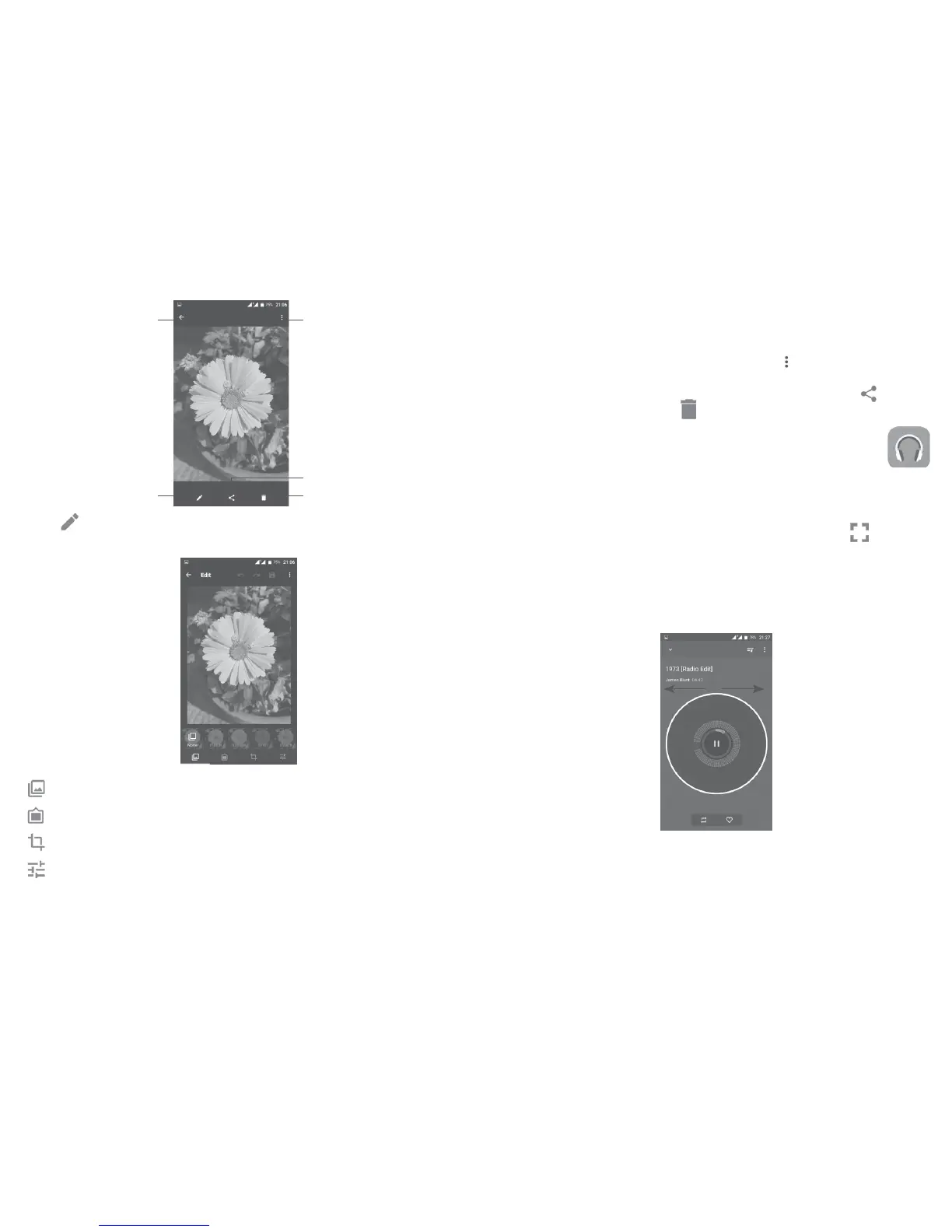
Open options menu
Delete the picture
Edit the picture
Go back
Share the picture
Touch in the full-screen picture view to edit a picture through Editor.
Editor
Set effects such as etc.
Add a border.
Crop, Straighten, Rotate, Mirror or the picture.
Adjust the picture colour.
Batch operation
Gallery provides a multi-select function, you can work with albums/pictures/
videos in batches.
On albums, pictures and videos list screen, touch
and then Select item to
activate batch operation mode (you can also long press one album/picture/
video), then touch videos/pictures you want to work on. Touch
to share
(only for pictures and videos), or
to delete selected items.
7.3 Mix ................................................................................
You can play music files stored on your phone or microSD card. Music files
can be downloaded from your computer to the phone or microSD card using
a USB cable.
To play your music, touch Mix from the Home screen. Touch
to expand
the Music screen.
You will find five categories in which all songs are classified: SONGS, ALBUMS,
Touch their tabs to open the lists.
7.3.1
Touch a song to play it.
Hide the play screen.
Open the playing list.
Open options menu.











 To Next Page