How to use the App 12
Setting the Thresholds
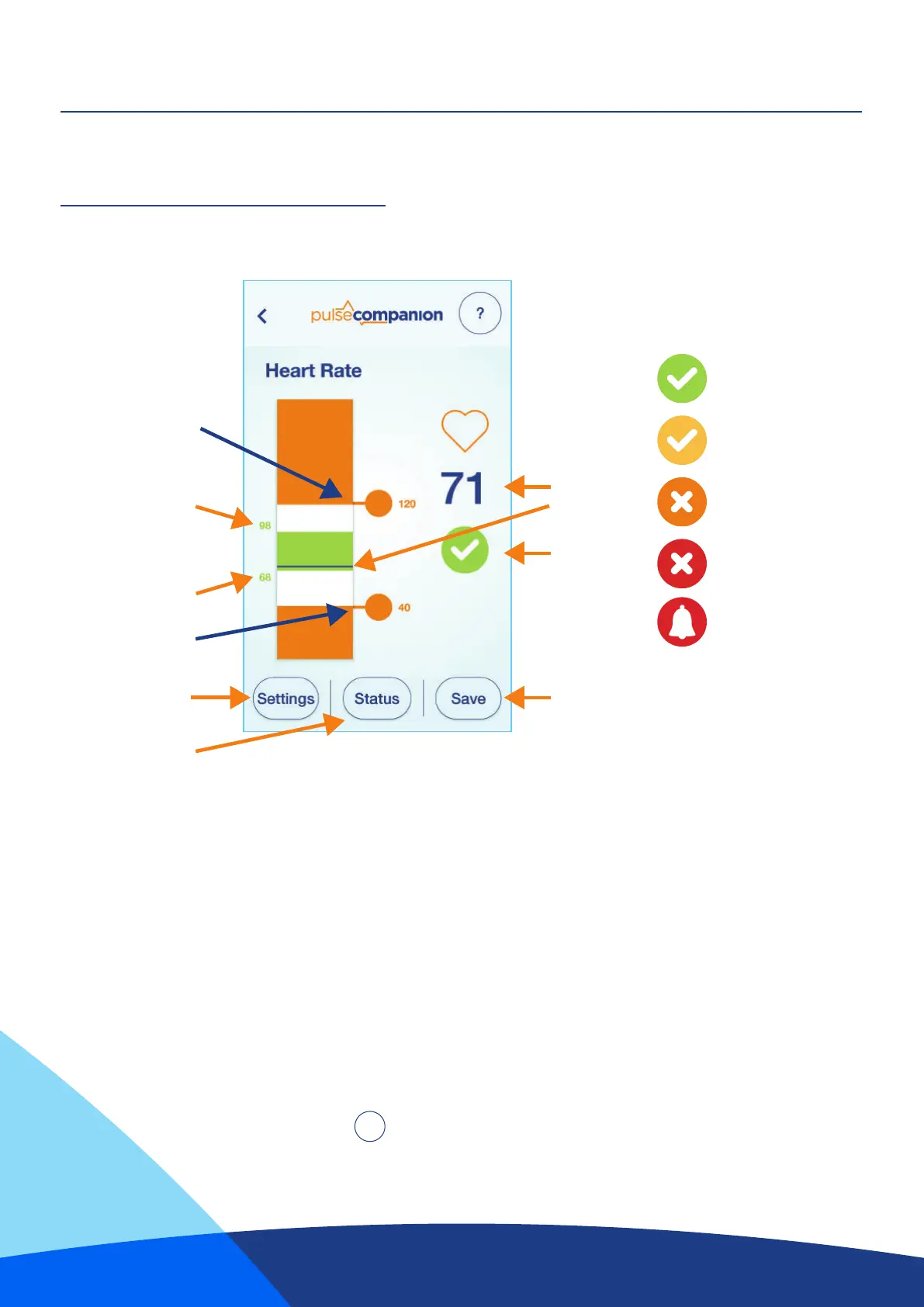
The black line moves up and down as the BPM reading changes.
The area in green shows the highest and lowest BPM readings that have been seen by the monitor
(Since the last reset of the High & Low).
The two orange circles slide up and down allowing the thresholds to be adjusted.
Tapping either orange circle will bring up a box that will allow the exact threshold value to be entered manually.
Please Note: The lowest possible limit that can be set is 30, the highest is 199.
The green area can be reset by pressing the “Reset High & Low” button found on the “Settings”
page (Page 13).
Current status will be represented by the icons in the table above, press “Status” for more details.
For Trouble Shooting Press
Figure 6
Max Threshold
Current
BPM
Status
icon
Save changes
Min Threshold
Settings
Status
Highest BPM Seen
Lowest BPM Seen
?
= Monitoring
Status Icons:
= monitoring but low
battery condition
= Disarmed
= in fault condition
= In alarm


 To Next Page