Using the Pulse Companion 17
Changing the Armband due to low battery
Turning the armband off
Charging the Armband
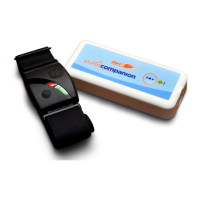
The battery in the armband should last 12 to 16 hours.
When the battery in the armband gets low, “Fault 28” will be shown on the pager screen.
1. Turn off the armband whilst still tted by holding its big button for 5 seconds.
2. Remove the armband
3. Turn on and t the new charged armband by holding its big button for 5 seconds.
4. Press the •
•
• button on the Pulse Companion to reconnect it to the new armband.
The fault should now clear from the pager.
5. Ensure Pulse Companion is monitoring by observing the LED ashing green
every 4 seconds.
If monitoring is not required for the rest of the day;
1. Ensure user is still wearing armband.
2. Turn the armband off by holding its big button for 5 seconds, remove when convenient.
3. “Fault 26” will now appear on the pager screen, press the “Up” arrow to silence the fault
tune for 5 minutes.
4. Hold the •
•
• button for three seconds on the
Pulse Companion to acknowledge the fault alarm.
The “Fault 26” on the pager will now clear
after 6 minutes.
Pressing the big button on the armband for 1 second will display the current charge level (three green bars).
The armband is charged by placing it into the cradle and plugging it into the mains USB charger.
The main LED ashes red while charging. When the armband is fully charged the LED turns blue.
The charge time is approximately 2 hours.
PLEASE NOTE:
where no safety concerns around detecting
Armbands being removed by user. For quick
disconnect see page 14.


 To Next Page