Introduction
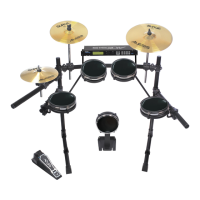
Thank you for purchasing the Alesis DM Pro Kit. It’s a complete electronic percussion
system that combines A l e s i s ’top-of-the-line DM Pro drum module with state-of-the-art
drum pads, mounting hardware and connecting cables. Flexible, powerful and durable, the
DM Pro Kit is an all-in-one solution for everyone from hobbyists to pro drummers.
To assure proper setup and take full advantage of the DM Pro Kit’s wide-ranging features, p l e a s e
read this Setup Guide and the DM Pro Module Reference Manual carefully.
How to Use This Manual
This Setup Guide is designed to help you configure your DM Pro Kit to the “power on”
stage. Please refer to the DM Pro Module Reference Manual for advanced instructions on
playing, programming and fine-tuning your percussion sounds.
When something important appears in this manual, an icon (like the one
on the left) will appear in the left margin. This symbol indicates that this
i n f o r mation is vital when setting up and operating the DM Pro Kit.
Assembly instructions are phrased for setting up a typical right-handed drum kit. W h e t h e r
you’re right-handed or left-handed, you can easily adjust and configure the DM Pro Kit to
accommodate your playing preferences.
Assembly instructions are phrased from the drummer’s point of view – that is, “right” and
“left” are used to describe procedures as if you are sitting on your drum throne facing the kit.
Before You Begin: Check DM Pro Kit Component List
The DM Pro Kit package contains everything you need to build a complete electronic
p e r c u s s i o n system. The components include five categories:
1) Rack and mounting hardware
2) Trigger pads
3) Cables
4) DM Pro Drum Module
5) Documentation
Before you begin assembly, we recommend that you take an inventory of all the components
and organize them into separate groups. Use a pen or pencil to check off the following
components. If you find that your DM Pro Kit is missing any components, please contact
Alesis Customer Support at 800-5-ALESIS.
DM Pro Kit Setup Guide 1
J












 To Next Page