AlgoForce E1500
10
Keep the coil close to the ground and swing it left and right at a pace of about 1 m/s. Ideally,
maintain a constant distance between the coil and the ground surface during the swing to avoid
picking up excess ground noise. The detector will continuously monitor the ground drift in the
background, presenting it as a horizontal bar in the Main Detection UI. If the Ground Drift
Indicator bar widens, initiate Auto GB once more. It is essential to be aware that target signals can
influence the Ground Drift Indicator. Therefore, for precise ground drift monitoring, ensure that
no targets are detected.
VIII. Pinpoint detected target (if needed)
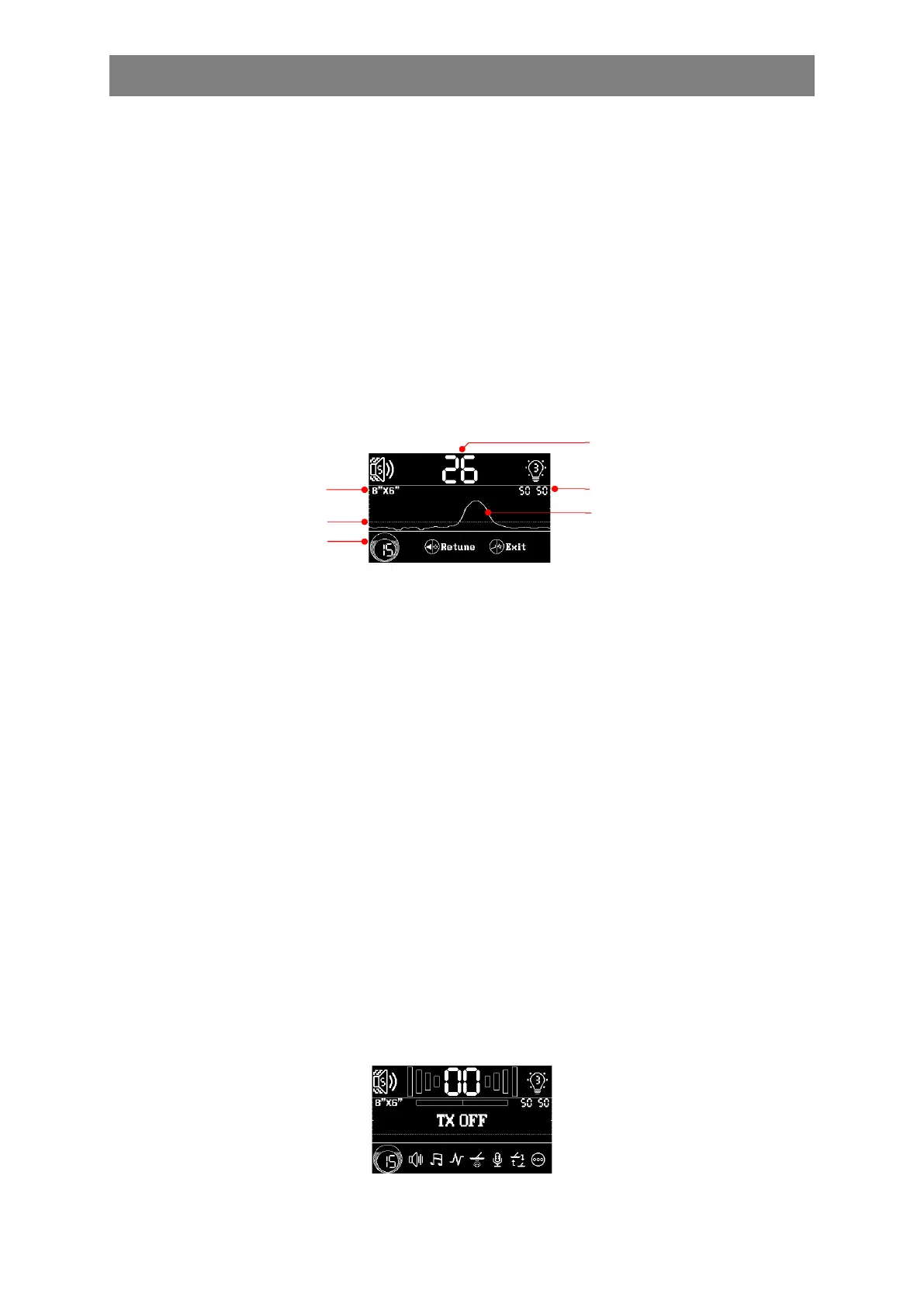
Enter the Pinpoint UI by pressing the Left/Pinpoint button in the Main Detection UI. In the
Pinpoint UI, adjust Sensitivity with the Minus or Plus button. To retune the detection threshold
due to ground variation or temperature drift, press the Left/Pinpoint button as needed. Perform
Auto GB if needed by holding the Right/Auto GB button. Return to the Main Detection UI by
pressing the Return/Auto FS button.
Pinpoint UI
Pinpoint is a non-motion mode where the coil doesn't have to move to indicate a target. The
detection signal gets stronger as the coil approaches the target, causing the audio (if audio output
is on) or vibration (if vibration mode is on) to intensify.
The Conductive Target ID (0-99) displayed in the Pinpoint UI remains stable even in highly
mineralised soils. A higher number indicates a larger or more conductive target. To obtain an
accurate target ID, it is recommended to follow these steps:
Move the coil away from but close to the target.
Ensure the coil is resting on the ground surface and press the Left/Pinpoint button to
retune.
After that, slide the coil on the ground surface until the target is positioned just below the
centre of the coil.
The target ID is also useful for assessing the target's shape. If the target ID fluctuates significantly
when the coil is moved slightly off but still above the target, it likely indicates an irregularly
shaped target, such as a bottle cap or a nail with a large head.
If a pinpointer is used to pinpoint the target and you find that the detector is interfering with the
pinpointer, you can turn off the detector's transmitter by double-clicking the Power On/Off
button. To turn back on the transmitter, simply press any button.
Selected Coil Size
Detection Threshold
Sensitivity
Conductive Target ID
Dual Ground Balance Values
Real-time Scrolling Signal



 To Next Page