Setting Up the Monitor | 25
Connecting the Computer
WARNING: Before you begin any of the procedures in this section,
follow the Safety Instructions.
NOTE: Do not connect all cables to the computer at the same time.
NOTE: See also Attaching the Stand.
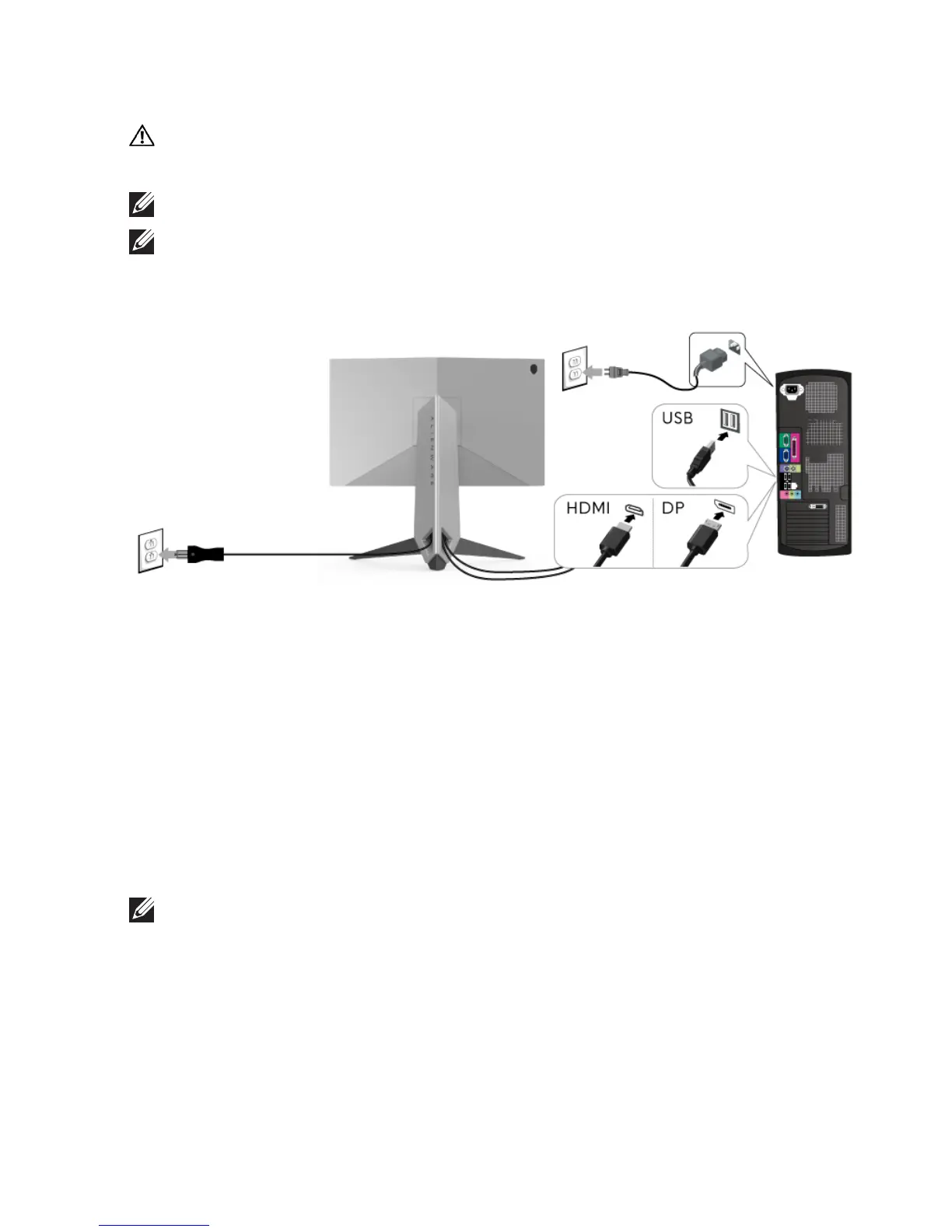
To connect your monitor to the computer:
1. Connect the other end of the connected DP or HDMI cable to your
computer.
2. Connect the upstream USB 3.0 port (cable suppl
ied) to an appropriate
USB 3.0 port on your computer. (See Rear and Bottom View for details.)
3. Connect the USB 3.0 peripherals to the downstream USB 3.
0 ports on the
monitor.
4. Plug the power cables for your computer and monitor into a nearby outlet.
5. Turn On the monitor and the computer.
If
your monitor displays an image, installation is complete. If it does not
disp
lay an image, see Universal Serial Bus (USB) Specific Problems.
NOTE: The graphics are used for the purpose of illustration only.
Appearance of the computer may vary.















 To Next Page