Views of Alienware m15
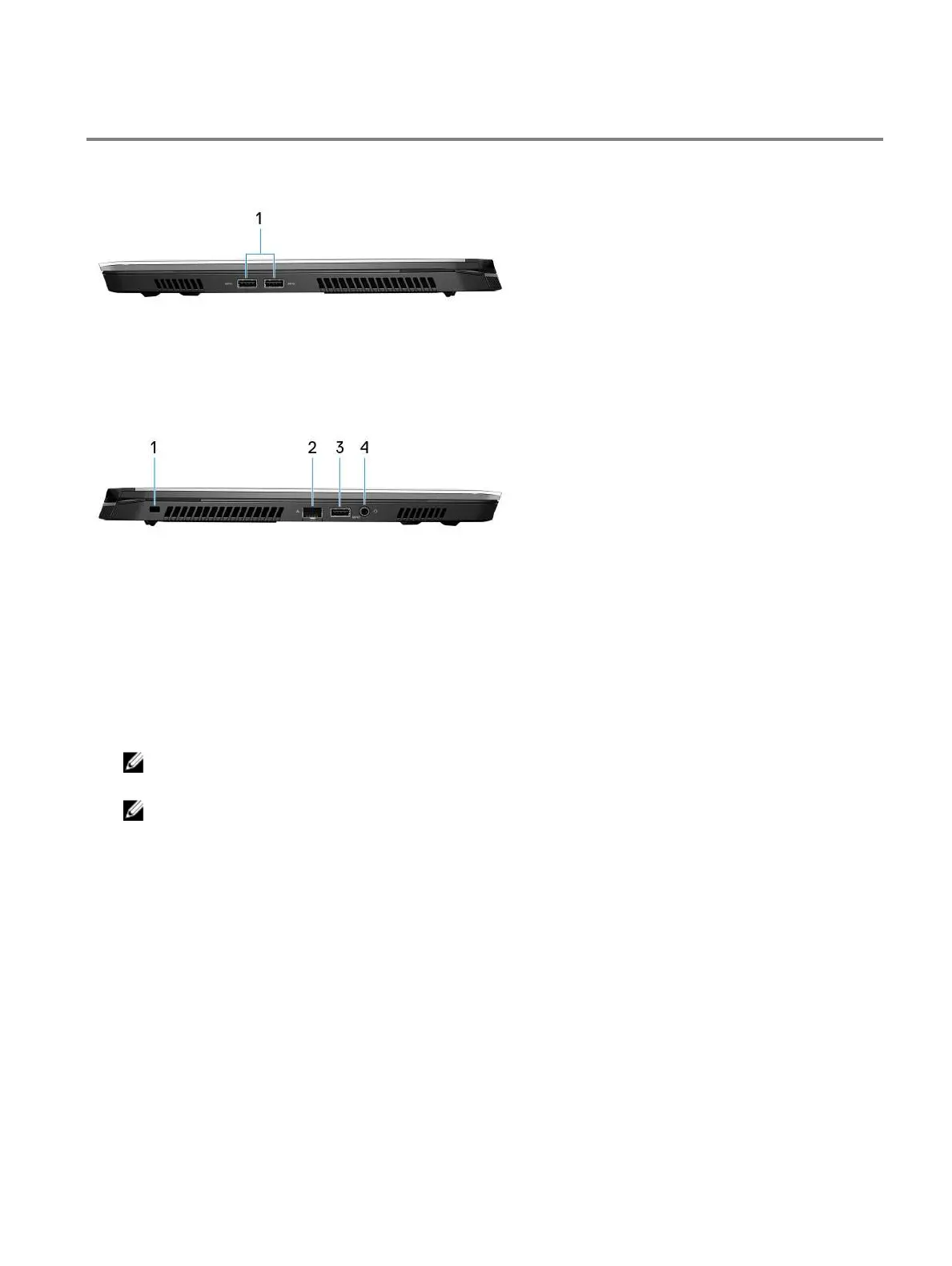
Right
1 USB 3.1 Gen 1 ports (2)
Connect peripherals such as external storage devices and printers. Provides data transfer speeds up to 5 Gbps.
Left
1 Security-cable slot (for Noble locks)
Connect a security cable to prevent unauthorized movement of your computer.
2 Network port
Connect an Ethernet (RJ45) cable from a router or a broadband modem for network or Internet access.
3 USB 3.1 Gen 1 port with PowerShare
Connect peripherals such as external storage devices and printers.
Provides data transfer speeds up to 5 Gbps. PowerShare enables you to charge your USB devices even when your
computer is turned
NOTE: If your computer is turned or in hibernate state, you must connect the power adapter to charge your
devices using the PowerShare port. You must enable this feature in the BIOS setup program.
NOTE: Certain USB devices may not charge when the computer is turned or in sleep state. In such cases,
turn on the computer to charge the device.
4 Headset port
Connect headphones or a headset (headphone and microphone combo).
7













 To Next Page