Need help?
Do you have a question about the Alinco EC10 and is the answer not in the manual?
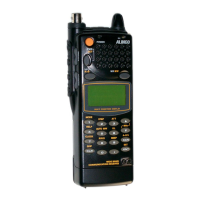
Antenna for radio transmission and reception, to be rotated and extended when operating.
Terminal for connecting an external regulated DC power source for charging or operation.
Ports for connecting optional external microphones and speakers for enhanced audio.
Press-to-talk switch used for transmitting audio signals.
Unmutes squelch to monitor weak signals and provides key lock functionality.
Activates secondary functions when pressed with other keys, or changes frequency digits.
Switches between VFO and memory channels, and is used for memory channel programming.
Decreases frequency or channel number; enters programming mode for CTCSS tones.
Increases frequency or channel number; enters programming mode for channel steps.
Switches to memory channel 'C' or resumes original frequency; toggles alarm function.
Initiates channel scanning; used with F key for semi-duplex offset frequency setting.
Illuminates LCD; toggles Auto Power Off function with UP/DOWN keys for timer setting.
Details frequency range, modulation, power source, current consumption, dimensions, and weight.
Outlines output power, modulator type, and maximum frequency deviation.
Provides information on receiver configuration, IF stages, sensitivity, and AF output.
Emits a beep upon PTT release to signal 'go ahead'; toggled via UP key and power-on.
Monitors uplink frequency for repeaters, toggled via F + SCAN and MONITOR key.
Toggles audible beep feedback for key presses using MONITOR key and power-on.
Displays only memory channel number for simplified operation; toggled via V/M key and power-on.
Resets the radio to factory default settings by pressing F key and turning on the power.
Lists available accessories including chargers, headsets, microphones, cases, and cables.
 General
| Brand | Alinco |
|---|---|
| Model | EC10 |
| Category | Transceiver |
| Language | English |

 To Next Page