EasyManua.ls Logo

Allen-Bradley PowerFlex 20-HIM-A3 - User Manual

Allen-Bradley PowerFlex 20-HIM-A3
8 pages
Print Icon
To Next Page IconTo Next Page
Loading...
1
Programming PowerFlex Drives (70, 70EC, 700Std, 700VC Series A & B)/ SMC Flex
Soft Starters with 20-HIM-A3 or 20-HIM-A5 External Door Mounted HIM
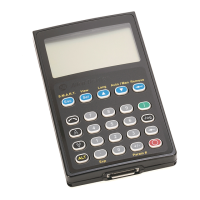
Programming Instructions shown using a 20-HIM-A3
Key Descriptions
Escape
Pressing the Escape Key once takes you back one level.
Select
When at the parameter level pressing select will move the cursor to the line of the
Display where the parameter value is. Then you are able to change its value. If the value
of the parameter is at a Bit level then repeatedly pressing the Select key will move the
cursor from one bit to the next (going from right to left).
Up and Down Arrows
Allows you to move between the different levels in the menu. When changing the
parameter value these will increase or decrease the value. The longer you hold down the
key the faster it changes the value.
Enter (This is the Universal key/Symbol used for “Enter”)
Pressing this key will select the Item Highlighted in the menu and take you to the
next level. Pressing this key when the value of a parameter has been changed will
then write the changed value to the drive.
ESC
Sel
This is the “User Display” Window – The drive
typically defaults to this window after 30 seconds
This is User Display Line 0
This is User Display Line 1
This is User Display Line 2
Direction Drive Status Alarm Auto/Man Information (The ALT View Function is allowed)
Blue Programming Keys
Question and Answer IconNeed help?

Do you have a question about the Allen-Bradley PowerFlex 20-HIM-A3 and is the answer not in the manual?

Overview

This document describes the programming and operation of PowerFlex Drives (70, 70EC, 700Std, 700VC Series A & B) and SMC Flex Soft Starters using the 20-HIM-A3 or 20-HIM-A5 External Door Mounted HIM (Human Interface Module). The HIM serves as a user interface for configuring, monitoring, and controlling these drives.

Function Description:

The HIM provides a comprehensive interface for interacting with the PowerFlex drives and SMC Flex soft starters. Its primary functions include:

  • Parameter Programming: Users can access and modify various drive parameters to customize operation, such as speed references, acceleration/deceleration rates, motor data, and control modes.
  • Monitoring: The HIM displays real-time operational data, including output frequency (HZ), current (AMPS), and bus voltage (Bus VDC). It also features a "User Display" window that typically defaults to showing key operational values after 30 seconds of inactivity. This window includes three customizable lines (User Display Line 0, 1, and 2) for displaying specific parameters.
  • Control: The HIM allows for direct control of the drive, including starting, stopping, jogging, and changing direction. It supports both manual control via the HIM and automatic control based on programmed logic.
  • Diagnostics and Alarms: The HIM displays alarm and fault conditions, enabling users to identify and troubleshoot issues. It also provides access to diagnostic menus.
  • Menu Navigation: A structured menu system allows users to navigate through different functions, including the Main Menu (Diagnostics, Parameter, Device Select, Memory Storage, Start-Up, Preferences) and sub-menus for parameter viewing and editing.
  • Language Selection: The HIM supports multiple languages (English, Français, Español, Italiano), which can be selected through a dedicated menu.
  • HIM Removal: The HIM can be removed from the drive without causing a fault, provided it is not actively controlling the drive or providing a speed reference.

Important Technical Specifications (Implied from the document):

  • Compatibility: Designed for PowerFlex Drives (70, 70EC, 700Std, 700VC Series A & B) and SMC Flex Soft Starters.
  • HIM Models: 20-HIM-A3 or 20-HIM-A5.
  • Display: Features a multi-line display with a "User Display" window and a "Main Menu" for navigation.
  • Input: Equipped with a keypad including numerical keys (0-9), directional arrows (Up/Down), and function keys (ESC, Sel, Start, Jog, Stop, Backspace, ALT, Enter, Decimal Point, +/-).
  • Communication: Interacts with the drive to read and write parameter values and control commands.

Usage Features:

The HIM offers several user-friendly features to facilitate drive operation and programming:

  • Keypad Layout: The keypad is organized with dedicated keys for common functions.
    • ESC (Escape): Returns to the previous menu level.
    • Sel (Select): Moves the cursor to the parameter value for editing or selects bits in a bit-level parameter.
    • Up/Down Arrows: Navigate through menus, increase/decrease parameter values, or adjust speed reference when the HIM is the speed source. Holding the key down increases/decreases the value faster.
    • Enter (Universal Key): Selects highlighted menu items, moves to the next level, or writes changed parameter values to the drive.
    • Start (|): Initiates drive modulation or run condition, provided no start inhibit (mask, fault, alarm) is present.
    • Jog (Jog): From a stopped state, pressing and holding this key causes the drive to modulate and follow the P100 Jog1 speed reference. Releasing the key stops the drive.
    • Backspace (←): Deletes text to the left of the cursor.
    • Stop (O): Stops the drive based on P155 or P156 settings (Coast, Ramp, Ramp to Hold, DC Brake, Fast Brake). Also clears resetable faults when P241 is enabled.
    • Change Direction (∧/V): Reverses the drive/motor direction, unless masked by P190.
    • Digital Pot Up/Down Arrows: When the HIM is the speed reference, these keys increase/decrease the speed.
    • Numerical Keys (0-9): Used to enter parameter values or speed references.
    • Decimal Point (.): Allows entry of fractional values.
    • +/-: Changes a parameter value to positive or negative.
  • ALT (Alternate) Key: This is a second-function key, color-coded yellow. Pressing and releasing ALT activates the yellow-labeled second functions of other keys for approximately 3 seconds.
    • ALT + ESC (S.M.A.R.T): Displays the "S.M.A.R.T" Start-up menu.
    • ALT + Sel (View): From the "User Display" window, provides a magnified view of User Display Line 1. From the "Main Menu" with "Parameter" highlighted, it displays the "Parameter" Sub menu.
    • ALT + Up Arrow (Lang): Displays the Language Selection menu.
    • ALT + Down Arrow (Auto / Man): Toggles between HIM manual control and automatic control of the drive.
    • ALT + Enter (Remove): Allows HIM removal without causing a fault.
    • ALT + Decimal Point (P. and R. (.)): Allows entering a value as an exponent (not available on PowerFlex 700).
    • ALT + +/- (Param #): Displays the Parameter Menu for viewing/editing parameters.
  • Parameter Viewing Options: The HIM allows users to select how parameters are viewed (File, Group, Numbered List, Changed Params), and this setting persists even after AC power cycles.
  • Advanced Access: Changing Parameter 196 to "1 Advanced" grants access to all parameters, indicating different levels of user access or complexity.

Maintenance Features (Implied from the document):

  • Fault Clearing: The Stop key can be used to clear resetable faults when P241 is enabled, aiding in basic troubleshooting.
  • HIM Removal: The ability to remove the HIM without faulting the drive simplifies maintenance or replacement of the HIM itself, provided the drive's control logic is not dependent on the HIM.
  • Parameter Persistence: Parameter viewing preferences are maintained even after power cycles, reducing the need for re-configuration after power interruptions.

The HIM provides a robust and intuitive interface for managing PowerFlex drives and SMC Flex soft starters, offering comprehensive control, monitoring, and programming capabilities through a well-defined keypad and menu system.

Allen-Bradley PowerFlex 20-HIM-A3 Specifications

General IconGeneral
BrandAllen-Bradley
ModelPowerFlex 20-HIM-A3
CategoryControl Unit
LanguageEnglish

Related product manuals