508155-01Issue 2108Page 44 of 49
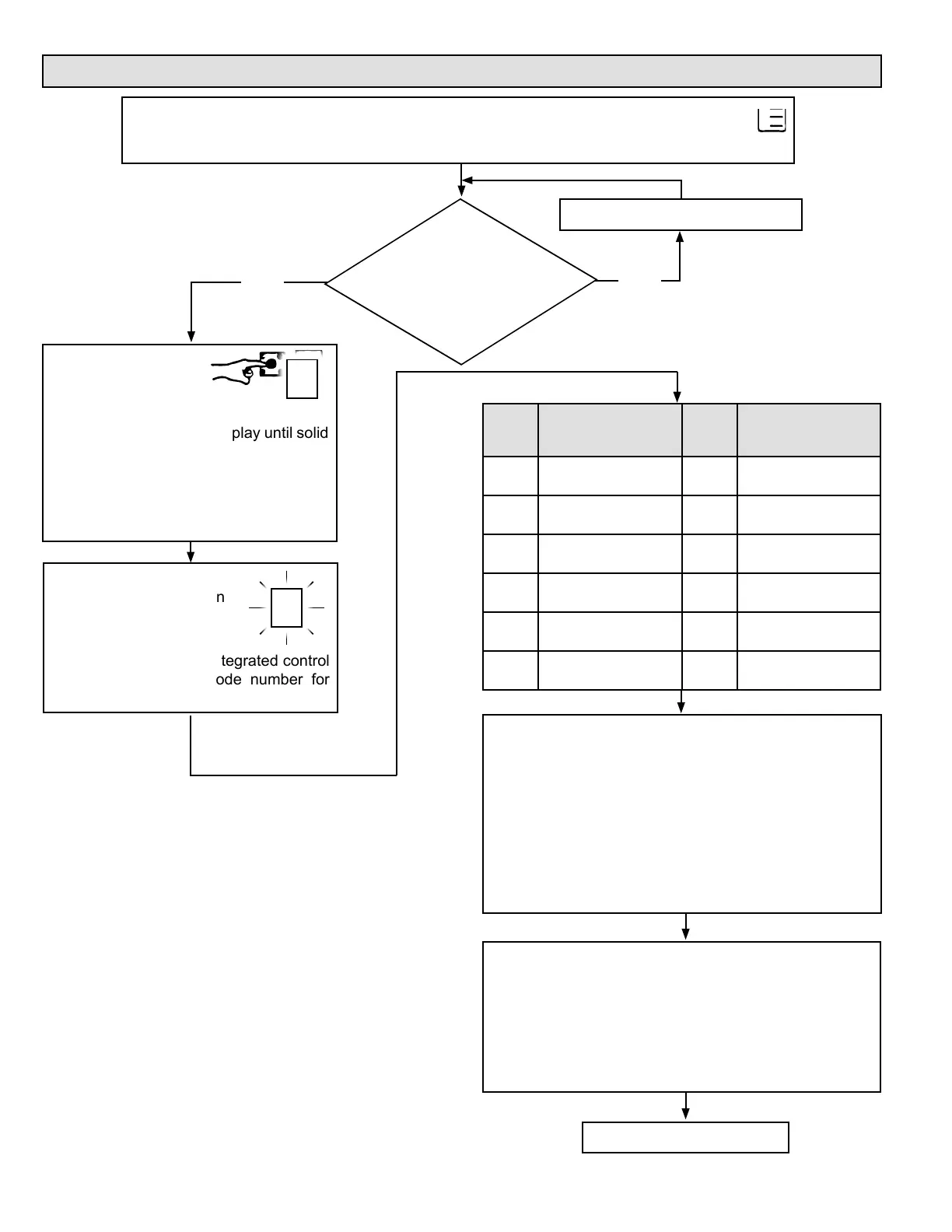
Program Unit Capacity Size Modes
Furnace control
in IDLE mode (No
heating, cooling,
or indoor fan
operation)
Turn room thermostat to OFF.
When the correct unit size code is displayed, release
button. Selected code will ash for 10-second period.
During that period, press and hold button for 5 seconds.
Integrated control will store code in memory and will
automatically exit Program Unit Capacity/Size mode
and reset. (If second period expires or button is held less
than 5 seconds, control will automatically exit Program
Unit Capacity/Size mode and go into Idle mode without
storing unit size code. If this happens, programming
function must be repeated.)
Verify that the selected unit size code is correct and
stored in non-volatile memory by cycling the 24 volt
power to the furnace control. (At 24 volt power-up of
the furnace control, the 7-segment LED will display a
unit size code. If three horizontal bars display, the board
does not recognize the unit size code. The programming
function must be repeated.)
FINISHED
Power-Up - Number displayed by integrated control represents unit size code (furnace
model and capacity). If three horizontal bars are displayed followed by continuous E203,
furnace control does not recognize unit size code. Congure per the following:
Yes No
Push and hold button. Integrated control
will display unit size code number for
each furnace model for three seconds.
Solid P starts blinking on
7-segment LED.
P
To enter Program
Unit Capacity/
Size mode: Push
and hold button
next to 7-segment LED display until solid
“P” symbol appears. Release button.
IMPORTANT: Field replacement controls
may need to be manually congured to
validate furnace unit size code.
P
UNIT
SIZE
CODE
FURNACE MODEL
UNIT
SIZE
CODE
FURNACE MODEL
A
A80US2V070A12(L)
H
A80DS2V070A12(L)
B
A80US2V090A12(L)
J
A80DS2V090B16(L)
C
A80US2V090B16(L)
L
N/A
d
A80US2V090C20(L)
n
A80DS2V110C20(L)
E
A80US2V110C20(L)
F
A80US2V135D20(L)


 To Next Page