6x Installation Guide
3 Chassis Views
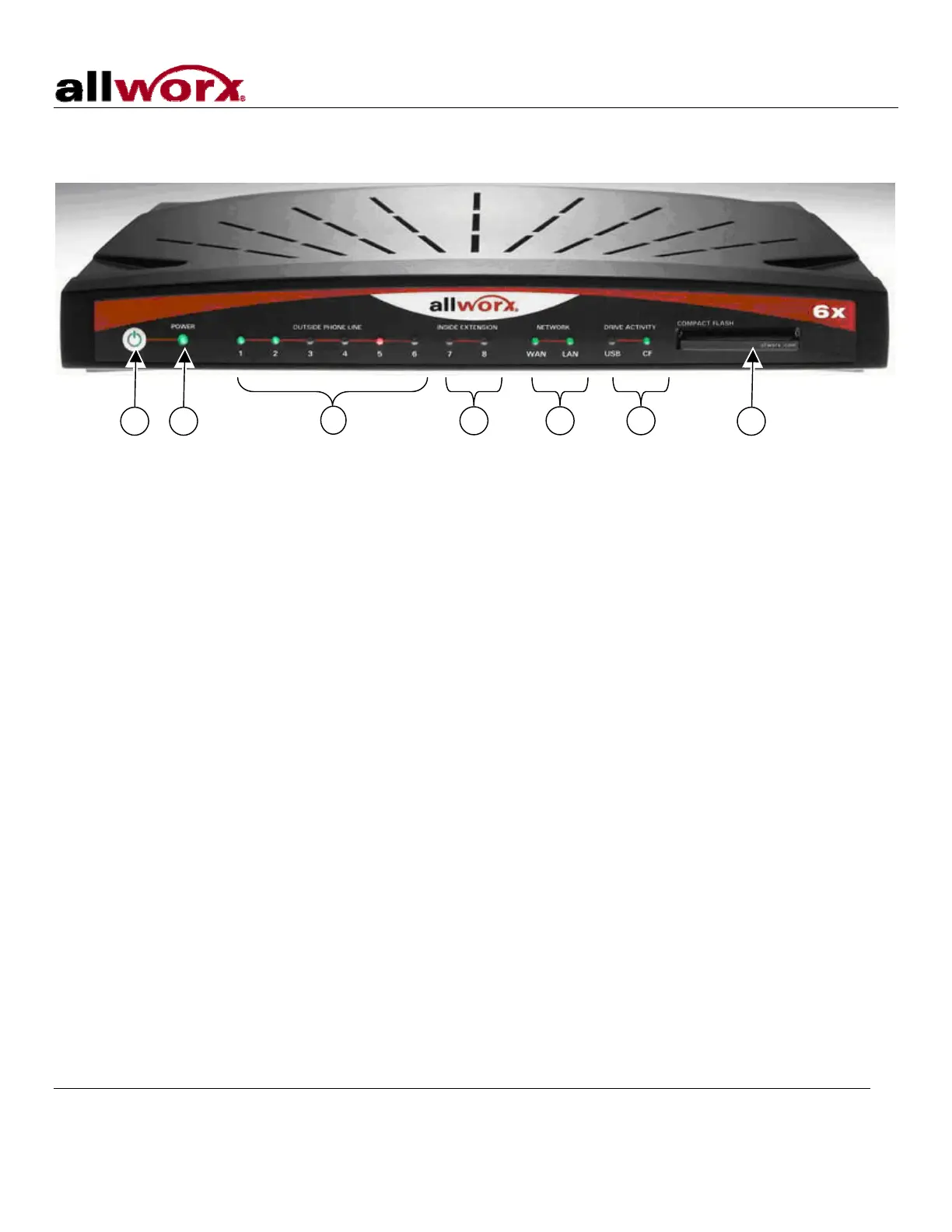
Figure 1: Front Chassis View
300 Main Street • East Rochester, NY 14445 • Toll Free 1-866-ALLWORX • 585-421-3850 • www.allworx.com
© 2007 Allworx Corp. All rights reserved. Allworx is a registered trademark of Allworx Corp. All other names may be trademarks or registered
trademarks of their respective owners.
Revised: December 27, 2007
Page 2
1 Power switch
Press & Release – Normal shutdown within a few seconds
Press & Hold – Forced shutdown
2 Power LED – Indicates system start up activity
3 Outside Analog Phone Line LEDs – Indicates status of a particular FXO port
4 Inside Analog Extension LEDs – Indicates status of a particular FXS port
5 Network LEDs – Indicates Ethernet link status; flashes off for activity
6 Drive Activity LEDs – Green indicates mounted drive; flashes off for activity
7 Compact Flash Slot – Accepts Type I or Type II Compact Flash Card
43 5 62 1 7



 To Next Page