Allworx
®
Verge™ IP Phone Series User Guide
Page 32 866.ALLWORX * +1 585 421 3850
www.allworx.com
Version: T Revised: February 14, 2019
• Attended Transfer - talk to the transfer recipient prior to transferring a call.
• To VM - send the call to another Allworx user’s voicemail.
• Quick Transfer - send the active call to another user by pressing a BLF (Allworx assigned
extension) or Contact (assigned phone number) programmable button.
• Merge - joins the original caller, Allworx user, and the intended recipient of the transfer into a
temporary conference call to introduce the parties before completing the transfer.
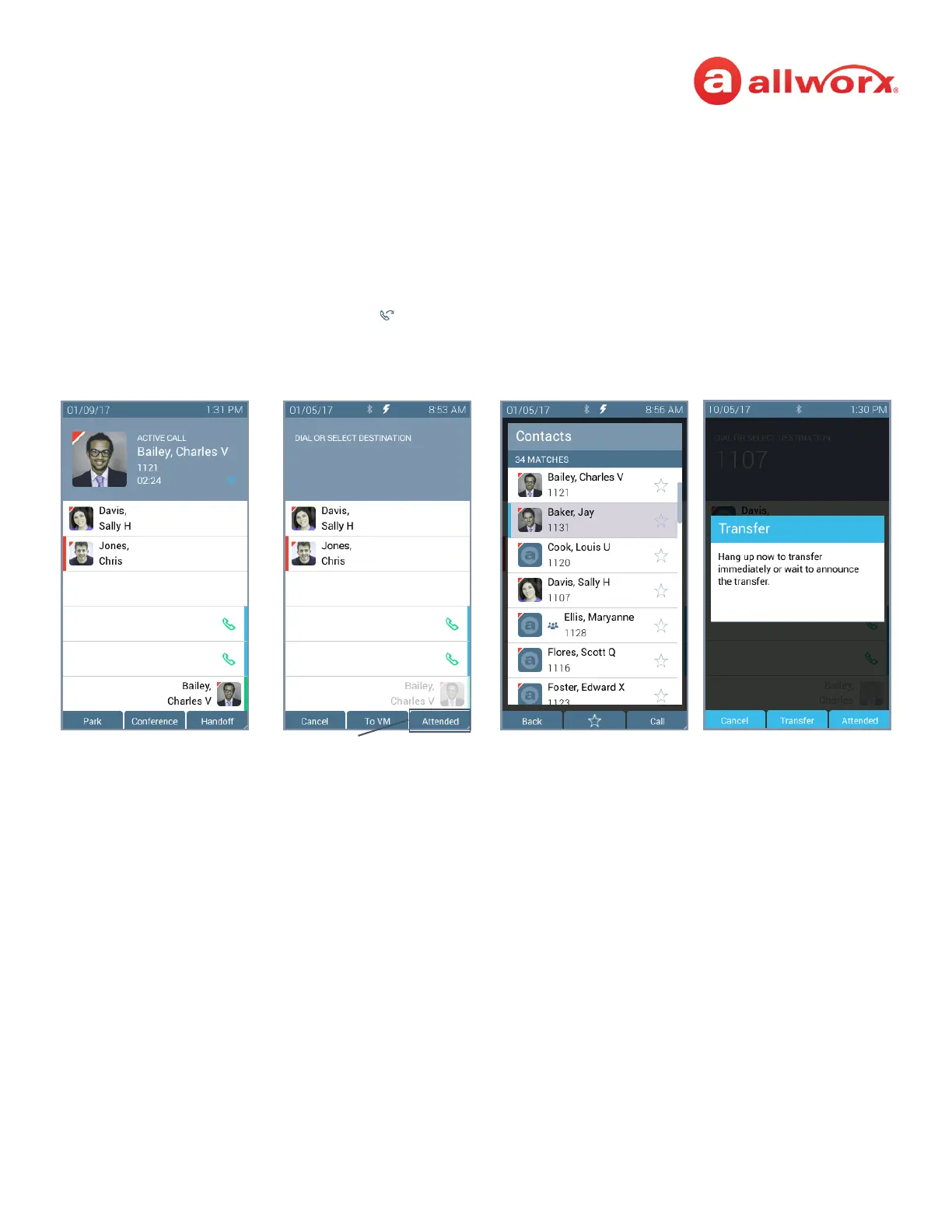
Verge IP phone Call Transfer example:
Call Transfer ( ) function
button pressed.
Select a recipient:
• Dial the recipient’s number
(contact matches display).
• Press the Contacts
function button (all
Active Call in progress.
(Optional) Press the Attended soft key to perform the Attended Transfer.
Do one of the following:
• Hang up to transfer the call
immediately (Blind
transfer).



 To Next Page