2 Installation
12
Alpha Technologies
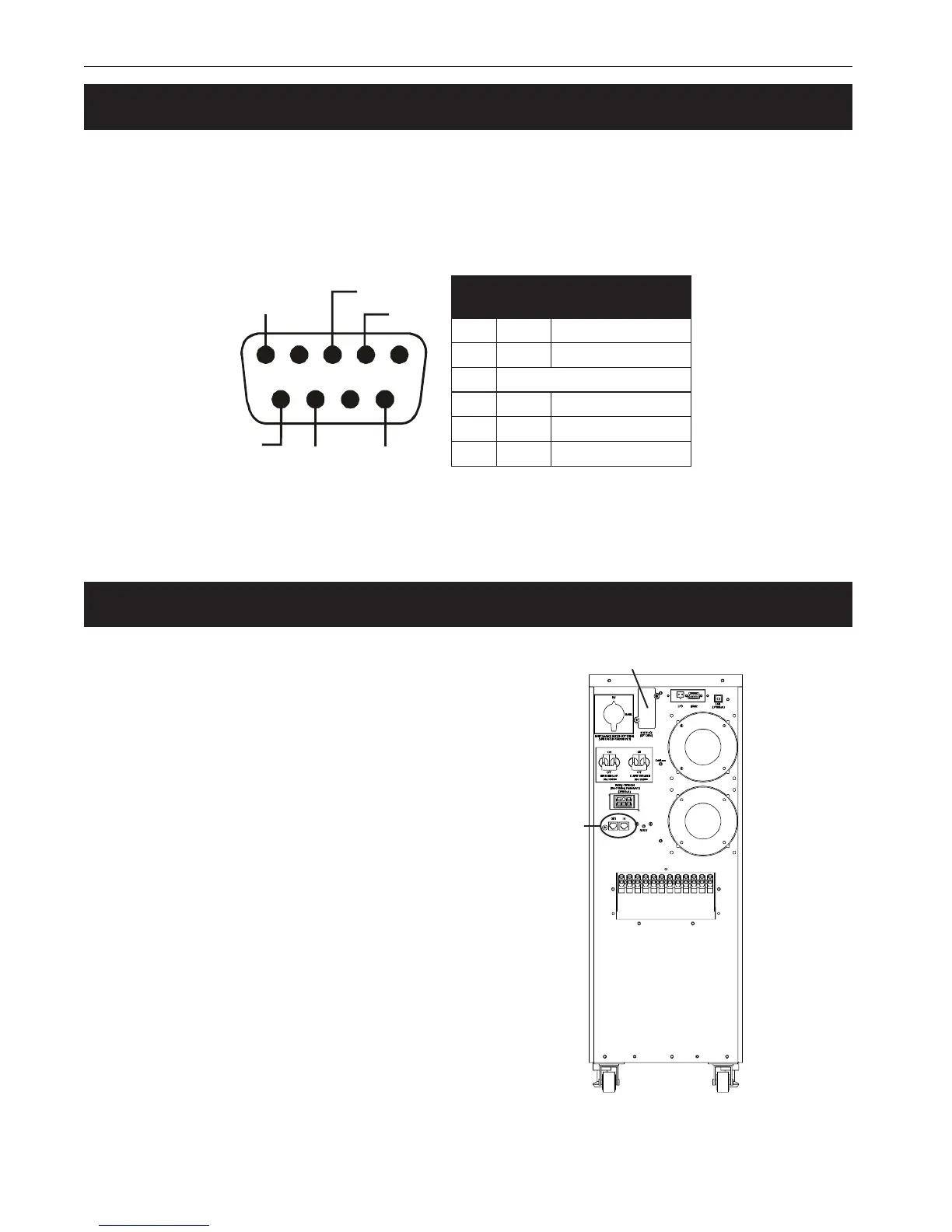
2.5 Connecting the RS-232 Port
With the Alphamon software, you can remotely control the unit with RS-232 communications. It
supports Windows 95/98/ME/2000/NT/XP, Novell NetWare or Linux. The CD that came with the
unit contains installation instructions. Only use the connection cable that came with the unit.
TIP: If the optional USB port is used, the RS-232 port is automatically disabled.
1234
6789
5
TxD
RxD
Common
CTSDCD
RI
#niP
langiS
emaN
noitcnuF
2DxTtuptuODxT
3DxRtupnIffOretrevnI/DxR
5nommoC
6STCtuptuOliaFCA
8DCDtuptuOyrettaBwoL
9IRrewoPCDV42--8+
Figure 2.4
DB–9 Port Pin Out
2.6 Network Connection
The rear panel’s Network Transient Protector
allows the unit to be connected to a network. It
uses a single RJ-45 (10BaseT) network card.
Plug the input connector to the “IN” connector
and the output connector to the “OUT” connec-
tor.
Two communication cards can be installed.
The SNMP card allows control and manage-
ment over a network or the internet. The AS/
400 card allows voltage free relay contacts.
Contact Alpha Technologies for more informa-
tion and availability
Figure 2.5
Network Connections
SNMP or AS/400 Card
Network Transient
Protector



 To Next Page