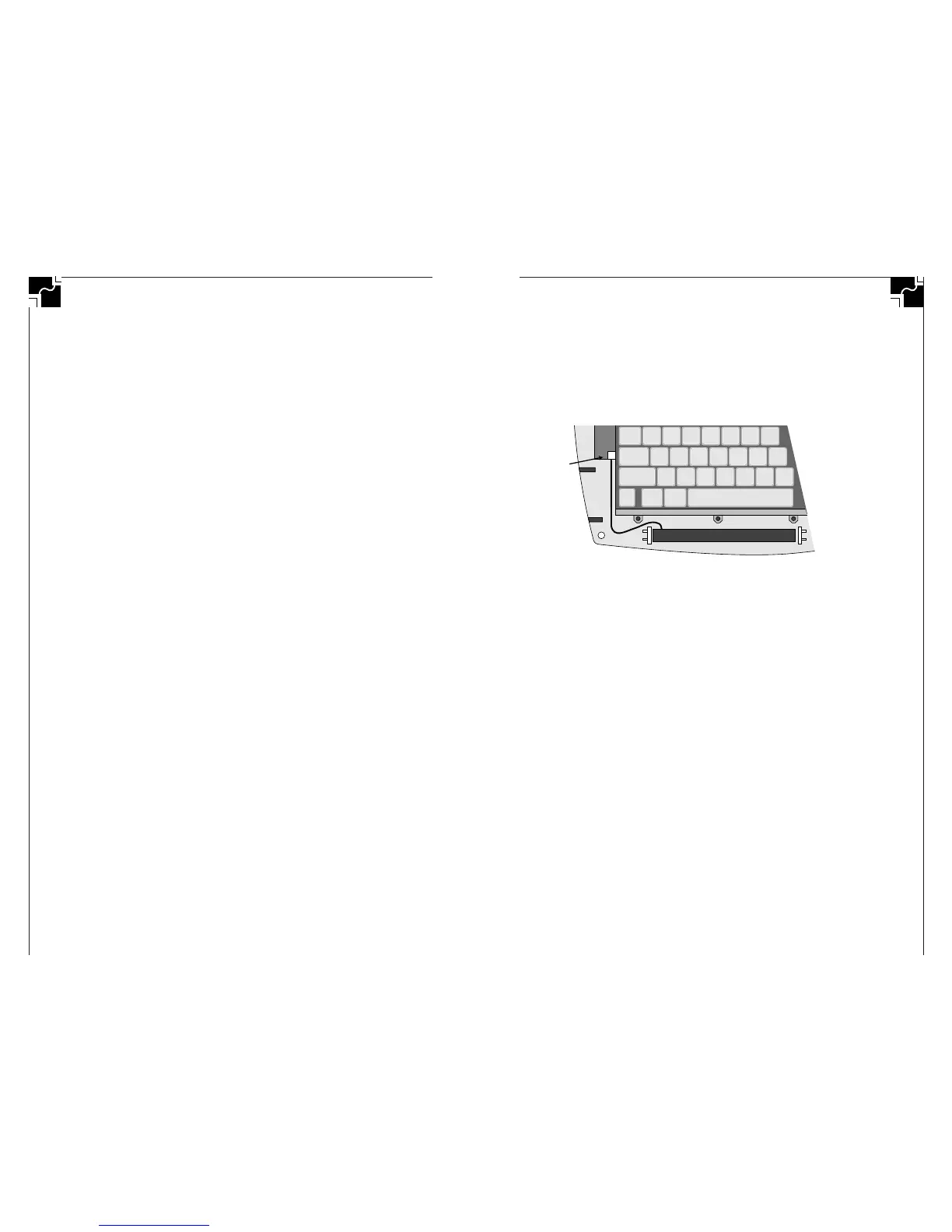
the keypad; if you can’t squeeze your finger under and
insert the connector, remove the six screws holding the
keypad in place and move the keypad while you insert the
connector. Then replace the keypad and its screws.)
6. Replace the top case, turn over, and replace the eight
screws.
Figure 21. Installing the NiCAD Battery Pack
Charging/Discharging a NiCAD Battery Pack
The NiCAD pack is recharged whenever the AC adapter is
plugged into the AlphaSmart 2000. The NiCAD will charge
whether the AlphaSmart is turned on or off. An overnight
charge of 16 hours will fully charge a discharged pack.
You will get the longest life from your NiCAD battery pack if
you do shallow discharge/charge cycles. (NiCAD cells have a
500–cycle lifetime if fully discharged and charged, but have
over a 1,000–cycle lifetime if the discharge/charge cycles are
less than 50% of capacity.) The memory effect will also be
avoided if the length of the discharges is somewhat random.
Complete charging of a discharged battery pack takes 16
hours. The best charging strategy is to recharge the NiCAD
pack overnight after 8–15 hours (1–3 days) of use. A fully
charged NiCAD pack will power the AlphaSmart for 20–50
hours, depending on use.
Conditioning a NiCAD Battery Pack
New NiCAD batteries require 3–5 charge/discharge cycles
before reaching their full rated capacity. For the longest run
time, charge and fully discharge your new battery pack
three times to achieve the full rated capacity.
AlphaSmart 2000
51
Battery Life and AlphaSmart 2000 Stacking Note: If Alpha-
Smart 2000s are stacked on top of each other, AND if the one on
top is offset by 1 inch to the front and 1/2 inch to the right, the
rubber foot of the one on top may depress the on/off key of the
AlphaSmart 2000 on the bottom. Constant depression of the
on/off key by the rubber foot of the unit on top will cause a small
but constant battery power drain even though nothing is displayed
on the screen. Solution: Stack your AlphaSmart 2000s on edge or
make sure they are stacked vertically and not offset.
When replacing batteries all 3 batteries must be changed. If
one discharged AA battery is used with 2 new batteries, the
user will see a marked reduction in the battery life—4-5
hours will be common—even though 2 out of the 3 are new
batteries.
Rechargeable NiCAD Battery Pack
For convenience, you may purchase an AlphaSmart recharge-
able NiCAD battery pack (see the AlphaSmart Accessories
section for a complete description). When the rechargeable
NiCAD battery pack is installed into your AlphaSmart, it is
automatically recharged whenever the AC adapter is plugged
in, or when your AlphaSmart is attached to a Macintosh or
PC. The NiCAD battery pack is charged regardless of whether
the AlphaSmart is turned on or off.
Installing a NiCAD Battery Pack
Equipment needed: 1 small phillips screwdriver
To install the NiCAD battery pack:
1. Remove the eight phillips case screws on the back of the
AlphaSmart 2000.
2. Turn the unit right side up and lift open the front case.
3. Remove the AA batteries, if any are installed.
4. Place the NiCAD pack in the battery compartment with
the wires to the left side of the compartment.
5. Insert the white NiCAD connector into connector J7 on
the printed circuit board, just below and to the left of the
tab key (see Figure 21). The little bump on the connector
will be up. The connector only goes in one way, so you
can’t install it wrong. (Connector J7 is partially covered by
50
AlphaSmart 2000



 To Next Page