16
-EN
Menu Screen
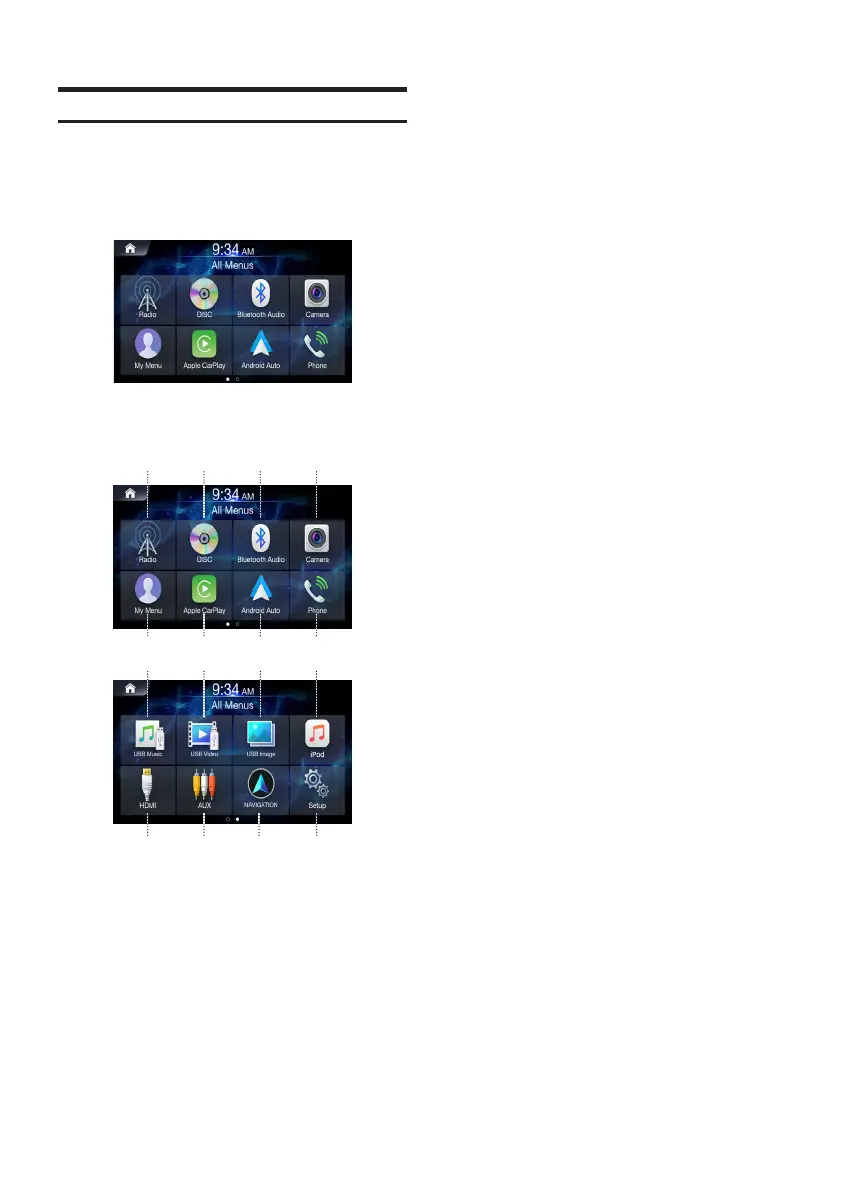
The Menu screen displays all of the available modes that can be
selected to operate the system.
Press the All Menus button.
The menu screen is displayed.
■
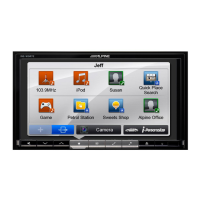
All Menus Screen example
〇①〇
Radio button
Displays the Radio screen. (page 17)
〇②〇
DISC button
Displays the DISC screen. (page 24)
〇③〇
Bluetooth Audio button
Displays the Bluetooth Audio screen. (page 49)
〇④〇
Camera button
Displays the Camera screen. (page 79)
〇⑤〇
My Menu button
Displays the My Menu screen. (page 10)
〇⑥〇
Apple CarPlay
Displays the Apple CarPlay screen. (page 45)
〇⑦〇
Android Auto
Displays the Android Auto screen. (page 45)
〇⑧〇
Phone button
Displays the Phone screen. (page 52)
〇⑨〇
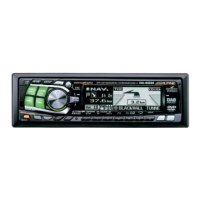
USB Music button
Displays the USB Music screen. (page 36)
〇⑩〇
USB Video button
Displays the USB Video screen. (page 39)
〇⑪〇
USB Image button
Displays the USB Image screen. (page 42)
〇⑫〇
iPod button
Displays the iPod screen. (page 43)
〇⑬〇
HDMI
Displays the HDMI screen. (page 46)
〇⑭〇
AUX button
Displays the AUX screen. (page 47)
〇⑮〇
Navigation button
Displays the Navigation screen.
Refer to the Map Manual for more information.
〇⑯〇
Setup button
Displays the Setup screen. (page 60)
⑧
④
⑫
⑤
⑬
①
⑨
⑦
③
⑪
⑥
⑭
②
⑩
⑮ ⑯
ALPINE_OM_AU_ENG_191023.indd 16 2019-10-23 오후 8:57:49


 To Next Page