23
OPTIONAL SETTINGS
Introduction
The PXE-H660's automatic setup process is now complete. If you wish to further tune
the system's sound quality, follow the steps below. Each output of the PXE-H660 has a
3-Band, parametric equalizer, up to 10 ms of time correction and customizable crossover
points for High-pass, Low-pass and Subwoofer.
Follow the procedures below to customize the Parametric EQ, Time Delay and Crossover.
Use the same procedure described below, for each of the channels being modied. Pressing
"ENTER" gets you into the program screen mode, allowing changes to current values. Use
"SAVE SETTINGS" to permanently store these changes into non-volatile memory.
PARAmETRIC EQUALIZER
The Equalizer uses 3 Bands for each of the 7 channels to customize the tone of the music.
Each Source Input to the PXE-H660 has its own EQ. Each of the Bands (Bass, Mid and
Treble) is adjusted in a similar manner. The following steps use the Bass Band as an ex-
ample. Use the same steps to make changes to the Mid and Treble Bands as well.
Equalizer
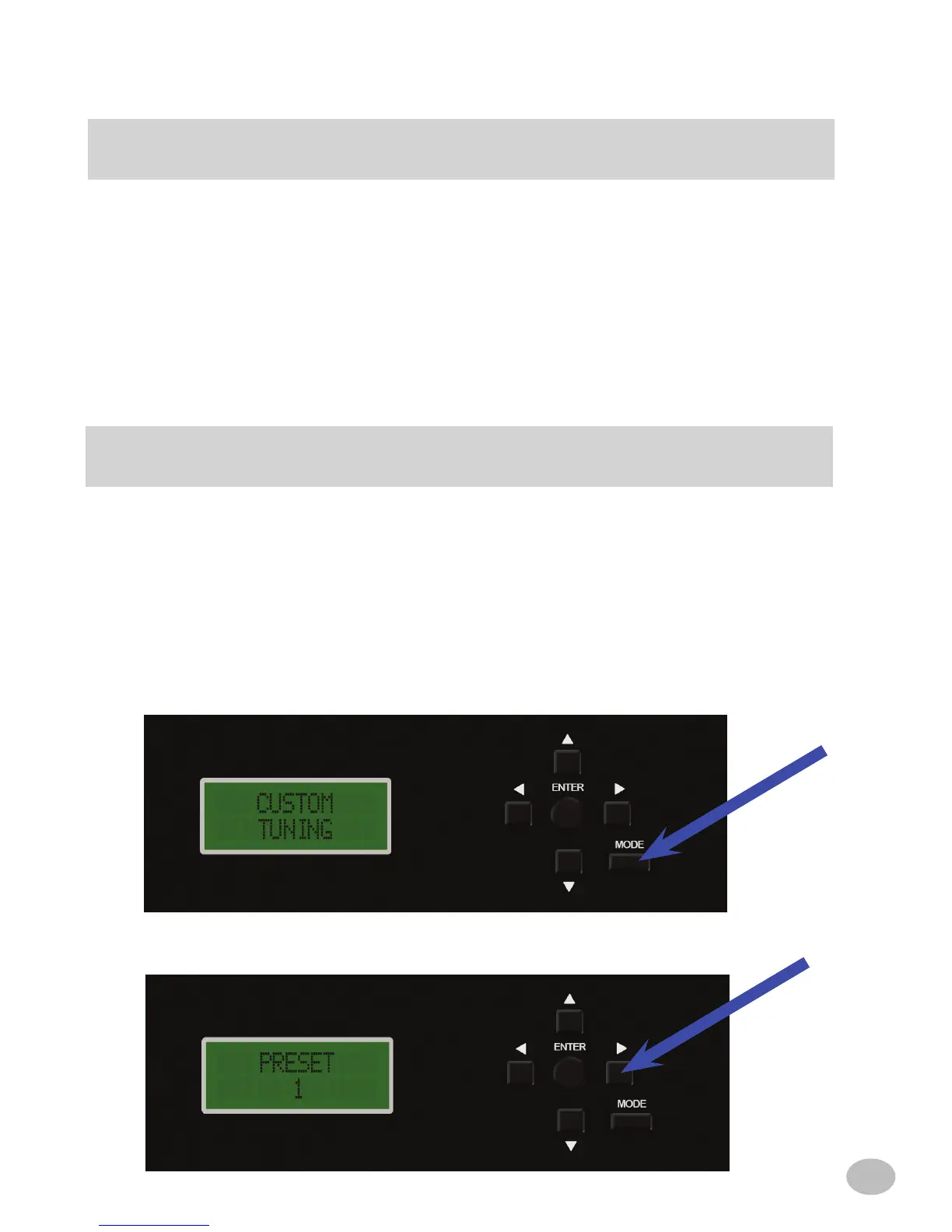
1. Press MODE twice to enter Custom tuning.
2. Press u to get "PRESET 1" in the display.



 To Next Page