ALPINE S2-A36F/S2-A55V 68-44781Z80-A (EN/DE/FR/ES/IT/SE/RU)ALPINE S2-A36F/S2-A55V 68-44781Z80-A (EN/DE/FR/ES/IT/SE/RU)
15-EN
EN
ES
DE
IT
RU
FR
SE
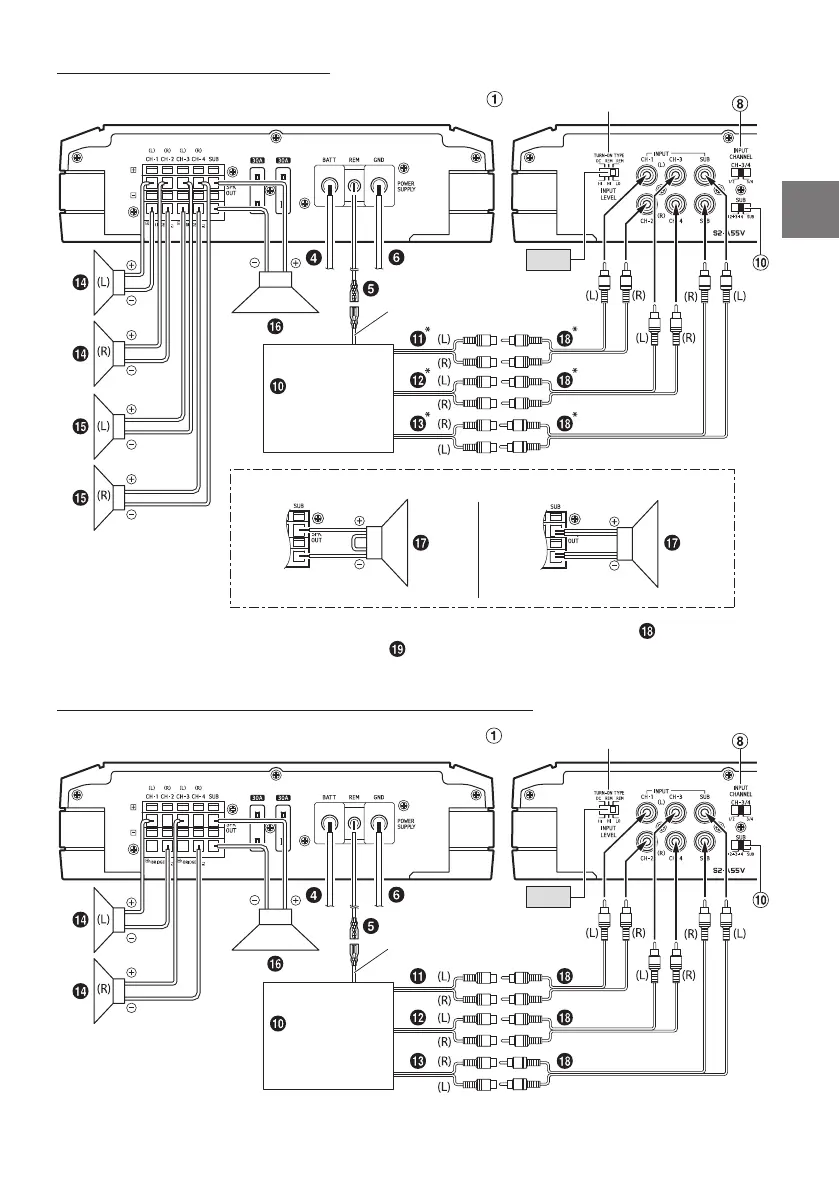
Basic Connection Diagram for S2-A55V
Front Output
Rear Output
Subwoofer Output
Front Speakers
Rear Speaker
Subwoofer
Dual Voice Coil Subwoofer
RCA Extension Cable (sold separately)
Speaker-RCA Conversion Cable (sold separately)
Y-Adapter (sold separately)
For S2-A55V, change the Input Channel Selector Switch ( )/( ) setting according to the number of
channels of the speaker input.
5-Channel Input: 4-Channel Input: 2-Channel Input:
Input Channel
Selector Switch
(CH-3/4)
[3/4]
[1/2]
Input Channel
Selector Switch
(SUB)
[SUB]
[1+2+3+4]
4 Speaker + Subwoofer System
Dual Voice Coil Subwoofer System
Series connection Parallel connection
[LO]
Head Unit, etc.
Remote Turn-On Lead
Input Level and Turn-on Type Switch
* If the connected head unit does not have a Speaker Output and RCA Extension Cable ( ) cannot be used,
you can use the Speaker-RCA Conversion Cable ( ) (sold separately). For details on how to make a
connection, see “About Connecting to the Speaker Input Level System” (page 16).
2 Speaker + Subwoofer System (Bridged Connections)
[LO]
Head Unit, etc.
Remote Turn-On Lead
Input Level and Turn-on Type Switch


 To Next Page