CONTROL UNITS UTR230868 / UTR400868 1111
SETTINGS
1
When the inscription ‘- -’ appears on the bottom of display, using
or if necessary set the doors in the position of full
closing
2
Press
to conrm the installed position. The inscription ‘- -’ will
appear with a dot
3
When the inscription ‘- -’ appears on the top of display, using
orif necessary
set the doors in the position of full opening
4
Press
to conrm the installed position. The inscription ‘- -’will
appear with a dot
5
After appearance, the inscription F3 press twice
and exit from
setting menu
× 2
Y
To limit the continuous operation of the drive, adjust the operating time. Settings
P5–F3 and P5–F4 (tab.13).
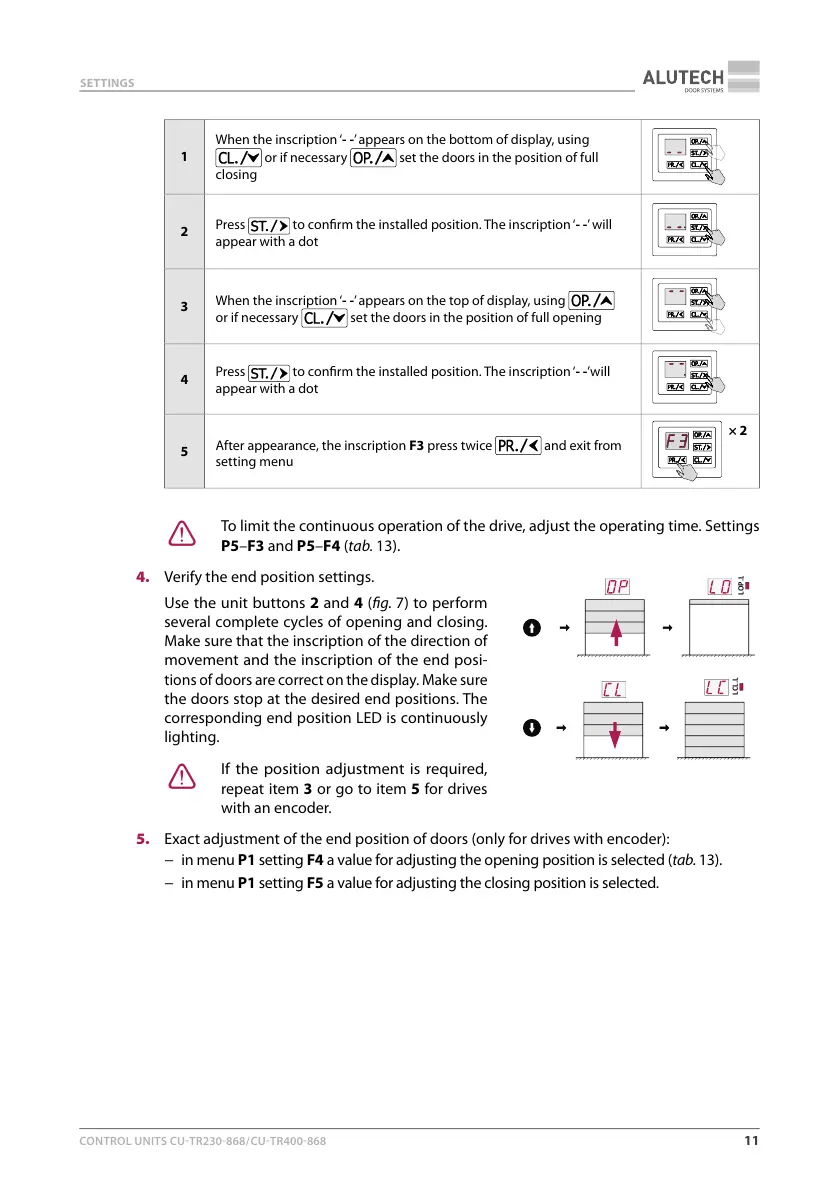
4. Verify the end position settings.
Use the unit buttons2 and 4 (g.7) to perform
several complete cycles of opening and closing.
Make sure that the inscription of the direction of
movement and the inscription of the end posi-
tions of doors are correct on the display. Make sure
the doors stop at the desired end positions. The
corresponding end position LED is continuously
lighting.
Y
If the position adjustment is required,
repeat item3 or go to item5 for drives
with an encoder.
5. Exact adjustment of the end position of doors (only for drives with encoder):
− in menu P1 setting F4 a value for adjusting the opening position is selected (tab.13).
− in menu P1 setting F5 a value for adjusting the closing position is selected.
LOP.



 To Next Page