CONTROL UNITS UTR230868 / UTR400868 3333
MALFUNCTIONS AND RECOMMENDATIONS FOR THEIR ELIMINATION
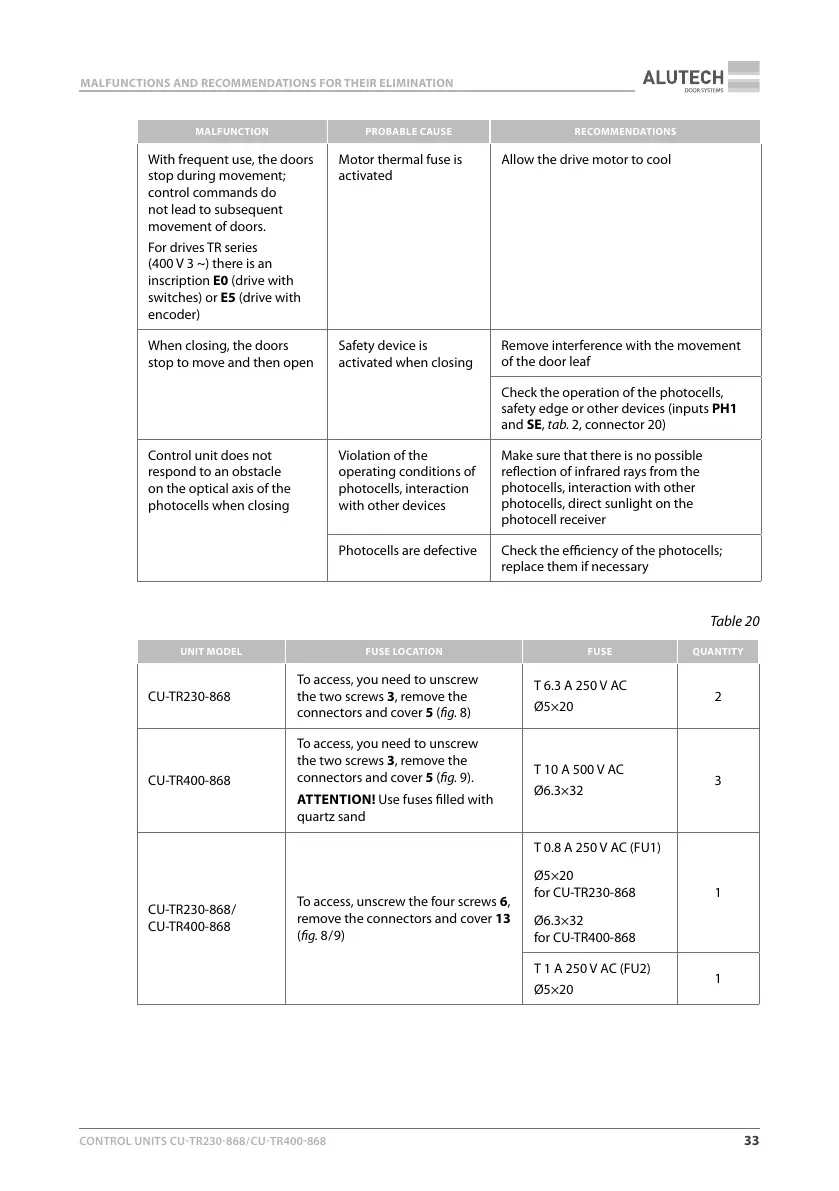
MALFUNCTION PROBABLECAUSE RECOMMENDATIONS
With frequent use, the doors
stop during movement;
control commands do
not lead to subsequent
movement of doors.
For drives TR series
(400V 3 ~) there is an
inscription E0 (drive with
switches) or E5 (drive with
encoder)
Motor thermal fuse is
activated
Allow the drive motor to cool
When closing, the doors
stop to move and then open
Safety device is
activated when closing
Remove interference with the movement
of the door leaf
Check the operation of the photocells,
safety edge or other devices (inputs PH1
and SE, tab.2, connector 20)
Control unit does not
respond to an obstacle
on the optical axis of the
photocells when closing
Violation of the
operating conditions of
photocells, interaction
with other devices
Make sure that there is no possible
reection of infrared rays from the
photocells, interaction with other
photocells, direct sunlight on the
photocell receiver
Photocells are defective Check the eciency of the photocells;
replace them if necessary
Table20
UNIT MODEL FUSE LOCATION FUSE QUANTITY
CU-TR230-868
To access, you need to unscrew
the two screws 3, remove the
connectors and cover 5 (g.8)
6.3A 250VAC
Ø5×20
2
CU-TR400-868
To access, you need to unscrew
the two screws 3, remove the
connectors and cover 5 (g.9).
ATTENTION! Use fuses lled with
quartz sand
10A 500VAC
Ø6.3×32
3
CU-TR230-868 /
CU-TR400-868
To access, unscrew the four screws6,
remove the connectors and cover13
(g.8 / 9)
0.8A 250VAC (FU1)
Ø5×20
forCU-TR230-868
Ø6.3×32
forCU-TR400-868
1
1A 250VAC (FU2)
Ø5×20
1



 To Next Page