Charge the speaker
After turn on the speaker, if the battery level is low, the
speaker’s Red LED flashes. If not charged, the speaker shuts off.
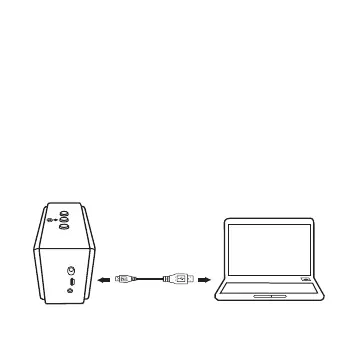
To charge the speaker, connect the USB charging cable to the
charging port and an available USB port on your computer.
If the speaker is ON, the Red LED will “ON” when charging.
If the speaker is OFF, the Red LED will “ON” while charging and
turn off when fully charged.
Remark: Please aware that the Blue LED is in ON/flashes status
when the speaker is “ON”. So, there will have Blue and Red
overlap lighting effect when you charging a “ON” speaker.
5
OFF
ON
AUX



 To Next Page