EasyManua.ls Logo

Amazon echo show 10 - User Manual

Amazon echo show 10
17 pages
Print Icon
To Next Page IconTo Next Page
Loading...
Question and Answer IconNeed help?

Do you have a question about the Amazon echo show 10 and is the answer not in the manual?

Summary

Getting to Know Your Echo Show 10

Device Components and Controls

Identifies physical controls like mic/camera, volume, shutter, and microphones.

Echo Show 10 Privacy Features

Wake Word and Indicator Lights

Explains how Alexa listens for wake words and uses indicator lights.

Microphone and Camera Privacy Controls

Details electronic disconnection of mics and camera shutter for privacy.

Voice History Management

Describes how to view and delete voice recordings in the Alexa app.

Echo Show 10 Placement Guidelines

Echo Show 10 Setup and Calibration

Screen Rotation Calibration

Instructions on how to turn motion on/off and calibrate screen rotation.

Interacting with Your Echo Show 10

Settings and Shortcuts Access

Guide to accessing device settings and shortcuts via screen gestures.

Amazon Alexa App Integration

Explains the benefits and purpose of the Alexa app for device management.

Providing User Feedback

Information on how to submit feedback about the Alexa experience.

Alexa Voice Commands for Echo Show 10

Media and Information Commands

Examples of voice commands for TV, music, news, and photos.

Home Management Voice Commands

Voice commands for shopping lists, timers, and recipes.

Smart Home Control Voice Commands

Voice commands to control smart home devices and routines.

Communication Voice Commands

Voice commands for making calls and announcements.

Important Safety Instructions

General Safety Precautions

Covers liquid exposure, heat sources, power adapter use, and preventing tipping.

Product Specifications and Regulatory Compliance

FCC Compliance

Details FCC rules and responsible party for compliance in the US.

Canadian ISED Compliance

Covers compliance with Innovation, Science and Economic Development Canada.

RF Exposure, Recycling, and Terms

Radio Frequency Exposure Information

Information on RF exposure limits and device installation distance.

Device Recycling Guidelines

Instructions on how to properly dispose of or recycle the device.

Additional Safety and Compliance Information

Notes on consulting user manuals and Alexa app for further info.

Amazon Terms & Policies Overview

Reference to terms and policies found in the Alexa app and website.

Echo Show 10 Limited Warranty

Warranty Limitations and Provider Details

Warranty Limitations and Disclaimers

Details on exclusive remedies, disclaimers, and limitations of liability.

Warranty Provider Identification

Identifies Amazon entities providing the warranty in the US and Canada.

Overview

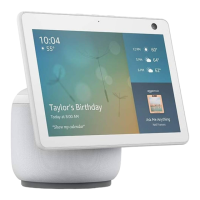
The Echo Show 10 is a smart display device designed to integrate seamlessly into your smart home ecosystem, offering a blend of entertainment, communication, and control features. At its core, it functions as an Alexa-enabled device with a rotating smart screen, allowing it to keep you in view during video calls or while you move around a room.

Function Description

The primary function of the Echo Show 10 is to provide a visual and interactive experience with Alexa. It acts as a central hub for your smart home, allowing you to control compatible devices, manage your daily schedule, and access a wide range of information and entertainment. The device features a built-in smart home hub, which simplifies the setup and control of various smart home devices, often without the need for additional bridges or hubs.

One of its most distinctive features is the rotating smart screen. This screen is designed to move and adjust its angle to keep you centered in the frame during video calls or to ensure the display is always facing you when you interact with Alexa. This motion is calibrated during the initial setup, where the device learns its idle position and adjusts its rotation range based on its placement in the room. This dynamic screen movement enhances the user experience, making interactions more natural and hands-free.

The Echo Show 10 also serves as a robust entertainment device. You can use it to watch TV shows, listen to music from various streaming services, and view your personal photos. Its display provides a visual complement to Alexa's voice responses, showing lyrics, recipes, news headlines, and more.

For communication, the device supports video calls, allowing you to connect with friends and family. The camera and microphones are integrated to facilitate clear audio and video interactions. It also offers messaging capabilities, enabling you to send and receive messages through the Alexa app.

Beyond entertainment and communication, the Echo Show 10 helps you stay organized and manage your home. You can use Alexa to add items to your shopping list, set timers, get unit conversions, and access recipes. It also provides voice control over your smart home devices, allowing you to view live feeds from security cameras, adjust lighting, and manage other connected appliances with simple voice commands.

Usage Features

Interacting with the Echo Show 10 is primarily done through voice commands to Alexa, but it also offers touch screen functionality for navigation and control.

  • Voice Control: The device is always listening for its wake word (e.g., "Alexa"). Once detected, a blue light indicator signals that it is recording your request. You can ask Alexa to perform a multitude of tasks, such as "Alexa, show me new TV shows," "Alexa, play today's hits on Amazon Music," "Alexa, add bananas to my shopping list," "Alexa, set an egg timer for 5 minutes," "Alexa, show me the front door," "Alexa, call Mom," or "Alexa, announce 'dinner is ready'."
  • Rotating Screen: The smart screen automatically rotates to keep you in view or to face you during interactions. This motion can be controlled through the device's settings or by voice commands like "Alexa, turn off motion." During setup, the device calibrates its rotation, and you can adjust its idle position to face the direction you'll most often see it from.
  • Touch Screen Navigation:
    • Changing Settings: To access device settings, you can swipe down from the top of the screen or say, "Alexa, show Settings."
    • Accessing Shortcuts: Swiping left from the right side of the screen reveals various shortcuts for quick access to frequently used features.
  • Privacy Controls: The Echo Show 10 is designed with privacy in mind. It includes physical controls for the microphone and camera.
    • Mic/Camera (on/off) button: A single press of this button electronically disconnects the microphones and camera, indicated by a red light.
    • Camera Shutter: A built-in physical shutter can be slid to cover the camera lens, providing an additional layer of privacy.
  • Alexa App Integration: To get the most out of your Echo Show 10, the Amazon Alexa app is essential. It allows you to:
    • Set up calling and messaging.
    • Manage music services.
    • Create and manage lists.
    • Adjust device settings.
    • Access news and other content.
    • View and delete your voice history, giving you transparency over what Alexa has heard.
    • Explore additional features, skills, and customization options.
  • Placement Guidelines: For optimal performance of the rotating screen, the device should be placed at least 6 inches (15.5 cm) from a wall. If placed closer, the device can learn to adjust its rotation range to avoid obstructions. It should be placed on a hard, clean surface to prevent unexpected tipping.
  • Motion Footprint Template: An included template helps identify the "keep-out space" around the device, reminding users to keep this area clear of objects that might be knocked over by the rotating screen.

Maintenance Features

While the Echo Show 10 is generally a low-maintenance device, there are a few considerations for its care and upkeep:

  • Cleaning: The device should be placed on a thoroughly clean and dry surface. For general cleaning, it's recommended to use a soft, dry cloth. Avoid exposing the device or its adapter to liquids. If it gets wet, unplug all cables and allow it to dry completely without using external heat sources like microwaves or hair dryers.
  • Software Updates: Alexa is continuously getting smarter and adding new skills through software updates. These updates are typically managed automatically by the device when connected to the internet, ensuring you always have the latest features and security enhancements.
  • Troubleshooting and Support: For help and troubleshooting, users can access the "Help & Feedback" section within the Alexa app or visit www.amazon.com/devicesupport. This resource provides comprehensive information, including customer service contact details and other applicable terms and device information.
  • Privacy Management: Regularly reviewing your voice history in the Alexa app and utilizing the physical microphone/camera controls and camera shutter are key maintenance features for personal privacy.
  • Physical Handling: When moving or lifting the device, it's important to hold it with both hands to prevent unexpected tipping. To avoid pinching, keep fingers away from the hinge where the display connects to the base. Also, avoid tugging or pulling at the display of the device.
  • Power Adapter: Always use the power adapter supplied with the device. Ensure the adapter is plugged into an easily accessible socket-outlet near the equipment.
  • Environmental Considerations: The device is designed for operation in temperatures between 0-35°C. It should not be exposed to extreme temperatures.
  • Recycling: When the device reaches the end of its life, it should be disposed of or recycled properly in accordance with local laws and regulations. Information on recycling can be found at www.amazon.com/devicesupport.

The Echo Show 10 is designed to be a robust and user-friendly smart display, offering a dynamic and interactive experience while prioritizing user privacy and ease of use.

Amazon echo show 10 Specifications

General IconGeneral
Voice AssistantAlexa
ProcessorMediaTek 8183
Display10.1-inch HD screen
Audio2 x 1" tweeters and a 3" woofer
Camera13MP camera with auto-framing
Connectivity802.11a/b/g/n/ac dual-band Wi-Fi, Bluetooth
Dimensions251 x 230 x 172 mm
Smart Home HubBuilt-in Zigbee smart home hub
MicrophonesArray of 8 microphones
PrivacyCamera shutter and microphone off button
PowerPower adapter included

Related product manuals