10Lockit Users manual |
7. Operation Modes
Within the ACN there is always one Lockit device acting as timecode transmit-
ter, broadcasting timecode and frame rate to the Receivers. You can choose
between C-Jam, TX and Single Jam Mode.
7.1 C-Jam Mode (Continuous Jam)
In C-Jam Mode we utilize our ACN network to completely prevent any drift. In
this mode one Lockit device acts as a C-Jam Master. It sends a pulse through
the ACN every six seconds to constantly align with all other Lockit boxes.
To start the unit as C-Jam Master press and hold
Green, then tap Power.
Press and hold
Green to conrm the timecode and start the C-Jam.
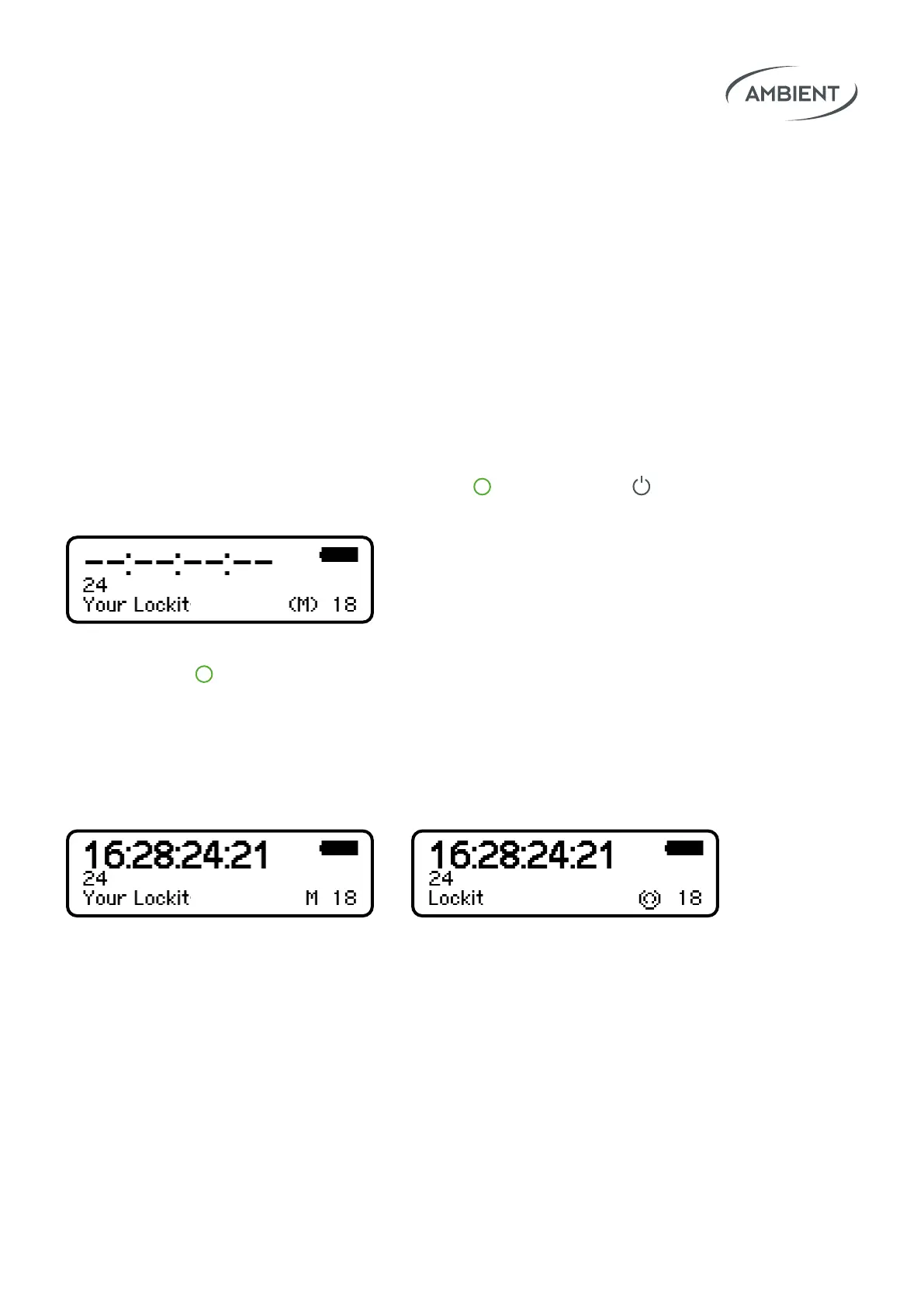
The icon on the display will switch to M.
All other Lockits (that are on the same ACN channel) will now automatically
follow the C-Jam Master and display an ACN icon at the lower right of the
display.
Since even in C-Jam Mode every unit still uses its own VCO (voltage-controlled
oscillator) to generate timecode (and sync), they don’t necessarily have to be
in range of the C-Jam master constantly to be accurate.
On the display you will see an (M)
appear, indicating that the device
is ready to go.



 To Next Page