15Lockit Users manual |
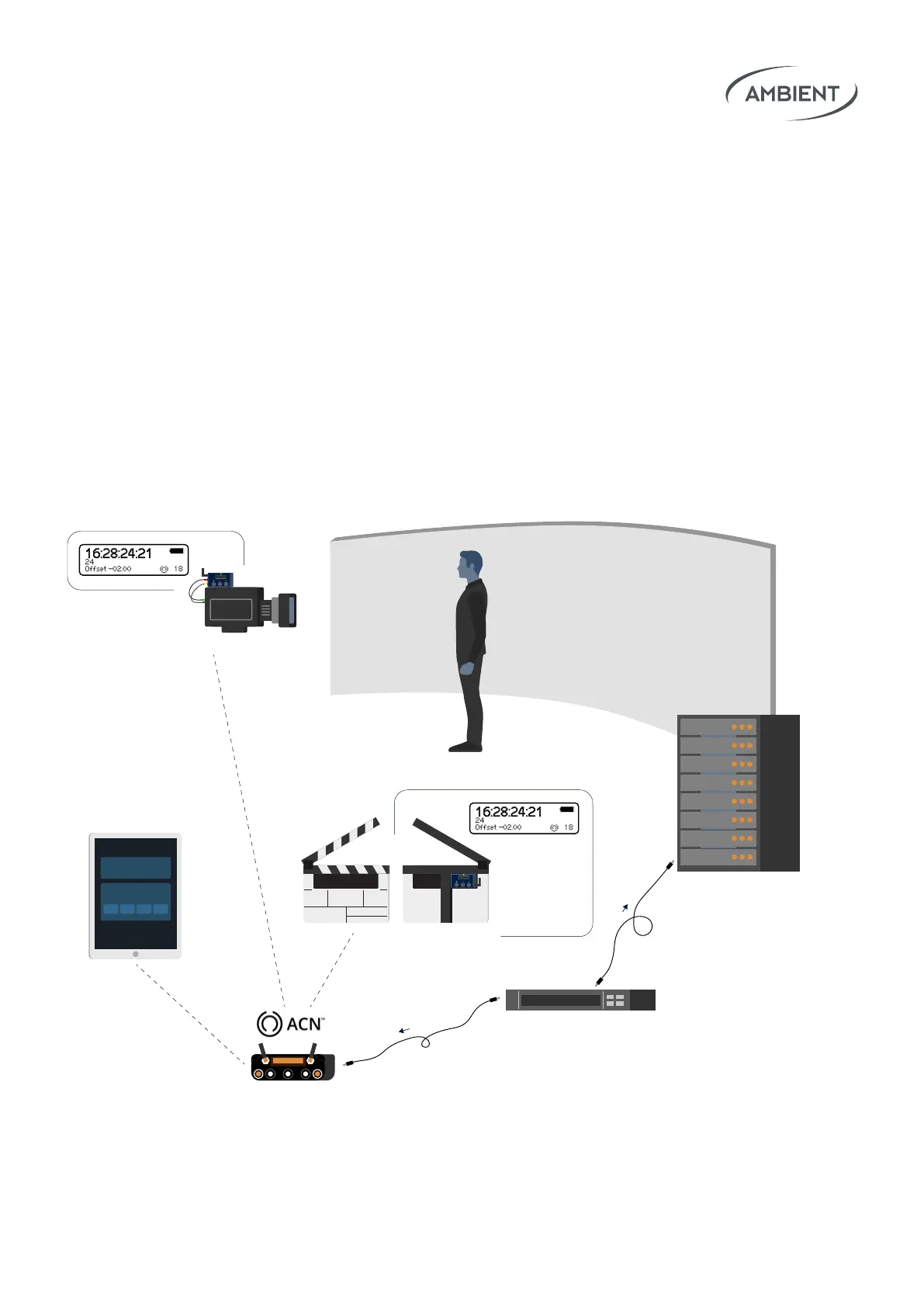
This setting will oset timecode and sync on all outputs and the LockitSlate’s
timecode display. The OLED will still show the current running timecode with
an indication of the oset value.
This allows for compensation of frame processing delay on video walls,
cameras and further 3rd party equipment.
8. Special: Wireless TC & Sync Oset
Use Case 1: How to compensate processing delays in virtual production
ACN Settings
Lockit+ TX Master
ACN Radar
-02.00 -02.00
16:28:24:21
Wireless TC & Sync Offset
How to compensate processing
delay in virtual production
Studio Master Clock
(LTC)
LTC
SYNC
16:28:24:21
16:28:24:21
16:28:24:19
16:28:24:19
16:28:24:21
LED wall
LockitSlate
offset
Lockit
offset
Set offset for all
Lockit devices in ACN via
Lockit+ web interface
Virtual production
server with 2 frames
processing delay
Lockit+



 To Next Page