USB/SD FUNCTIONS KEY
• ON/Off - turns on and off USB/SD section on the device.
• Function – music source selection. Change music source between USB and SD.
• P mode – change playing mode: repeat one → repeat folder → random→
normal.
• ■ - Play/pause/stop button.
• - backward playing tack by pressing
• - forward playing track by pressing
• Volume - when the unit is in playing mode, turn the clockwise or
counterclockwise if you want to increase or decrease volume level
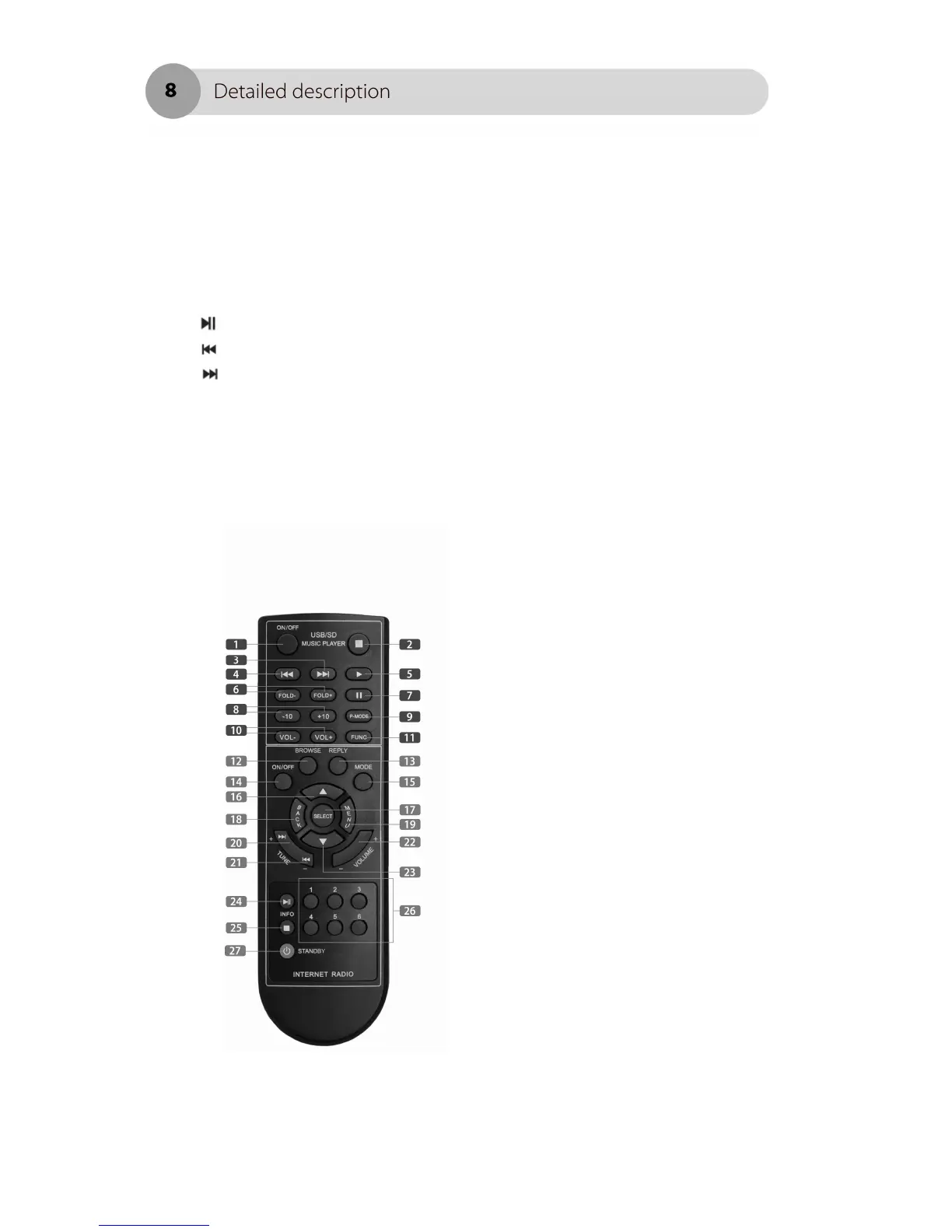
Remote control
1. ON/Off - turns on and off USB/SD
section on the device.
2. Stop playing USB/SD track
3. Backward USB/SD playing
4. Forward USB/SD playing tack
5. Play button for USB/SD player.
6. Change the playing folder.
7. Pause played track form USB/SD
player
8. Skips 10 track to backward or forward
9. Change playing mode on the USB/SD
player : repeat one → repeat folder →
random→ normal.
10. Volume key for USB/SD player
11. Function – music source selection.
Change music source between USB and
SD.
12. BROWSE – browse the track info in
the playlist (active in media mode only)
13. Replay – this key for future upgrade
function, communicate with internet
server.
14. Radio tuner on/off switch
15. Mode – change music source
between internet radio → FM radio →
Media player



 To Next Page