How To Operate Your American-Standard
Control Center Thermostat
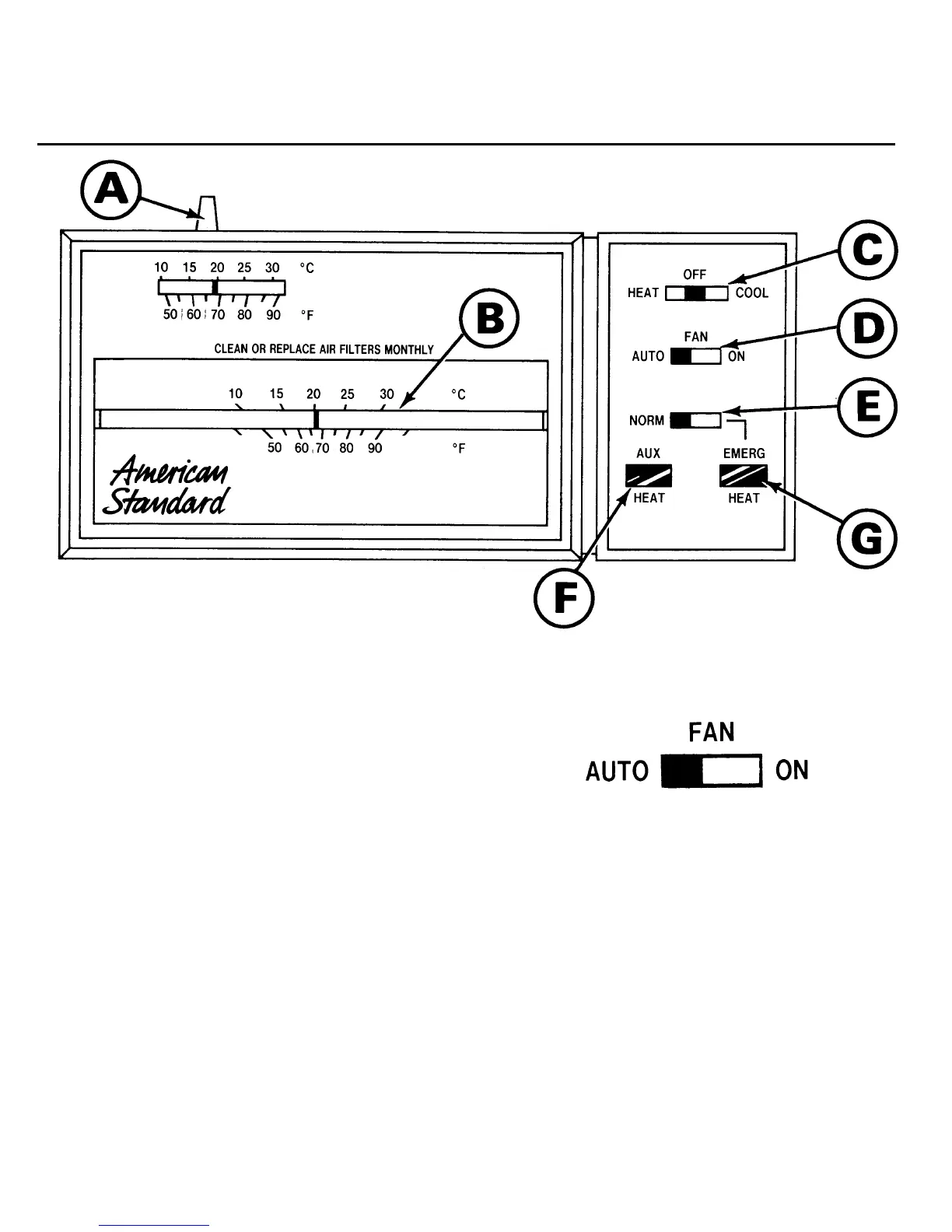
Setting the Temperature
Set the Temperature Selector at the
indoor temperature you wish to
maintain.
Set the System Selector to HEAT or
COOL as weather conditions
require.
(A) Temperature Selector
(B) Temperature Indicator
(C) System Selector
(D) Fan Switch
(E) Normal/Emergency Heat
Switch
(F) Auxiliary Heat Light
(G) Emergency Heat Light
Setting the Fan Switch
The Fan Switch may be set at
either “AUTO” or “ON.”
When the Fan Switch is set to
AUTO, the indoor air handler fan
will cycle “on” and “off” with the
American-Standard heat pump
outdoor section. This “ON” and
“OFF” cycle is controlled by the
thermostat as it operates the
system to maintain the selected
indoor temperature.




 To Next Page