18-CE03D1-1F-EN
101
Table 7. Fault Code Recovery
Fault Code Recovery
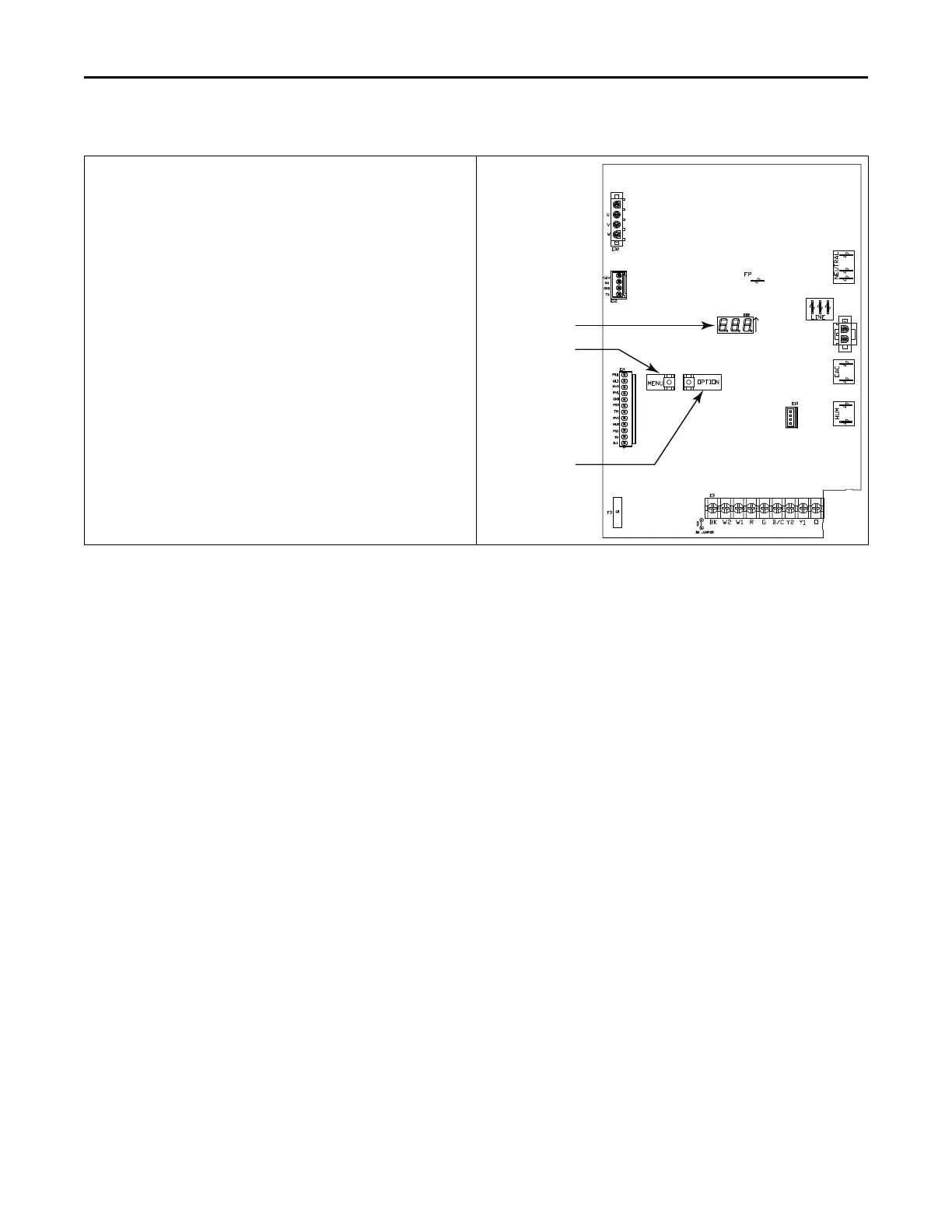
1. To view the last 6 faults, press the “Menu” key until the “Last 6
Faults” (L6F) menu appears.
2. Enter the menu by pressing the “Option” key.
3. The last 6 faults can be viewed.
Clearing the Last 6 Faults
1. To clear the last 6 faults, press the “Menu” key until the “Last 6
Faults” (L6F) menu appears.
2. Enter the menu by pressing the “Option” key.
3. Hold the “Option” key for at least 5 seconds.
4. Release and a set of 3 dashes with be seen 3 times. This confirms
the faults have been cleared.
Resetting Factory Defaults
1. Display must be in Idle Mode.
2. Push the “Menu” and “Option” buttons at the same time for 15
seconds then release.
3. The 7 segment will flash “FD” 3 times. This confirms the unit has
been reset to the factory defaults.
7 Segment LED
OPTION Button
MENU Button
IInntteeggrraatteedd FFuurrnnaaccee CCoonnttrrooll DDiissppllaayy CCooddeess



 To Next Page