Video Door Phone User Guide
21
SIP Services
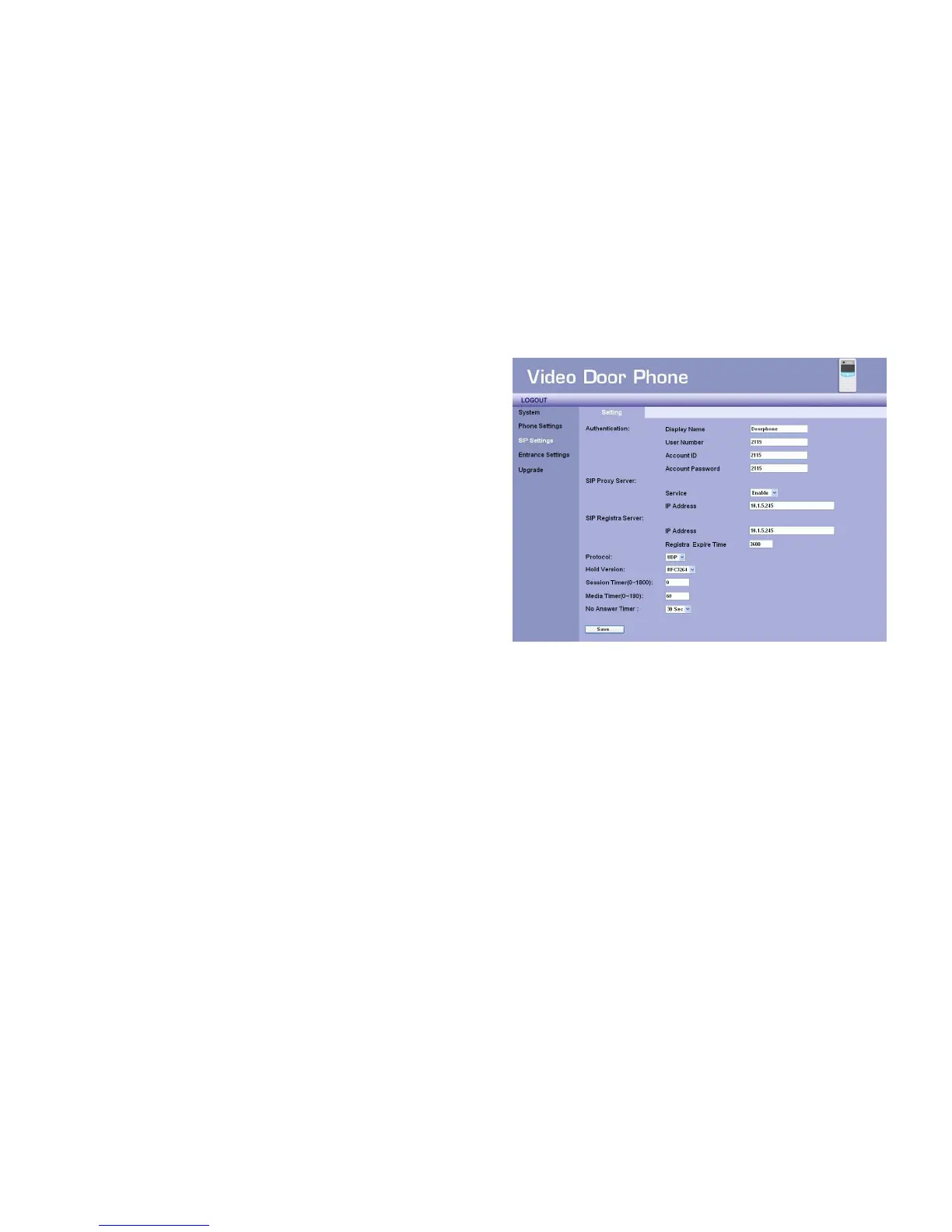
You may setup advanced SIP service parameters in this page:
Authentication
z Display Name – This name will show on the IP phone of called
parties. You may fill in the preferred name here. ”Doorphone” is
preferred.
z User Number – You may fill in the phone number here, normally
it is provided by service provider. To work with IP PBX, you may
fill in extension number here.
z Account ID –You may fill in your account name of SIP service
here.
z Account Password – You may fill in the password of your SIP
service account here.
SIP Proxy Server
z Service – You may enable or disable to register the SIP Proxy Server. (only Enable available )
z IP Address – You may fill in the IP address of SIP Proxy Server in this field.
SIP Registrar Server
z IP Address – You may fill in the IP address of SIP Registrar Server here.
z Registrar Expire Time – Here you can input expire time of SIP Registrar Server. The correct expire time shall provide by your
service provider. Default time is 3600 seconds.
Protocol – You may select network protocol of the SIP service here. There are 2 options: UDP and TCP. Default setting is UDP.
Figure 20 : SIP Services Settings



 To Next Page