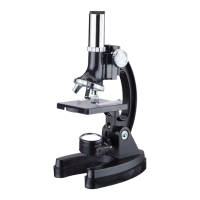
This document describes the IQCrew M40 Premium Microscope & Camera Kit, part of the Early Explorer Series by AmScope, designed to inspire children aged 8 and up to learn about science. The kit emphasizes STEM (Science, Technology, Engineering, Math) education by providing tools for exploration, learning, and growth.
Function Description:
The IQCrew M40 is a compound microscope designed for viewing specimens under high magnification, where light is transmitted through the specimen. It comes with a digital eyepiece camera, allowing users to connect the microscope to a computer (PC or Mac) to view and capture images and videos of their observations. The microscope helps children understand science and nature by enabling them to explore the microscopic world, making it a valuable tool for biology, chemistry, and geology studies.
Usage Features:
The microscope features an eyepiece, which is the lens you look through, adding magnification to the image. It has three objective lenses attached to a rotating turret, offering different magnifications (low, medium, and high). The low magnification lens is recommended for initial viewing, while medium and high lenses provide more detail. A focus knob on each side of the microscope allows for precise adjustment of the objective lenses' height to bring the specimen into focus.
The stage is a flat surface where slides are placed for viewing, secured by two stage clips. Below the stage is a filter wheel with various apertures, some containing color filters (grey, yellow, blue, green) and others being empty with different sizes. These filters can change the color and brightness of the light, which is particularly useful for clear or dim specimens. The microscope uses a 2-sided light source: a mirror to reflect ambient light (from a lamp or window) and an LED light for illumination. Rotating the light source determines whether the LED or mirror is active.
The total magnification of the microscope is a combination of the eyepiece and objective lens, ranging from 120x to 1200x. The digital eyepiece camera captures 30FPS @640x480 video and connects via microUSB 2.0. Dedicated software for PC and Mac is available for download to facilitate camera use.
The manual provides detailed instructions on how to use the microscope, including installing two AA batteries (not included) in the battery compartment to power the LED light. It guides users through adjusting the focus, positioning slides, and rotating the objective turret to change magnification. The importance of adjusting the light source for the best image is also highlighted.
The kit encourages users to prepare their own slides, offering instructions for both wet mount and dry mount slides. Wet mounts are ideal for plant material, mold spores, and fibers, while dry mounts are suitable for hair, insects, and cloth. The manual also includes an experiment for staining specimens using eosin dye to enhance visibility of details like cell nuclei.
A step-by-step guide is provided for the "Onion Skin Cell Experiment," which teaches users how to prepare and view onion cells, identifying parts like the cell wall, nucleus, cytoplasm, and vacuole. Another experiment focuses on "Crystal Growth," using Epsom salt and water to observe crystal formation.
The "Brine Shrimp Hatchery" section details how to grow and observe brine shrimp, tiny crustaceans ideal for microscopic study. It covers preparing saltwater, hatching eggs in a specialized station, and observing the shrimp's life cycle and development, including molting and the appearance of eyes and appendages. Experiments are suggested to test the shrimp's preferences for different water conditions and their reactions to various pollutants.
The manual also includes troubleshooting tips for common issues such as dim light, blurry images, or non-uniform lighting, providing solutions like checking batteries, aligning objective lenses, or adjusting the filter wheel.
Maintenance Features:
The manual emphasizes several best practices for maintaining the microscope. It advises using the microscope in a dry environment to prevent damage to the light source and optical system from moisture. Users should always turn off the illuminator when not in use.
For storage, it is recommended to remove the batteries to prevent corrosion and to remove all slides from the stage. Only lens cleaning tissue should be used to clean the lenses. The microscope should be carried with two hands—one around its arm and one under the base—and stored in a cool, dry, dust-free place, preferably with a dust cover, to prevent dust and humidity from entering the microscope.
Finally, the manual encourages users to think like scientists by making records of their experiments, noting observations such as specimen types, colors, shapes, patterns, magnification levels, preparation methods, and comparisons between different specimens. Sketch templates are provided for recording observations at various magnifications.



 To Next Page
 General