www.amulethotkey.com | Page 9
Before you start
1
1. Before you start
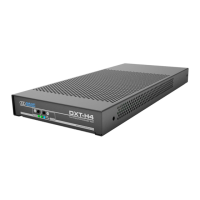
This manual is for the Amulet Hotkey DXT-H4 Quad Display KVM
Extender Host.
The Amulet Hotkey DXT-H4 is based on KVM-over-IP technology
using the industry standard PCoIP® protocol. It is an ideal host
soluon for remote desktop applicaons that require pixel
perfect video across mulple monitors.
1.1 DXT-H4 models
The DXT-H4 is a Quad Display KVM Extender Host with its own
power supply. The following variaons are also available.
1.1.1 Network soluons
RJ45: The standard DXT-H4 unit has a single RJ45 network
port;
SFP: The DXT-H4 is also available with a single network port
that accepts either a ber or copper SFP module (see 1.2 and
Figure 5).
1.1.2 Rack soluon
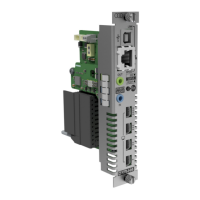
A rack-mounted variant of this product, the DXR-H4 Quad
Display KVM Extender Host card is also available.
1.1.3 Terminology
The general terms ‘PCoIP host’ or ‘host’ are used throughout
this manual to describe all product variants.
1.2 SFP modules
Amulet Hotkey can provide a range of suitable SFP modules,
including 1 Gbps and 100 Mbps ber SFP modules for single or
mul-mode ber and copper SFP modules with RJ45 connectors.
See the Amulet Hotkey SFP Modules Datasheet for details of
currently available modules.
Be aware that SFP modules have diering specicaons, and
the distances over which they can drive a signal can vary. This
especially applies to ber SFP modules.
Important!
The SFP variant only supports certain models of
SFP module. If in doubt, contact Technical Support for advice.
1.3 IP and MAC addresses
Before you set up a host, make a note of these details:
• MAC and IP address of the external PCoIP host;
• MAC and IP address of the zero client.
You will nd the MAC address informaon wrien on the
underside of the zero client and on the conguraon record/
serial number label of the host. You can also use the AWI (see
4.5.2) to nd the MAC addresses.
If your network uses DHCP, the host and zero client obtain
their IP addresses from the DHCP server. If no DHCP server is
available, the host and zero client me out aer approximately
three minutes and adopt the following default IP addresses:
• Zero client: 192.168.1.50;
• PCoIP Host: 192.168.1.100.
1.4 Cabling
The DXT-H4 comes with a Power Supply Unit (PSU) and
mains cable. You will also need the following cables, available
separately in short (1 m) and long (2.8 m to 3 m) sets:
• video cable (for example Mini DisplayPort to DisplayPort);
• two stereo audio cables;
• USB cable (type A to type B).
Note: The Amulet Hotkey audio cable loom comprises two
cables each with a blue connector at one end and a green
connector at the other. The instrucons in this manual are
specic for this parcular cable loom.
Cauon:!
The CE/EMC compliance is tested with video, USB and
audio cables that are no longer than 3 m long.


 To Next Page