Programming
34
Instruction Manual - Massio ControlPads and Keypads
Programming
Programming the Massio Keypads
This chapter provides information on programming Massio Keypads, including NetLinx and Telnet commands.
Button Layouts
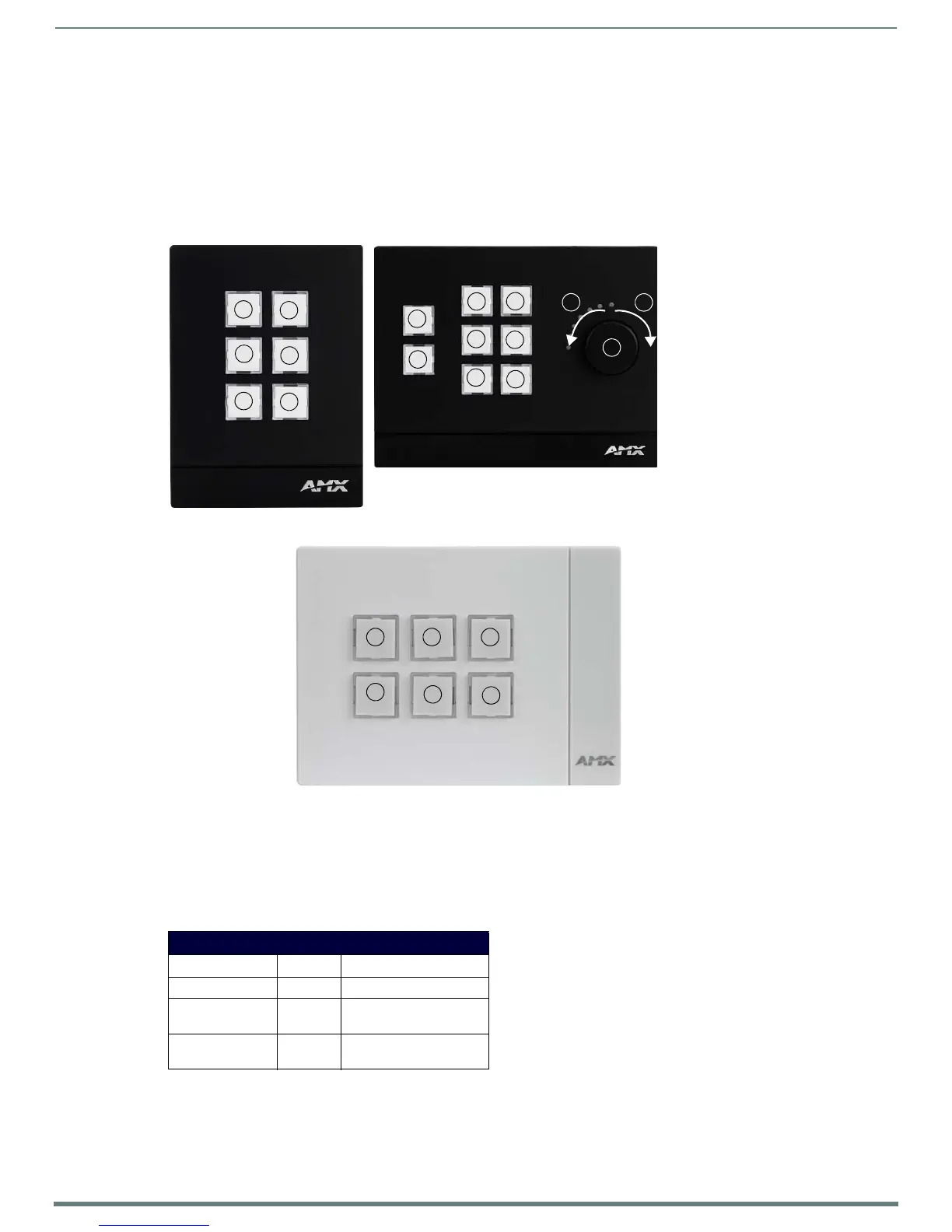
The following illustrations indicate the button numbers for each of the Massio Keypads (MKP-106 and MKP-108):
Channels
Channels on Massio Keypads correspond to the button numbers on each keypad as indicated in FIG. 39.
Port Numbers and Levels
Massio Keypads support the following port numbers and levels:
Programming the Knob and LED Bargraph (MKP-108)
The knob on the MKP-108 has multiple programming functions and can be treated from a NetLinx programming perspective as 1
pushbutton plus Channel up and down. The button layout for the knob is indicated in FIG. 39.
FIG. 39
Button Layout - Massio Keypads
Port Numbers and Levels
Keypad Part Port Level
Keypad Buttons 1 None
Knob (MKP-108
only)
12, range is 0-255
LED Bargraph
(MKP-108 only)
11, levels indicate 0-255
1
2
1
2
3
4
56
34
5
6
7
8
11
13
12
Rotate clockwise = Button #12
Rotate counter-clockwise = Button #13
MKP-108
Push in = Button #11
MKP-106 (Portrait)
6
4
2
5
3
1
MKP-106 (Landscape)


 To Next Page