WebConsole - Modules Options
64
NX-Series Controllers - WebConsole & Programming Guide
Modules - User-Def ined Devices
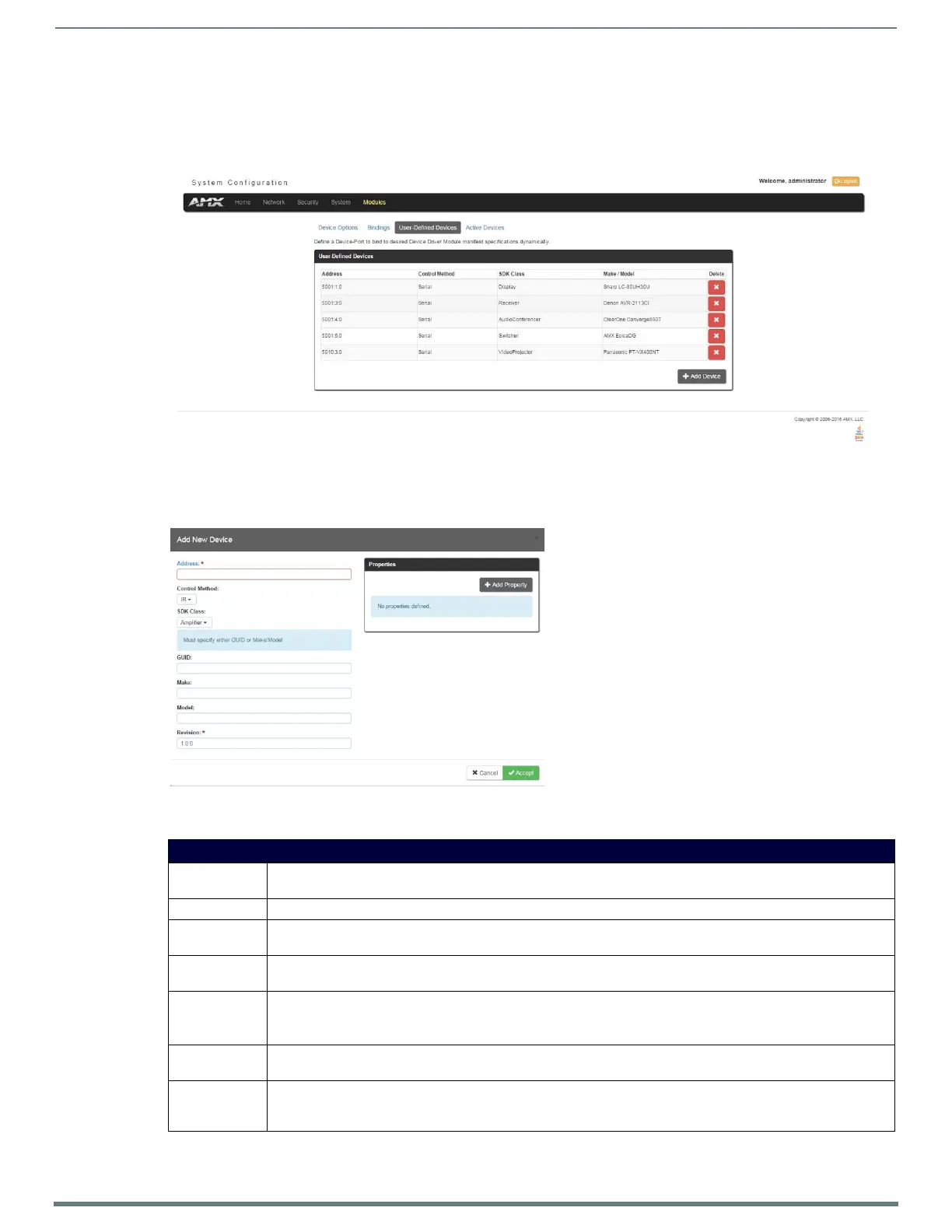
Click the User-Def ined Devices link (in the Manage Devices tab) to access the User-Def ined Devices page (FIG. 53). This page
provides a listing with all of the dynamic devices that have been discovered in the system, and allows you to add and delete
User-Defined Devices.
Adding a User-Defined Device
1. Click the Add Device button (in the User-Defined Devices page) to access the Add User Defined Device page (FIG. 54):
2. Fill in the device information fields, as described in the following tables:
FIG. 53
Modules - User-Defined Devices
FIG. 54 User-Defined Devices - Add New Device
User-Def ined Device Information Fields
Address: Enter the address of the physical device in the Address field. This information can be either the NetLinx Master port
value (D:P:S) or an IP Address (#.#.#.#).
Control Method: Use the drop-down list to select the control method associated with the physical target device (IR, IP, Serial, Other).
SDK Class: Use the drop-down list to select the closest Device SDK class type match for the physical target device. The SDK Class
Types table on page 65 provides a listing of the available choices.
GUID: Enter the manufacturer-specified device’s GUID (Global Unique Identification) information. You must specify either the
GUID or Make/Model.
Make: Enter the name of the manufacturer for the device being used (ex: Sony, ONKYO, etc.)
• Up to 55 alpha-numeric characters
• Spaces in the name will be converted to underscores.
Model: Enter the model number of the device being used (ex: Mega-Tuner 1000). You can enter up to 255 alpha-numeric
characters.
Revision Enter the firmware version used by the target device. Text is required within this field. The version must be in the
format: major.minor.micro (where major, minor, and micro are numbers). An example is: 1.0.0 (revision 1.0.0 of the
device f irmware).


 To Next Page
 Loading...