28
Important!
In the case where the modules are retracted and inspection on cables is difficult, use the Second special boot-up
mode to move actuators manually. Refer to section 3, E-bx special boot-up modes and position reset. The section
below describes methods on “How to” and provides “additional information”.
4.1.5.1 How to and additional information
4.1.5.1.1 Checking battery voltage
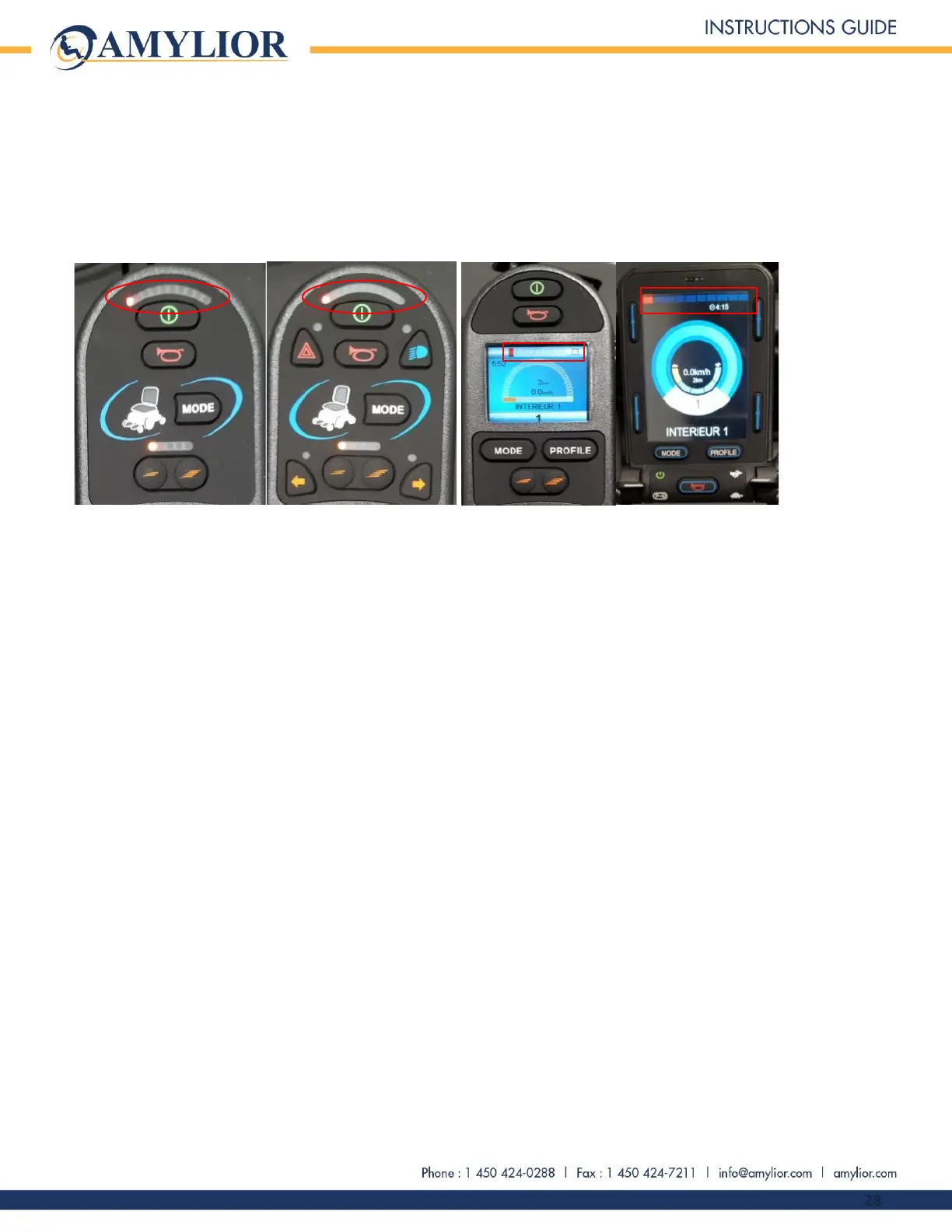
Examples of batteries with a low voltage
There are two methods to check battery voltage:
1. Visually, on the joystick’s battery voltage level display
Refer to example above.
If only one light is on or flashing, the battery voltage is less than 23.5 Volts. When battery voltage falls
below that, the e-bx and the R-Net power module can generate error codes. A fully charged battery will
have all 10 lights on. The voltage should be between 25.3 and 27.5 Volts.
2. Using a multimeter in voltage mode, connect probes directly to the joystick’s charger port positive and
negative terminals.
Refer to the images below showing probe connections from multimeter to joystick.
Turn on multimeter and set it to “V” for voltage mode. Select DC voltage reading mode. It is not possible
to get a proper voltage reading in AC mode. Probes must be well connected to desired terminals to obtain
a reliable reading.
CAUTION! Extreme care must be taken while connections are made between multimeter probes and
desired terminals when reading current measurements because there is a risk of damaging multimeter,
probes and chair; of burning oneself; of getting pieces of metal in the eye when getting a reading.


 To Next Page