5
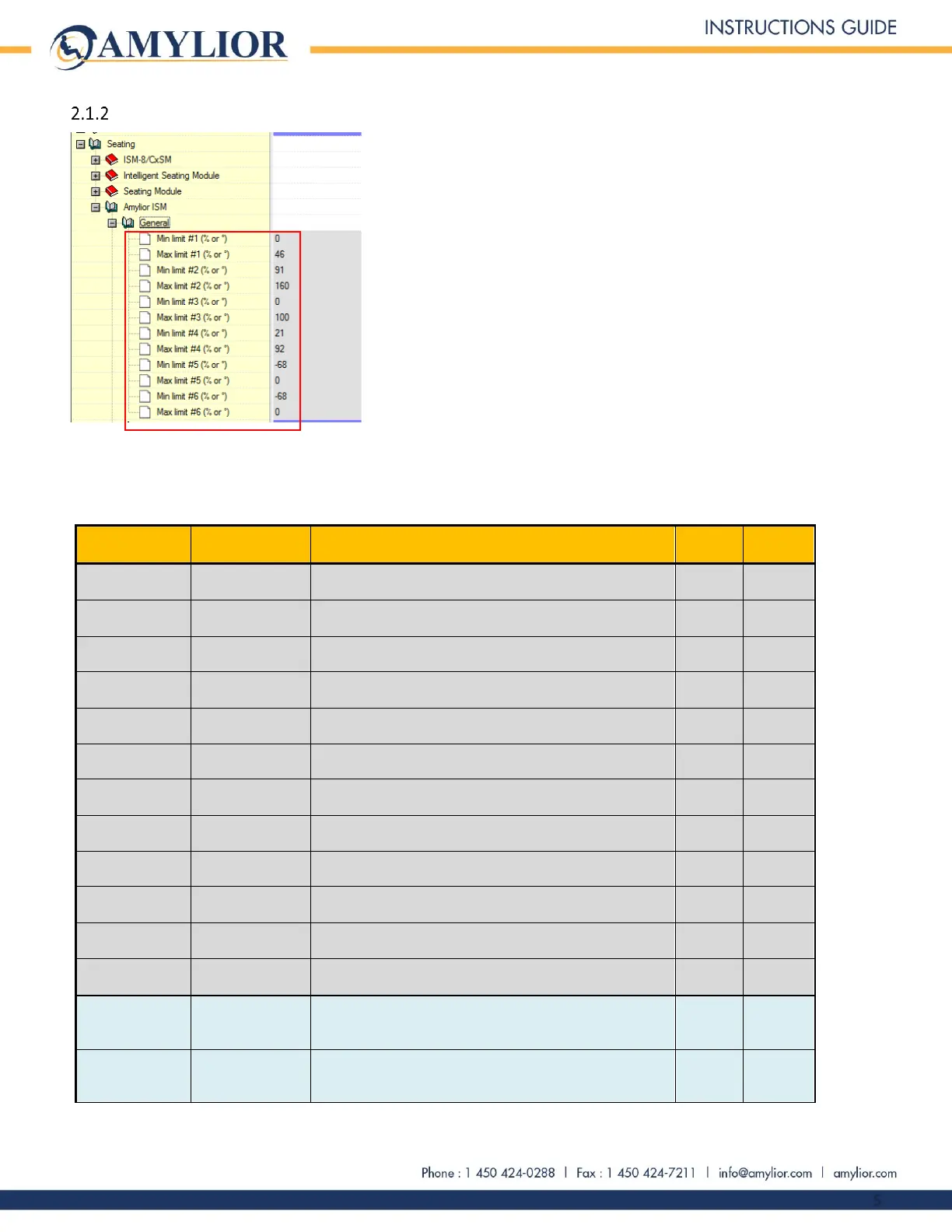
Settings under the “General” submenu
The settings included the “General” submenu are all the adjustments available for setting minimum and maximum
limits on each actuator. The following table shows all the possible settings.
2.1.2.1 Settings under the “General” submenu
Actuator #1 (Tilt)
Note 1
Minimum setting for tilt position (Angle between seat plate and chair
base). Note 2
Actuator #1 (Tilt)
Note 1
Maximum setting for tilt position (Full tilt) max angle between seat
plate and base.
Minimum setting for backrest recline position (Angle between seat
plate and chair base).
Maximum setting for backrest recline position (Fully reclined)
maximum angle between seat plate and base. Note 9
Actuator #3 (Elevate)
Note 4
Minimum setting for seat elevate position (Percentage of the range
of elevation). Note 2
Actuator #3 (Elevate)
Note 4
Maximum setting for seat elevate position (Fully elevated)
percentage of range. Note 3
Actuator #4 (Center
mount)
Minimum setting of center mount legrest position (Legrest fully
elevated) minimum angle between legrest and seat plate line. Note 5
Actuator #4 (Center
mount)
Maximum setting of center mount legrest position (Legrest fully
lowered).
Actuator #5 (Left
legrest)
Minimum setting of left legrest position (Legrest fully elevated)
minimum angle between legrest and seat plate line.
Actuator #5 (Left
legrest)
Maximum setting of left legrest position (Legrest fully lowered).
Actuator #6 (Right
legrest)
Minimum setting of right legrest position (Legrest fully elevated)
minimum angle between legrest and seat plate line.
Actuator #6 (Right
legrest)
Maximum setting of right legrest position (Legrest fully lowered).
Actuator #5 (Left
stander)
Minimum setting of left stander actuator (Standing module fully
deployed) minimum angle between the seat plate and the base
Notes 6 et 7
Actuator #5 (Left
stander)
Maximum setting of left stander actuator (Standing module
completely closed) Notes 6 et 7


 To Next Page