•
-
09011
1/
M
1,
q
,
......
...
ti
Lookup Review
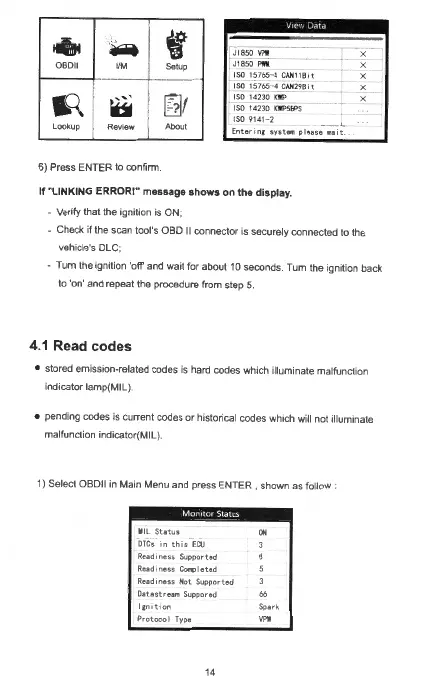
6) Press ENTER to confirm.
f
Setup
~/
About
Jl 850
VPW
r J1a
SO
1"1111
' 1
so
15
765-4
CAH11B
,t
1
1
so
1
57
65
- 4
CAH298
,t
1
1S014
2JO
KWP
l
1S0
14
230
KllPSBPS
(
SO
9141- 2
En
te
r1n
,:
sy
st
""' p l
ease
••
•t
If
"LINKING
ERROR!" message
shows
on
the
display
.
- Verify that the ignition is ON;
- x
X
X
X
X
- Check
if
the scan tool's OBD
II
connector is securely connected to the
vehicle's DLC;
- Tum the ignition
'off
and wait for about 10 seconds. Turn the ignition back
to 'on' and repeat the procedure from step 5.
4.1 Read
codes
• stored emission-related codes is hard codes which illuminate malfunction
indicator tamp(MIL
).
• pending codes is current codes
or
historical codes which will not illuminate
malfunction indicator(MIL).
1)
Select 0B011 in Main Menu and press ENTER , sho
wn
as follow :
M
il
St
a
tus
ON
DT
Cs
1
nth1sECU
3
Readiness
Supp
or
te
d
Read i
ness
Coq)leted
Readiness
Ho
t
Sopported
Oatastrearn
Suppored
66
lgn
1t 1on
Spa
r k
Protoco
l
Ty
pe
VPW
14



 To Next Page