6. Help
This menu enables you to view device information and OBD introduction.
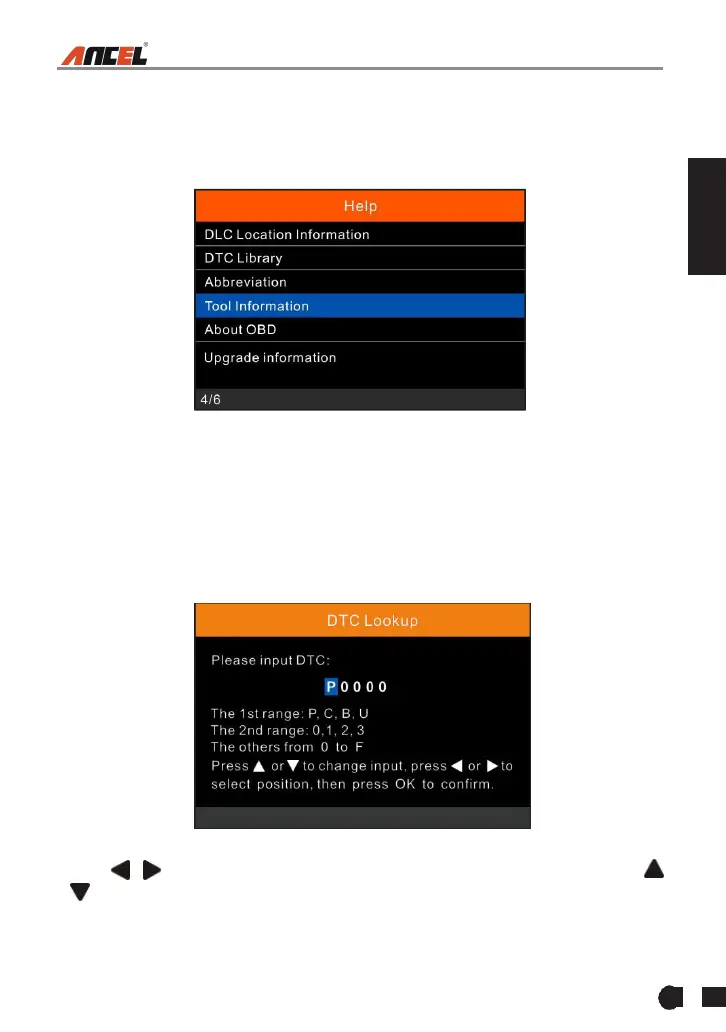
In main menu, select [Help] and press [OK] to enter Figure 6-1.
Figure 6-1
6.1 DLC Location Information
This option helps you to find the location of the vehicle’s DLC.
6.2 DTC Library
In Figure 6-1, select [DTC Library] and press [OK] to enter the following screen.
Figure 6-2
Press [ ]/[ ] button to move the highlight bar to different position. Press [
]/[ ] button to alter the value, then press [OK] button, the screen will display
definition of the DTC.



 To Next Page