03 EN
Windows System
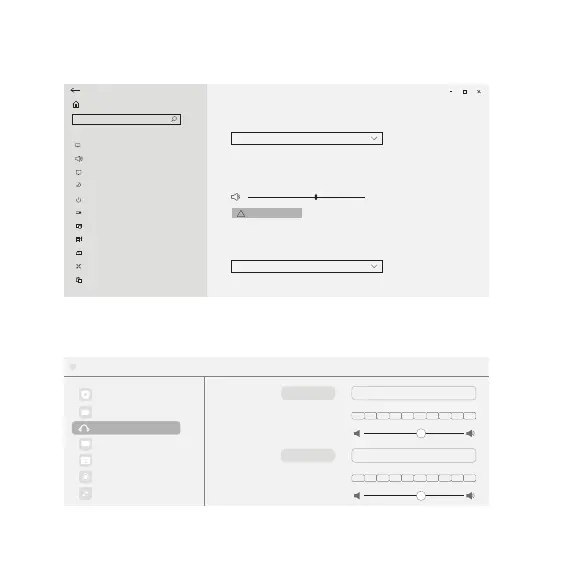
Right-click on the sound icon > Open Sound settings > Choose your output
device / Choose your input device
Choose your output device
Output
Input
Device properties
63
Master volume
Manage sound devices
Sound
Headphones (Anker Soundsync A3303)
Choose your input device
Headphones (Anker Soundsync A3303)
Certain apps may be set up to use different sound devices than the one
selected here. Customize app volumes and devices in advanced sound options.
Certain apps may be set up to use different sound devices than the one
selected here. Customize app volumes and devices in advanced sound options.
Troubleshoot
Settings
Home
System
Display
Sound
1RWLƓFDWLRQVDFWLRQV
Focus assist
3RZHUVOHHS
Storage
Tablet mode
Multitasking
Projecting to this PC
Shared experiences
Clipboard
Find a setting
!
Software
Audio Settings > Microphone / Speaker
General
Settings
Speaker
Video
Chat
Virtual Background
Recording
Advanced Features
Test Speaker
Output Level
Anker Soundsync A3303
Output Volume:
Microphone Test Mic
Input Level:
Anker Soundsync A3303
Input Volume:
:
Audio



 To Next Page