DC Recharging
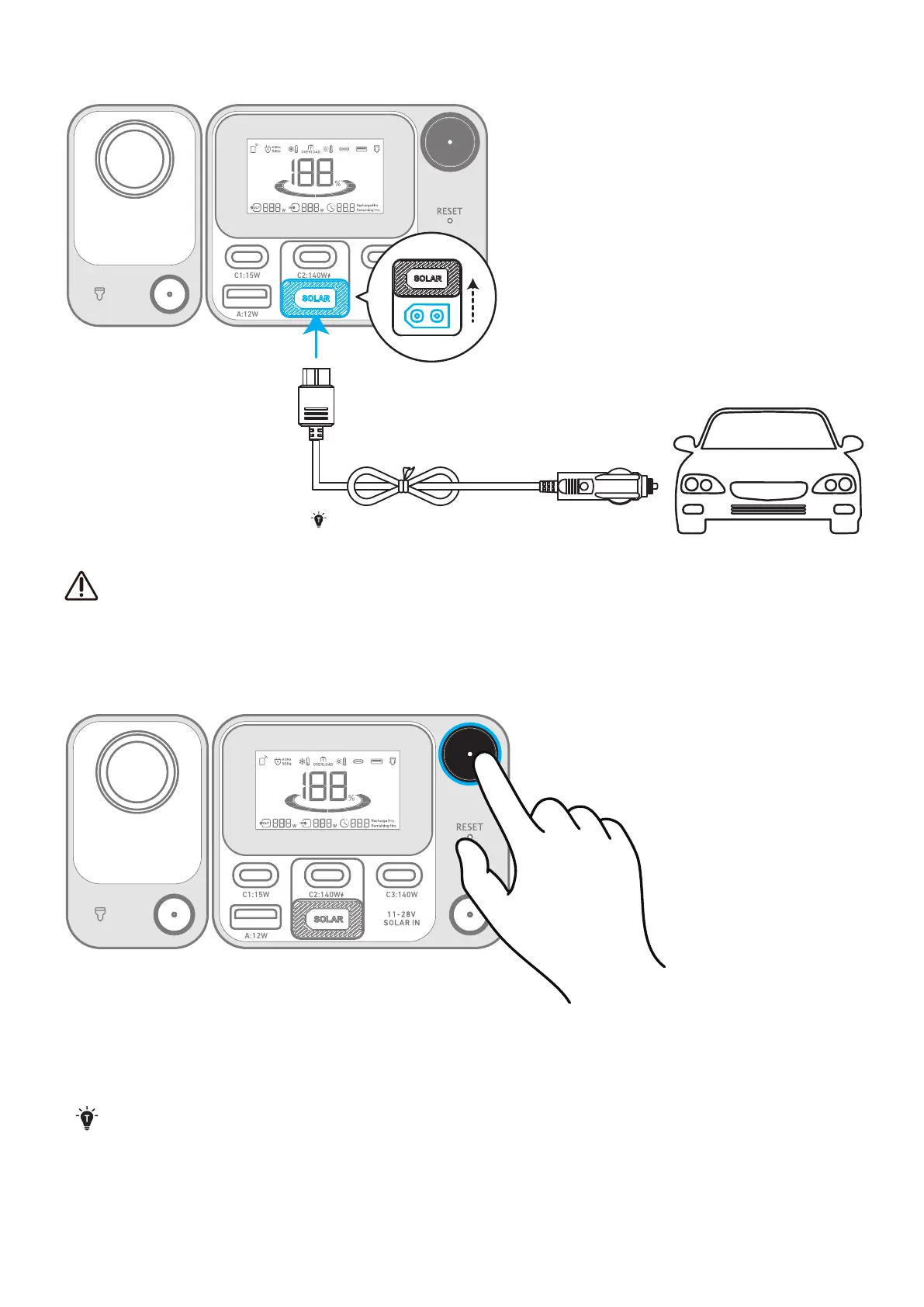
Recharge your power station by connecting to a DC output port with the DC charging cable.
C1:15W C2:140W C3:140W
A:12W
C2:140W
DC charging cable sold separately.
When your portable power station only has 1% battery remaining, the "Remaining Battery" indicator will flicker to
remind you to recharge.
Powering Your Device
Power On/O
C1:15W C2:140W C3:140W
A:12W
Press the main power button for 3 seconds to turn your power station on or o.
When the "Remaining Battery" indicator shows on the LCD screen, your power station is ready to charge devices.
• When powered on, press the main power button to turn the screen on or o.
• The screen will automatically turn o after 15 seconds of lighting up. The auto-o time can be set in the Anker
app.
• The power station will power o automatically if the output buttons are turned o and no power loads are
detected for 2 hours. The standby duration can be set in the Anker app. We recommend not setting this to
ʼnever," so that the product can shut down on its own and save power in a long-term unused state.


 To Next Page