Need help?
Do you have a question about the Anker SOLIX C300 and is the answer not in the manual?
The Anker SOLIX C300 Portable Power Station is a versatile and compact device designed to provide reliable power on the go, featuring a range of input and output options, smart control capabilities, and safety features.
The Anker SOLIX C300 serves as a portable power station, capable of recharging from various sources and powering a wide array of devices. It includes AC output ports, USB-C and USB-A output ports, and a car socket, making it suitable for charging everything from small electronics to larger appliances. A key feature is its Uninterruptible Power Supply (UPS) functionality, which allows it to act as a backup power source, supporting a transfer time of less than 10ms. The device also incorporates Anker's SurgePad™ technology, enabling it to deliver up to 600W AC output for high-wattage devices by automatically turning on when the total output exceeds the rated output. This is particularly effective for devices that generate heat. For convenience and smart control, the power station can be managed remotely via the Anker app, which allows users to monitor status, adjust settings, and receive firmware updates. An ambient light feature with adjustable brightness levels and an SOS mode further enhance its utility in various environments.
Cell Capacity: 288Wh AC Input Voltage: 220V-240V~ 2.0A Max, 50Hz/60Hz, L+N+PE AC Input Power (Charging): 330W Max AC Input Power (Bypass Mode): 380W Max Solar Panel Input: 11-28V=8.2A (100W Max) USB-C2 Input: 9V=3A / 15V=3A / 20V=5A / 28V=5A (140W Max) Car Charger Output: 12V=10A AC Output (Inverter Mode): 230V~1.31A, 50Hz, 300VA/300W Max AC Output (Bypass Mode): 220V-240V~ 1.37A, 50Hz/60Hz, 300VA/300W Max USB-A Output: 5V=2.4A (12W) USB-C1 Output: 5V=3A (15W) USB-C2 Output: 5V=3A / 9V=3A / 15V=3A / 20V=5A / 28V-5A (140W Max) USB-C3 Output: 5V-3A / 9V-3A / 15V-3A / 20V-5A / 28V-5A (140W Max) USB-A and USB-C1 Total Output: 5V=4A (20W Max) Total Output: 360W UPS: <10ms Discharging Temperature: -20°C-40°C / -4°F-104°F Charging Temperature: 0°C-40°C / 32°F-104°F Size: 16.416.124.0 cm / 6.56.39.5 in Net Weight: 4.13 kg / 9.1 lb
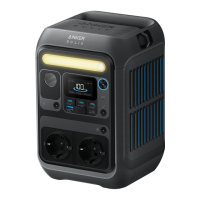
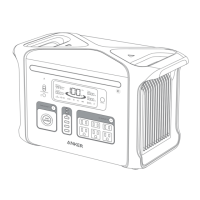
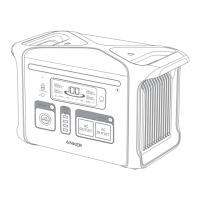
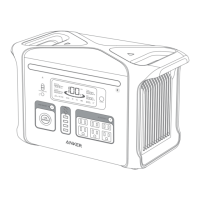
The device features a 140W USB-C Input/Output Port (bidirectional), a car socket, 15W USB-C output, and 12W USB-A output ports. It also includes a Car Socket On/Off Button, Solar Input and Car Input (with a sliding cover to prevent simultaneous use with the 140W USB-C port), 140W USB-C Output Port, AC Input Port, AC Output Ports, Ambient Light On/Off Button, Ambient Light, Main Power Button, LCD Screen, Reset button, IoT Button, and AC Output On/Off Button. The strap attachments are designed for Anker SOLIX adjustable straps (sold separately).
Recharging: The power station can be recharged via AC (up to 330W Max), solar panels (up to 100W Max, 11V-28V), USB-C (up to 140W Max), or DC (car charging cable). USB-C and XT-60 recharging cannot be used simultaneously. The solar charging cable and USB-C cables are sold separately. For optimal USB-C charging, a 140W USB-C cable and adapter are recommended. Power On/Off: Press the main power button for 3 seconds to turn the power station on or off. The LCD screen indicates "Remaining Battery" when ready to charge devices. Screen Control: Pressing the main power button when powered on turns the screen on or off. The screen automatically turns off after 15 seconds of inactivity, with auto-off time adjustable in the Anker app. Automatic Shutdown: The power station automatically powers off if output buttons are turned off and no power loads are detected for 2 hours. The standby duration can be customized in the Anker app, with a recommendation against setting it to "never" to conserve power. AC Charging: Press the AC outlet button and connect devices. The AC outlets intelligently detect plug insertion, automatically turning off if no plug is detected for over 15 minutes to prevent power waste. USB Charging: Connect devices to the USB ports. USB-C2 and USB-C3 are PS3 classified, requiring consideration of fire safeguards for connected equipment. Only connect to equipment compliant with IEC/EN IEC/BS EN IEC 62368-1 standards. Car Socket Charging: Turn on the car socket and connect devices. UPS Functionality: Connect the power station to a wall outlet with the AC charging cable, press the AC outlet button, and connect devices to the AC output ports. UPS supports a transfer time of 10ms. SurgePad™: Supports up to 600W AC output for high-wattage devices. It activates automatically when total output exceeds rated output. Note that SurgePad™ does not function in bypass mode (when charging with AC output on) and is best suited for heat-generating devices, not precision instruments or devices with strict voltage requirements. Ambient Light: Press the ambient light button once to turn it on, and up to two more times to switch between brightness levels. SOS Mode: Hold the ambient light button for 2 seconds to activate SOS mode. LCD Screen Guide: The LCD displays various indicators including IoT status (Bluetooth/Wi-Fi), AC charge and voltage frequency, low-temperature alert, overload warning, high-temperature alert, USB-C input/output port, USB-A output port, car charging, remaining battery, current output power, current input power, estimated time to fully recharge, and estimated time for battery to deplete. Anker App for Smart Control: Download the Anker app from the App Store or Google Play. Connect the device to a network for initial setup, then it can be controlled off-grid. The app also provides firmware updates, requiring the power station to be AC charged and connected to Wi-Fi or Bluetooth during the update.
Reset Function: If the power station is not working correctly, insert a paper clip or pin into the reset hole for 1 second to perform a factory reset. Storage: Store the power station in a dry and cool environment with the main power button turned off. Battery Maintenance: Check the remaining battery capacity weekly. If the battery level falls below 30%, fully charge the power station. Charge it to 100% every 3 months to prevent self-consumption and ensure optimal battery lifespan. Upright Use: The product must be used and stored upright.
 General
| Brand | Anker |
|---|---|
| Model | SOLIX C300 |
| Category | Portable Generator |
| Language | English |

 To Next Page