
 Need help?
Do you have a question about the ANNIN ROBOTICS AR3 and is the answer not in the manual?
Detailed list of parts, quantities, and sourcing information for the robot.
Details and images of the main structural parts made of aluminum or 3D printable.
Information on 3D printable covers and spacers for the robot's aesthetic and protection.
Lists various bearings, belts, chains, pulleys, and screws required for the robot.
Details the specific stepper motors needed for each joint of the robot, including SKUs.
Information on digital stepper drivers (DM542T, DM320T) and power supply units.
Lists enclosure boxes, internal panels, and air vents for the robot's electrical system.
Detailed instructions for assembling the robot arm and its components.
Instructions for preparing the enclosure and wiring the motors and cables.
Visual guides for wiring drivers, encoders, limit switches, and control boards.
Detailed wiring diagram connecting stepper drivers to the Teensy 3.5 controller.
Diagram showing encoder wiring from the Teensy 3.5 to Ethernet cables.
Diagram showing encoder wiring from Ethernet cables to the robot's encoders.
Diagram illustrating how to wire limit switches to the Teensy 3.5 using Ethernet cables.
Shows how to connect the Arduino Mega and relay module for controlling external devices.
Explains how to connect and control servo or pneumatic grippers for the robot.
Lists reach, payload, accuracy, repeatability, weight, and power consumption.
Guides users through the initial power-up, connection, and troubleshooting steps for the robot.
Critical information for powering up, checking connections, and initial troubleshooting.
Covers robot programming, including communication, motion control, and calibration methods.
Instructions on determining and setting the COM port for Teensy 3.5 and Arduino Mega.
Explains how to control robot speed, acceleration, and deceleration parameters.
Describes methods for manually moving robot joints using the control box or Xbox controller.
How to define and save specific robot positions for programming moves like Joint, Offset, Linear, Arc, Circle.
Details on using wait commands for program flow control based on time or input signals.
How to control digital inputs/outputs from the Arduino for external devices like grippers.
Creating and managing program routines, including calling and returning between programs.
Explains how to use registers for counting, storing values, and controlling program flow.
How to control external servo motors using Arduino analog pins for gripper actuation.
Procedures for modifying, copying, and inserting lines of code in the robot's program.
Covers auto-calibration, force-to-midrange, fine calibration, and direction defaults for robot setup.
Setting joint freedom of motion and stepper motor steps for custom robot configurations.
Explains Denavit-Hartenberg parameters for robot kinematics calculation.
Shortcut buttons on the IO tab for quickly toggling servos or outputs.
Guide to building the robot without encoders for cost savings or upgrading from AR2.
 General
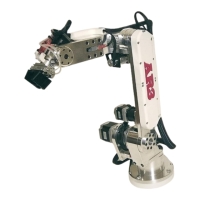
| Payload | 3 kg |
|---|---|
| Number of axes | 6 |
| Reach | 600 mm |
| Control System | ANNIN Robotics Controller |
| Degrees of Freedom | 6 |
| Communication Interface | Ethernet |
| Programming | Python |
| Mounting | Floor |

 To Next Page