9
RM200
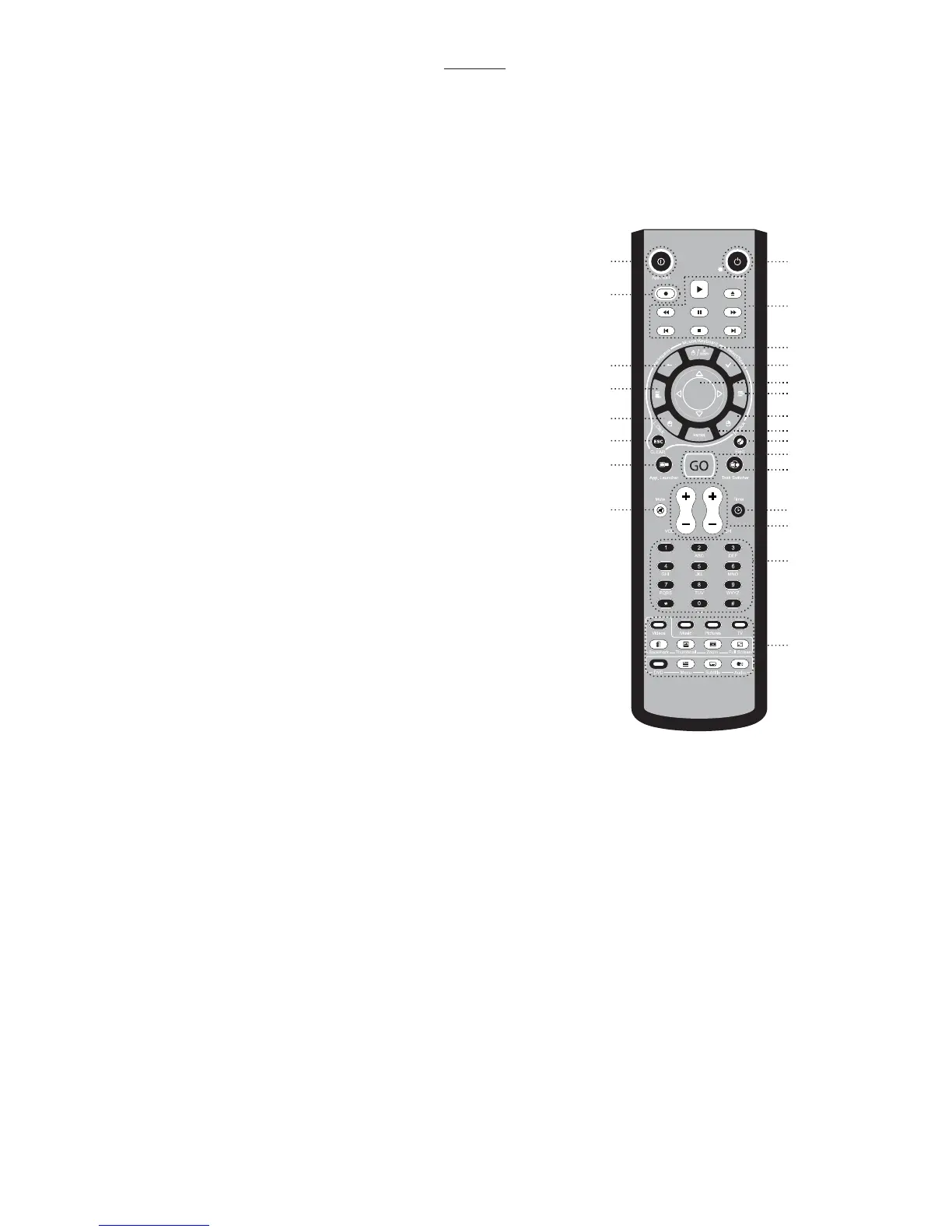
1. Application Exit: Close the active window or close iMEDIAN HD [ALT + F4]
2. Power: Turn the PC on/off (Power switch also located on the internal receiver)
3. Record
4. Media Control Group 1: Play/Pause/Stop/Open/Prev/Next/Rew/F.Fwd
5. Mouse/Keyboard: Switch the PAD controller between a mouse and a keyboard
6. Backspace: View previous menu
7. Select/Space
8. PAD Controller: Mouse cursor control & 4-way
arrow keys
9. Windows Start
10. Windows Menu
11. Mouse left click
12. Mouse right click
13. ENTER
14. Esc
15. Open/Close: Open or close DVD or CD-ROM
tray
16. “go”: Start iMEDIAN HD application
17. Application Launcher: Run an application
18. Task Switch: Switch between running
applications [ALT-TAB]
19. Mute
20. Timer: Use a timer to manage on/off and alarm
schedule
21. VOL/CH: Change the volume and TV channel
22. Custom button group for user-customized
commands
23. Media Control Button Group 2
12
4
5
7
8
10
12
13
15
16
18
20
21
22
23
3
6
9
11
14
17
19


 To Next Page