17
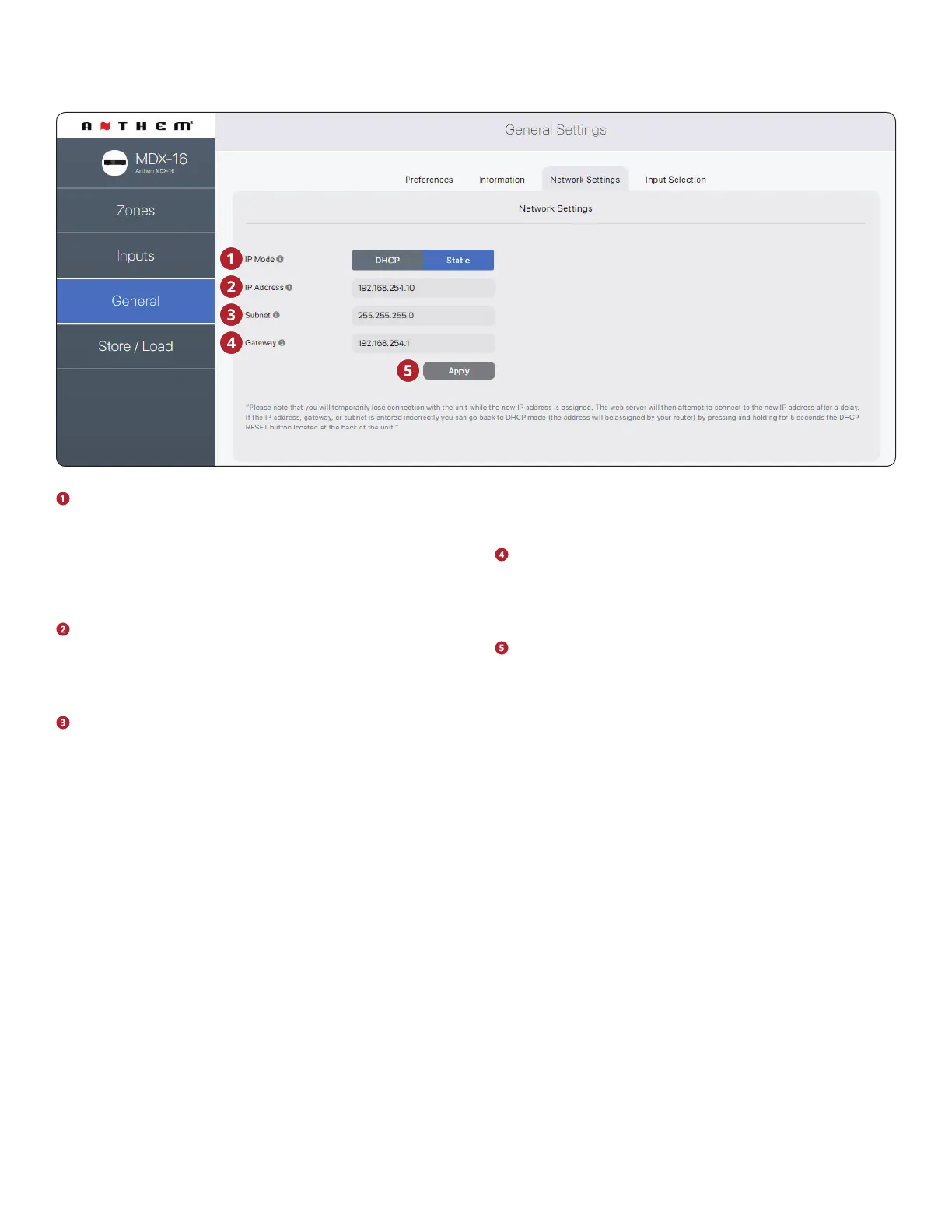
IP Mode: Toggles the MDX between DHCP and Static net-
work assignments. Changes take eect after clicking Ap-
ply. If errors occur when adjusting static IP settings, the
MDX can be manually set back to DHCP using the DHCP
Reset / Factory Image button located on the MDX’s back
panel (refer to troubleshooting).
IP Address: Displays the MDX’s current IP address. Adjust-
able if Static is selected. Changes take eect after clicking
Apply. Set new values for IP Address, Subnet, and Gateway
before clicking Apply.
Subnet: Displays the MDX’s current subnet mask. Adjust-
able if Static is selected. Changes take eect after clicking
Apply. Set new values for IP Address, Subnet, and Gateway
before clicking Apply.
Gateway: Displays the MDX’s current gateway address.
Adjustable if Static is selected. Changes take eect after
clicking Apply. Set new values for IP Address, Subnet, and
Gateway before clicking Apply.
Apply: Save the new network settings (if they have
changed). After clicking Apply, the MDX restarts a connec-
tion with the server and the web browser should automat-
ically attempt to reconnect to the new address.
2.8 GENERAL: NETWORK SETTINGS
The user interface design is subject to change.


 To Next Page