21
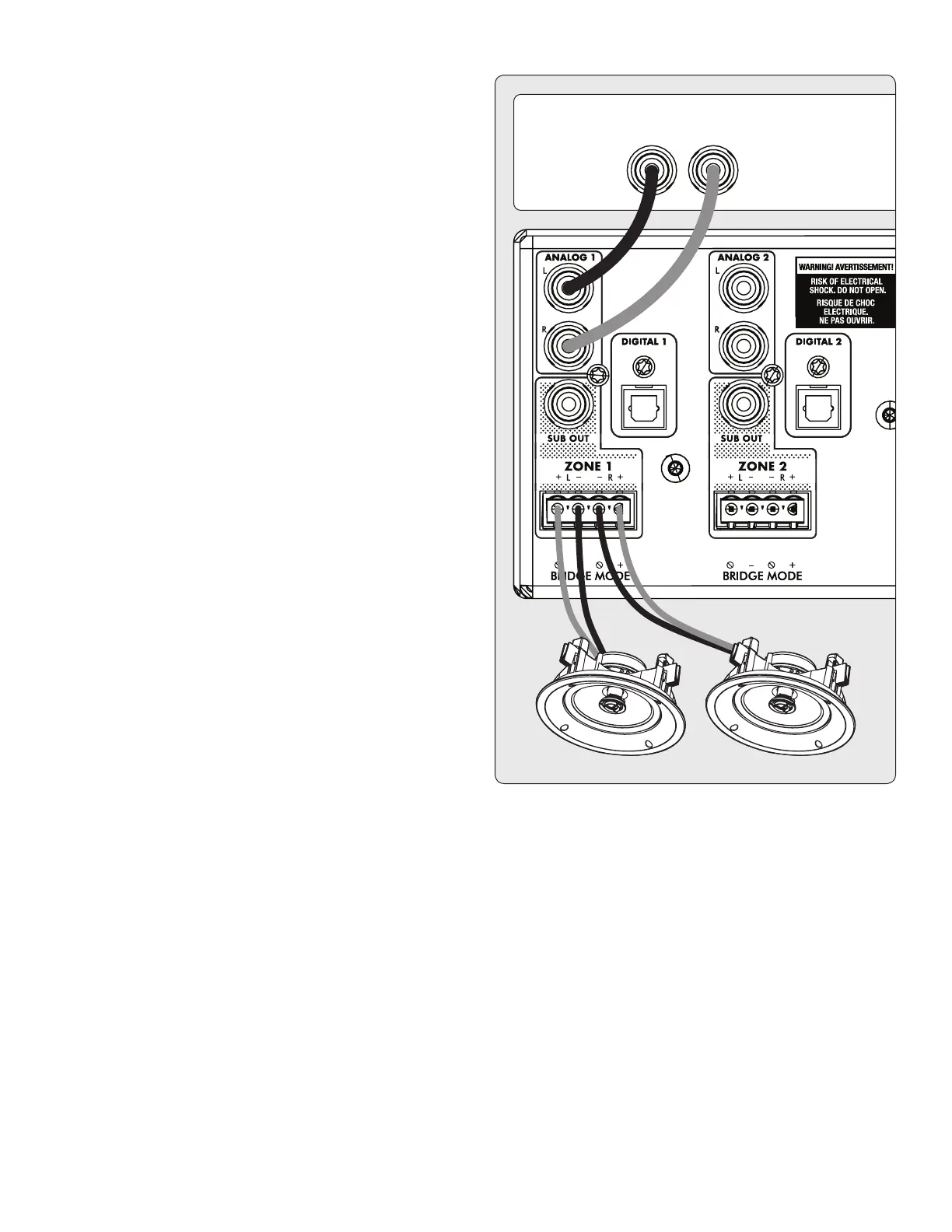
3.3 CONNECTING STEREO SPEAKERS
Connect a pair of speakers to a zone using a Euroblock (also
known as a Phoenix
TM
) connector. These connectors are in-
cluded with the MDX and come preinstalled. Euroblock con-
nectors accept speaker wire up to 12 gauge. Use speakers as
low as 4 Ohms in this conguration.
1. Remove the zone’s Euroblock connector from the MDX by
gently pulling it until it releases.
2. Use a small slotted screwdriver to loosen and tighten each
contact on the Euroblock when inserting the speaker wire.
3. Connect the red (+) connection on the left speaker to the
positive (L+) contact on the Euroblock connector as indi-
cated by the printing located on the MDX (above the con-
nector) or on the connector itself.
4. Connect the black (–) connection on the left speaker to
the negative (L–) contact on the Euroblock connector as
indicated by the printing located on the MDX (above the
connector) or on the connector itself.
5. Repeat for the right channel.
6. After attaching speaker wires to the Euroblock connector,
insert it into the MDX by gently pressing it into place.


 To Next Page