24
3.6 SUBWOOFER OUTPUTS
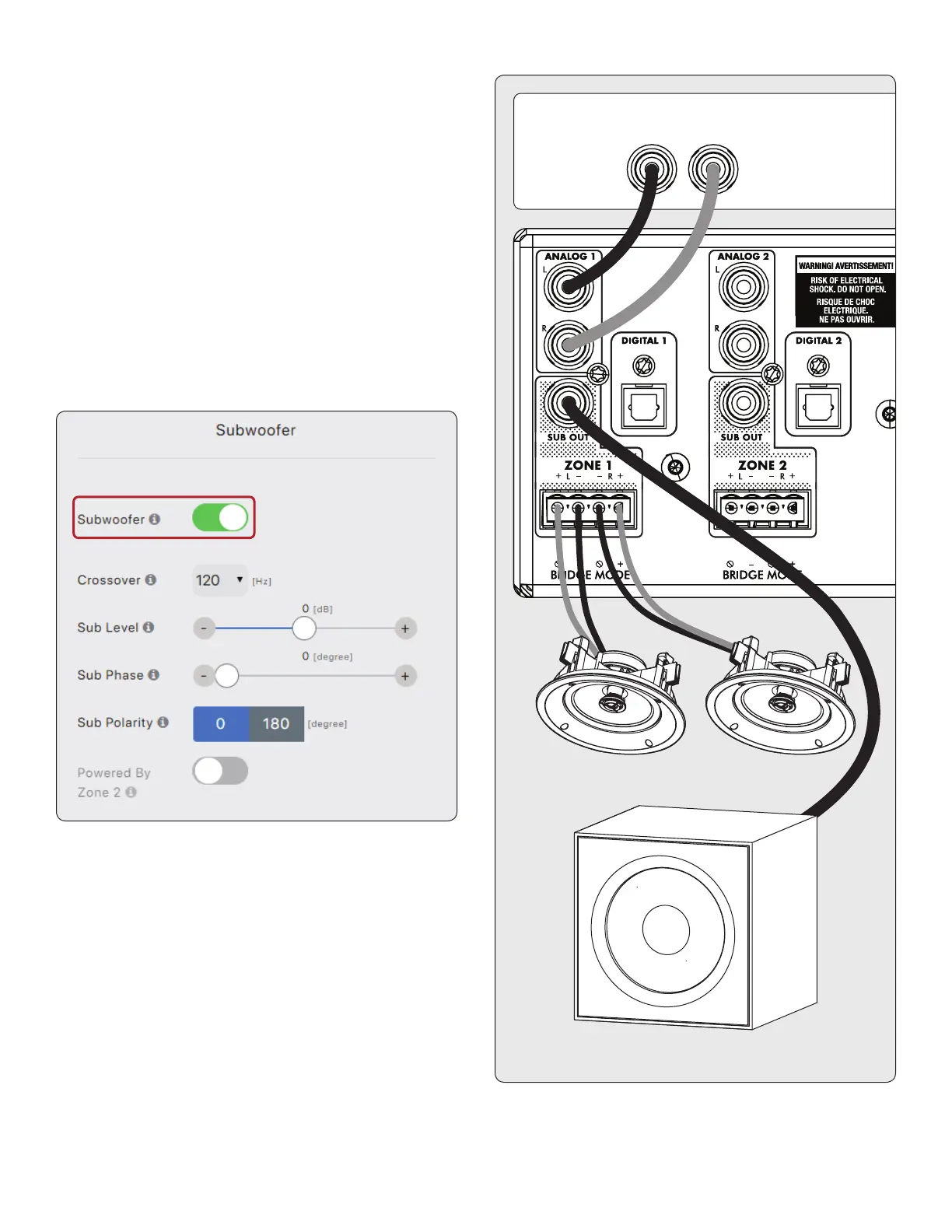
If you’re using this MDX to power a passive (non-powered)
subwoofer refer to the next section. To connect a powered
subwoofer, use an RCA cable, connect a zone’s Sub Out to a
powered subwoofer LFE input, and enable the subwoofer using
Zones > Subwoofer. If the powered subwoofer doesn’t have
an LFE input, connect to either the left or right input and set
the sub’s low-pass lter (commonly referred to as crossover) to
its highest or bypass setting. Please refer to your subwoofer’s
manual for specic connection and control setting instructions.
This control also enables the high pass lter on the left and
right outputs. If you are not using ARC and do not have a sub-
woofer connected, you can enable this control and set the
crossover frequency. This will avoid overloading speakers that
don’t support a full-range signal.


 To Next Page