A3 PLUS - A5 - A6 PLUS - L6
SURGICAL SINGLE CART
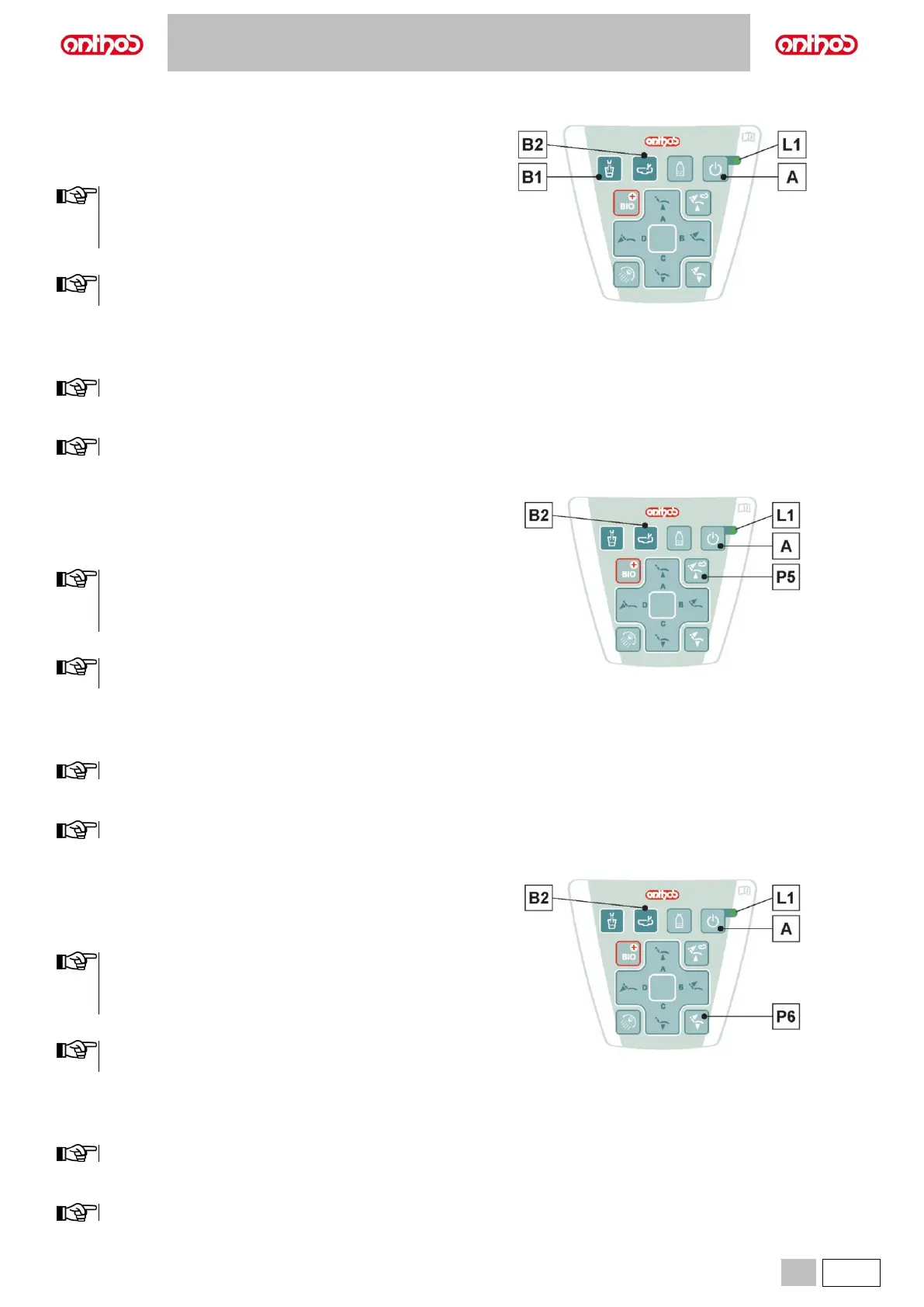
Changing the water to bowl controller with water delivered to cup.
The controller that delivers water to the bowl when the button (B1) is
pressed can be turned on/off.
• After switching on the dental unit, press button (A) 3 times to enter the
water unit settings.
1 intermittent BEEP will initially signal that the procedure is
being carried out correctly, then the intermittent BEEP will be
replaced by the slow flashing of LED (L1), indicating that it is
possible to proceed with the settings.
• Press and hold button (B2) to enter the bowl function settings.
The fast flashing of LED (L1) will signal the bowl function
settings.
• Press button (B1) to change the operation.
A beep sounds to signal the selected operating mode.
1 BEEP: controller enabled.
3 BEEPS: controller disabled.
The controller is enabled by default.
• Press and hold button (A) to exit the settings and confirm the changes
made.
The LED (L1) will turn off after exiting the settings.
Water-to-bowl controller modification upon recall of dental chair
RINSE POSITION.
The controller that delivers water to the bowl when the button (P5) is
pressed can be turned on/off.
• After switching on the dental unit, press button (A) 3 times to enter the
water unit settings.
1 intermittent BEEP will initially signal that the procedure is
being carried out correctly, then the intermittent BEEP will be
replaced by the slow flashing of LED (L1), indicating that it is
possible to proceed with the settings.
• Press and hold button (B2) to enter the bowl function settings.
The fast flashing of LED (L1) will signal the bowl function
settings.
• Press button (P5) to change the operation.
A beep sounds to signal the selected operating mode.
1 BEEP: controller enabled.
3 BEEPS: controller disabled.
The controller is enabled by default.
• Press and hold button (A) to exit the settings and confirm the changes
made.
The LED (L1) will turn off after exiting the settings.
Water-to-bowl controller modification upon recall of dental chair
AUTOMATIC RETURN.
The controller that delivers water to the bowl when the button (P6) is
pressed can be turned on/off.
• After switching on the dental unit, press button (A) 3 times to enter the
water unit settings.
1 intermittent BEEP will initially signal that the procedure is
being carried out correctly, then the intermittent BEEP will be
replaced by the slow flashing of LED (L1), indicating that it is
possible to proceed with the settings.
• Press and hold button (B2) to enter the bowl function settings.
The fast flashing of LED (L1) will signal the bowl function
settings.
• Press button (P6) to change the operation.
A beep sounds to signal the selected operating mode.
1 BEEP: controller enabled.
3 BEEPS: controller disabled.
The controller is enabled by default.
• Press and hold button (A) to exit the settings and confirm the changes
made.
The LED (L1) will turn off after exiting the settings.



 To Next Page