-7-
2. SELECT THE SHADE NUMBER
RECOMMENDED SETTINGS
9
876 10
Shade 8
Shade 5
Shade 9 Shade 10
Shade 11 Shade 12 Shade 13 Shade 14 Shade 15
Shade 11 Shade 12 Shade 13 Shade 14
Shade 12 Shade 14
Shade 15
Shade 11
Shade 13Shade 12Shade 11Shade 10 Shade 14
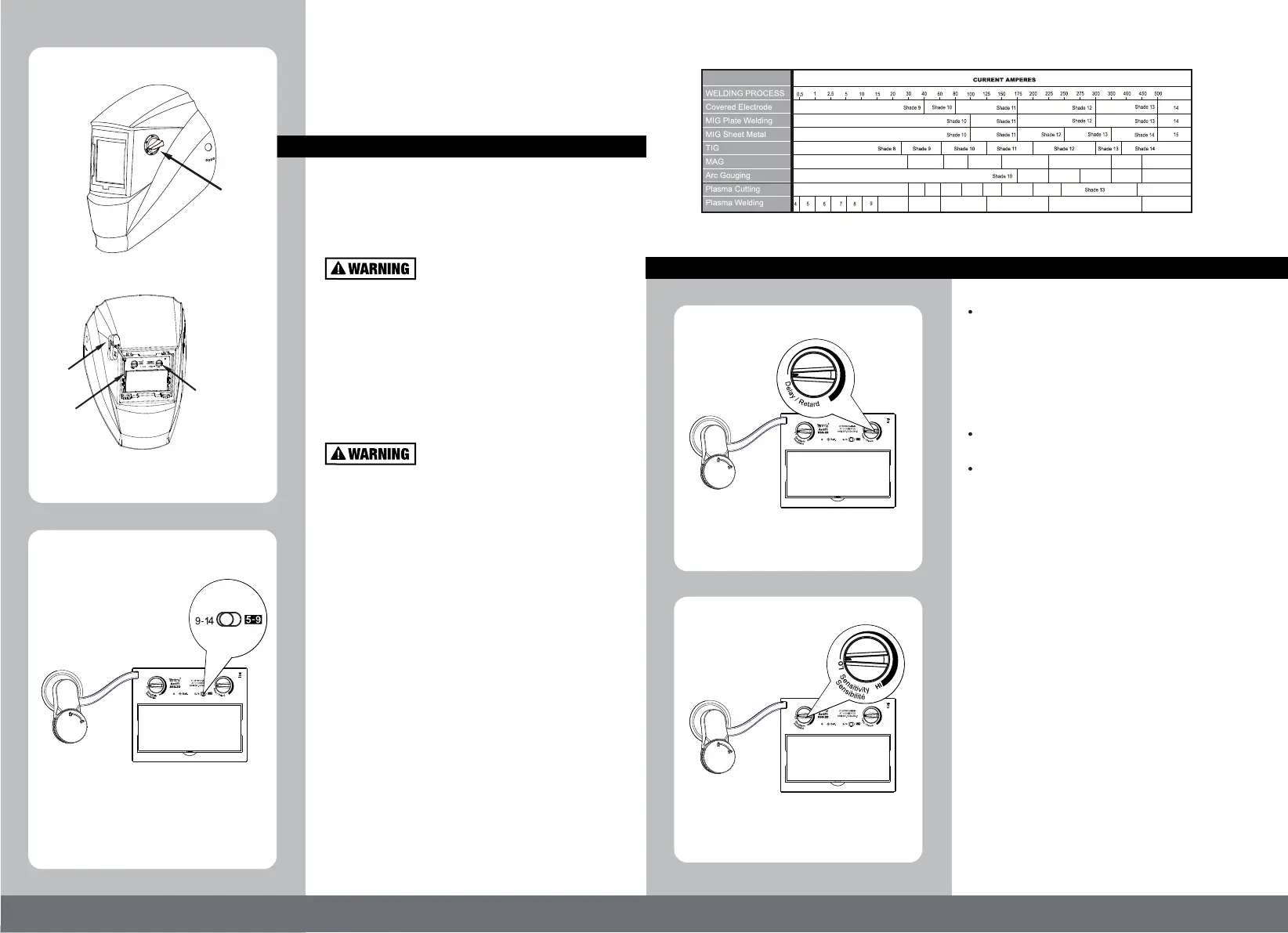
The solar unit automatically switches
ON when exposed to light.
ON/OFF
This welding helmet is featured with
continuously adjustable delay time control. The
lens will lighten in 0.1 to 1.0 seconds upon
ambient temperature and shade setting. By
turning the DELAY knob (Fig.7) clockwise, the
delay time will increase from 0.1 seconds to 1.0
seconds.
Turn Knob counter-clockwise for tack welding or
production welding with short welds.
Turn Knob clockwise for welding at high
amperage where there is an after glow from the
welding.
-8-
This welding helmet is featured with continuously
adjustable sensitivity control knob. Sensitivity is a
setting of how sensitive this helmet is responding
to the welding arc.
Turn knob clockwise to increase the sensitivity
(Fig.8).
Scenario may need to increase:
1) Low amperage welding
2) Used for DC TIG welding
Turn knob counter-clockwise to decrease the
sensitivity (Fig.8).
Scenario may need to decrease:
1) High ambient light
2) Interference exists
Adjust sensitivity setting to properly condition
according to the application and the environment.
(Fig.4)
Adjustment
Knob
(Fig.5)
3. DELAY TIME
(Fig.6)
The arrow on the knob indicates the shade setting.
Set the adjustable knob to "Grind" position for
grinding application.
MAKE SURE TO RESET the knob back to "5-9" or
"9-14" position after grinding.
Make sure that the adjustment knob is on the
"5-9" or "9-14" position before starting to weld.
Two ranges of shade numbers, "5-9" and "9-14" are
available in the dark state(Fig.6).
(Fig.7)
(Fig.8)
Shade numbers are given as a guide only and may be varied to suit individual needs.
1) Welding control
2) Grinding control
sensitivity
CR2450
delay



 To Next Page