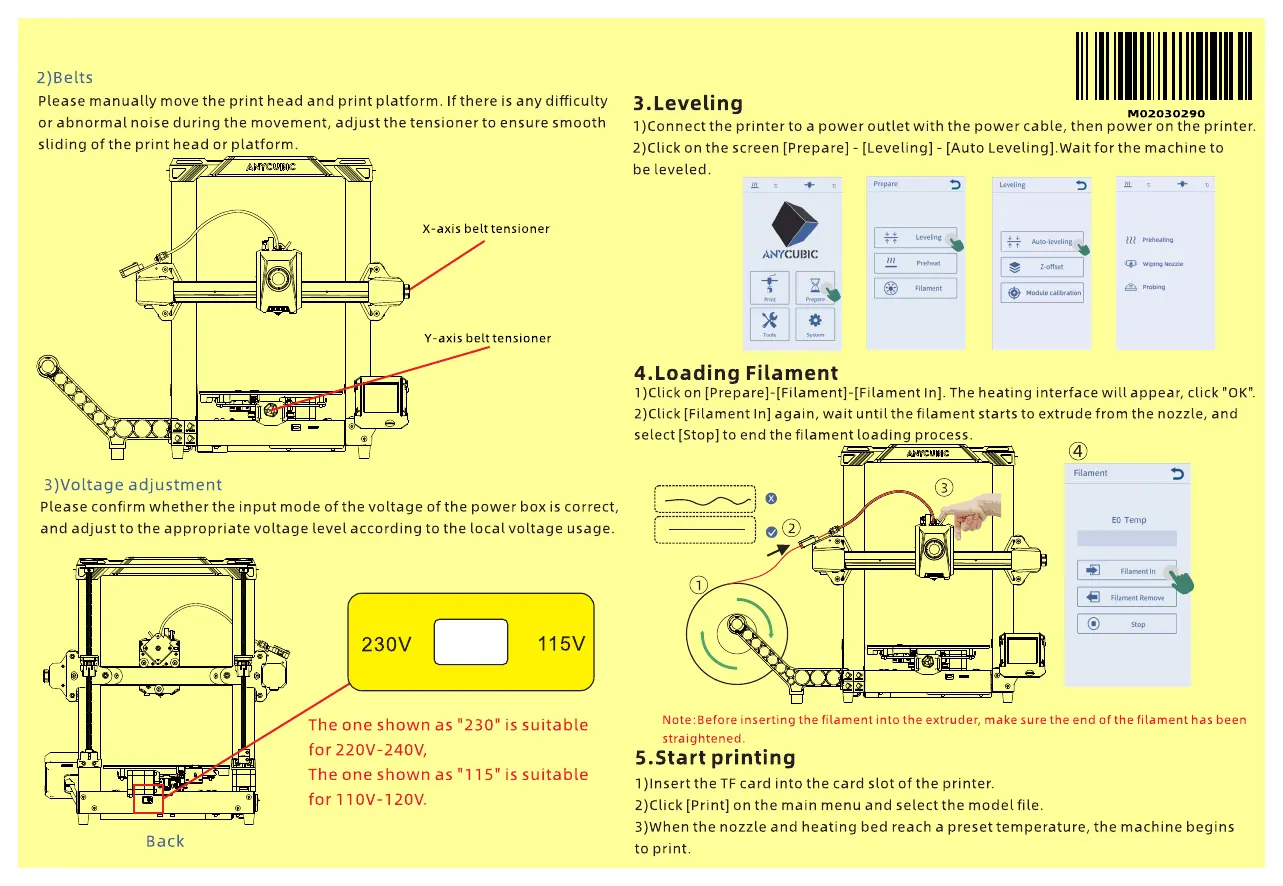
2)Belts
Please manually move the print head and print platform. If there is any difficulty
or abnormal noise during the movement, adjust the tensioner to ensure smooth
sliding of the print head or platform.
3.Leveling
M02030290
1)Connect the printer to a power outlet with the power cable, then power on the printer.
2)Click on the screen [Prepare] - [Leveling] - [Auto Leveling].Wait for the machine to
be leveled.
3 3
o
X-axis belt tensioner
Y-axis belt tensioner
Wiping
4.Loading Filament
1)Click on [Prepare]-[Filament]-[Filament In]. The heating interface will appear, click "0K".
2)Click [Filament In] again, wait until the filament starts to extrude from the nozzle, and
select [Stop] to end the filament loading process.
Filament
3)Voltage adjustment
Please confirm whether the input mode of the voltage of the power box is correct,
and adjust to the appropriate voltage level according to the local voltage usage.
o
EOTemp
Filament In
9
230V
The one shown as
for 220v-240V,
The one shown as
for110V-120V.
"230
115V
" is suitable
is suitable
Back
Note: Before inserting the filament into the extruder, make sure the end of the filament has been
straightened.
5.Start printing
1 )lnsert the TF card into the card slot of the printer.
2)CIick [Print] on the main menu and select the model file.
3)When the nozzle and heating bed reach a preset temperature, the machine begins
to print.



 To Previous Page